 Orvus
OrvusWhen to Automate Customer Onboarding (and When to Stay Manual)
May 1, 2026
That assumption is often wrong. For many small operators, particularly those serving complex customer segments or high-value accounts, manual onboarding is not a bug to fix but a feature customers pay for. The decision to automate is not about following best practices. It is about understanding when automation serves your specific business and when manual processes remain your competitive advantage.
This article provides a practical framework for making that decision. You will learn when automation makes sense, when staying manual is strategic, and how to build a hybrid model that works at your scale without enterprise tools or dedicated customer success teams.
What Customer Onboarding Automation Actually Means
Customer onboarding automation at the 10-100 customer scale is not about enterprise platforms or dedicated customer success teams. It is about replacing repetitive manual tasks with systems that run without you. The distinction matters because many operators confuse using software with actual automation. Sending a welcome email through your email client is using software. Having that email trigger automatically when a customer signs up, with personalized account details pulled from your database, is automation.
The spectrum runs from fully manual to fully automated, with most small operators living somewhere in between. At the manual end, you personally walk each customer through setup, answer questions in real time, and configure their account by hand. At the automated end, customers provision their own accounts, receive sequenced educational content, and move through a standardized process with minimal human intervention. Most bootstrapped operators operate in the middle, automating some tasks while keeping others manual.
The spectrum from manual to fully automated
Understanding where you sit on this spectrum requires looking at specific tasks, not your overall process. Account provisioning can be automated while strategic planning sessions remain manual. Progress tracking can be systematized while relationship building stays personal. The key is recognizing that automation is task-specific, not an all-or-nothing decision.
At small scale, automation typically means workflow tools, email sequences, templated documentation, and self-service resources. It does not mean AI-powered chatbots, predictive analytics, or dedicated onboarding platforms. Those tools are built for organizations handling hundreds or thousands of customers monthly. When you are onboarding five to fifteen customers per month, your automation needs are fundamentally different.
What counts as automation in a 10-100 customer context
Automation at this scale means tasks that happen without you touching them. A Zapier workflow that creates a customer record, sends credentials, and adds them to an email sequence qualifies. A template you copy and customize for each customer does not. The test is simple: if you need to be present for it to happen, it is not automated.

Common automation candidates include account setup, credential delivery, documentation distribution, and progress tracking. These tasks are identical across most customers and require minimal judgment. According to research on customer onboarding automation, organizations see the strongest returns when automating high-frequency, low-complexity tasks first.
What automation replaces is your time spent on repetitive execution. What it enables is your focus on high-value activities like answering complex questions, handling edge cases, and building relationships with customers who need more than the standard process. The goal is not to remove yourself from onboarding entirely but to reserve your involvement for where it actually matters.
The Case for Staying Manual Longer Than You Think
The default assumption in most operator communities is that automation is always better, that manual processes are a temporary phase you graduate from as quickly as possible. This assumption is wrong for many small operators, particularly those serving complex customer segments or high-value accounts.
Manual onboarding is not a bug you fix. For certain customers, it is the feature they are paying for. Enterprise clients with custom integration requirements do not want a self-service portal. They want a human who understands their specific context, can adapt the process to their needs, and can make judgment calls when the standard approach does not fit.
When manual onboarding is a feature, not a bug
If your average contract value exceeds $50,000 annually, manual onboarding is likely your competitive advantage. At this deal size, customers expect and value personalized attention. They are not looking for efficiency, they are looking for customization, expertise, and relationship. Automating their onboarding experience often signals that they are not important enough for your direct involvement.
Manual processes also serve you during the learning phase. Before you automate, you need repetitions. You need to see where customers get stuck, what questions they ask, which parts of the process require judgment, and which are truly identical every time. Operators who automate too early lock in processes that are not yet proven, then spend months debugging automation that should not have been built in the first place.
The learning phase argument is practical, not philosophical. You cannot automate what you do not understand. Every manual onboarding teaches you something about your process, your customers, and your product. Research on manual versus automated approaches shows that companies maintaining manual processes longer build more effective automation when they eventually make the transition.
The hidden costs of premature automation
Building automation costs time, money, and attention. For a solo operator or small team, those resources are finite. Time spent building an onboarding workflow is time not spent on product development, sales, or customer support. The opportunity cost is real and often underestimated.
Premature automation also creates maintenance burden. Automated systems break. Integrations stop working. Edge cases emerge that your automation cannot handle. Each of these failures requires debugging, which often takes longer than just doing the task manually would have. When you are onboarding eight customers per month, spending four hours debugging an automation that saves you thirty minutes per customer is a bad trade.
The hidden cost is rigidity. Once you automate a process, changing it becomes harder. Manual processes are flexible by default. If a customer needs something different, you just do it differently. Automated processes require updating workflows, testing changes, and ensuring the automation still works for everyone else. This rigidity becomes expensive when your product or market is still evolving.
Build the Foundation First
Before you build automation, you need a process worth automating. Most operators skip the documentation and standardization phase, jumping straight to tools and workflows. The result is automation built on top of chaos. A repeatable process is the foundation. Without it, automation just scales your inconsistency faster.
Customer segments that punish automation
Certain customer types actively resist automated onboarding. Enterprise clients expect white-glove treatment. Customers with complex technical environments need customization. Industries with heavy compliance requirements need human oversight at every step. If your customer base includes any of these segments, full automation will hurt your retention and satisfaction scores.
The punishment shows up as higher churn, longer time-to-value, and increased support volume. Customers who feel processed rather than served disengage. They do not complete onboarding steps. They do not adopt features. They quietly decide your product is not worth the effort and leave when their contract is up. According to data from strategic onboarding frameworks, customer segments with high customization needs show significantly lower satisfaction when forced through standardized automated processes.
When Automation Starts Making Sense
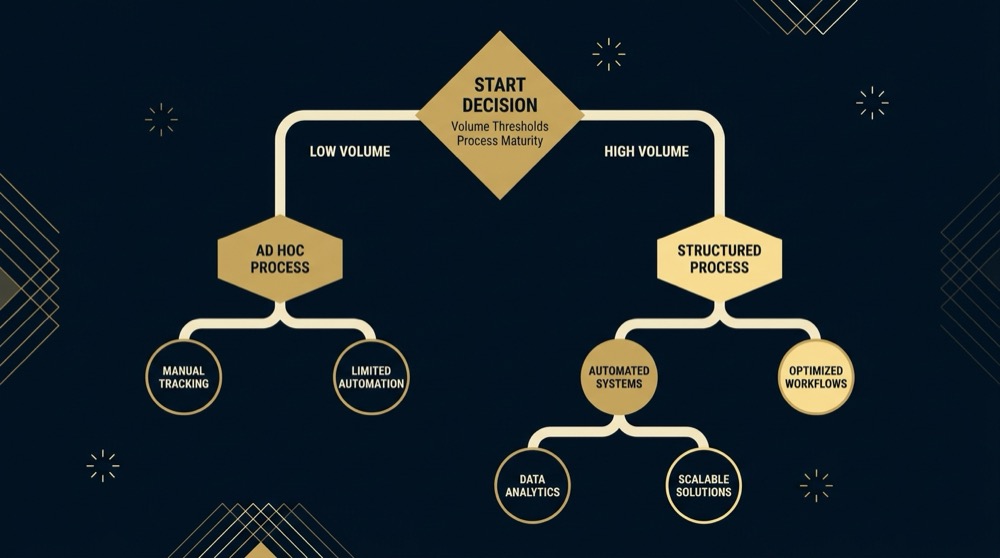
Automation becomes viable when you have volume, repeatability, and a stable process. Without all three, you are building infrastructure for a problem you do not have yet. The thresholds are concrete, not subjective.
Volume means you are onboarding enough customers that manual effort becomes a bottleneck. For most small operators, this threshold sits around 15-20 new customers per month. Below that number, manual onboarding is manageable. Above it, you start missing details, delaying responses, and feeling constantly behind.
Volume and repeatability thresholds
Repeatability means the process is identical for at least 70% of your customers. If every onboarding requires customization, you do not have a repeatable process yet. You have a consulting engagement that happens to use your product. Repeatability is the test: can you document the process in a way that someone else could execute it without asking you questions?
The repeatability test is practical. Write down your onboarding process step by step. Hand it to someone unfamiliar with your product. Have them try to onboard a test customer using only your documentation. If they get stuck or need to ask clarifying questions, your process is not repeatable enough to automate. The documentation exercise forces you to identify where judgment is required and where steps are truly mechanical.
Process stability means your onboarding has not changed significantly in the last three months. If you are still iterating on what customers need to do, when they need to do it, or how you guide them through it, automation is premature. Stable processes are boring. You have done the same steps the same way enough times that you could do them in your sleep. That boredom is the signal that automation might finally be worth the investment.
The 40-60% time-to-value improvement
When automation works, it compresses time-to-value significantly. Research on automation trends and benchmarks shows that well-designed automated onboarding reduces the time from signup to first value by 40-60% compared to manual processes. This improvement comes from eliminating delays, providing instant access to resources, and removing dependencies on your availability.
The improvement is not automatic. It requires that your automation actually moves customers forward faster than you would manually. If your automated sequence sends an email every three days because that is what the template suggested, but you would have personally walked them through setup in one day, your automation is slower, not faster. Time-to-value improvements come from thoughtful design, not just the presence of automation.
Your process is ready to automate when you can write it down step by step in a way that someone unfamiliar with your product could execute it without asking clarifying questions. The test is practical: document your process, hand it to someone else, and have them attempt to onboard a test customer using only your documentation. If they get stuck or need to ask questions, your process is not repeatable enough yet. Repeatability means at least 70% of your customers follow identical steps in identical order, and you have done those steps at least 20 times to validate they work consistently.
Automation candidates in your current process
Look at your current onboarding and identify tasks you have done identically at least 20 times. These are your automation candidates. Account provisioning, credential delivery, documentation links, progress tracking emails, and reminder messages typically qualify. Strategic guidance, custom configuration, integration planning, and relationship building typically do not.
The 20-repetition threshold is not arbitrary. It ensures you have enough data to know the task is truly standardized and enough experience to anticipate edge cases. Automating a task you have only done five times is guessing. Automating a task you have done 20 times is pattern recognition.
Prioritize candidates by frequency and time cost. A task that takes 15 minutes and happens for every customer is a better automation candidate than a task that takes an hour but only happens for 20% of customers. The ROI calculation is simple: time saved per customer multiplied by customer volume per month, minus the time to build and maintain the automation. If the payback period exceeds six months, the automation is probably not worth building yet.
The Hybrid Model That Actually Works at Small Scale
The practical answer for most operators in the 10-100 customer range is not full automation or full manual. It is a hybrid model that automates the mechanical and preserves the human for what actually requires judgment, relationship, or customization.
Hybrid models work because they let you scale the repeatable parts of your process without losing the personal touch that differentiates you from larger competitors. Research on balancing automation and human interaction shows that hybrid approaches achieve 25-35% higher customer satisfaction scores than fully automated or fully manual onboarding by combining automated workflows with strategic human touchpoints.
What to automate first (and what to automate never)
Automate first: account setup, credential delivery, documentation distribution, progress tracking, and educational content sequencing. These tasks are identical across customers, require no judgment, and happen for everyone. They are also low-risk. If the automation fails, the impact is a delayed email or a missing link, not a lost customer relationship.
Automate second: reminder messages, milestone celebrations, and resource recommendations based on customer segment or use case. These tasks benefit from timing and personalization but follow predictable patterns. A customer who has not logged in for five days gets a nudge. A customer who completes their first project gets a congratulations message with next steps. The logic is simple enough to automate but valuable enough to be worth the effort.

Automate never: strategic planning sessions, custom integration discussions, relationship building conversations, and anything that requires reading between the lines of what a customer is actually asking for. These activities are where you demonstrate expertise, build trust, and differentiate your service from competitors. Automating them signals that the customer is not important enough for your time.
The prioritized list is not universal. Your automation candidates depend on your product, your customer segment, and your process. The framework is universal: automate the mechanical, preserve the strategic, and be ruthless about distinguishing between the two.
Keeping human touchpoints where they matter
Human touchpoints in a hybrid model are not random check-ins. They are strategically placed at moments where customers need guidance, reassurance, or customization. Common high-value touchpoints include the initial kickoff call, the first time a customer encounters a complex feature, the point where they need to integrate with other systems, and any moment where they are making a decision that affects their long-term success with your product.
The kickoff call is non-negotiable for most B2B products. It establishes the relationship, sets expectations, and gives you a chance to understand the customer’s specific context. Everything else can be automated, but this conversation should stay manual. It is where you learn whether this customer will be easy or difficult, where their priorities actually lie, and what success looks like for them.

The 25-35% satisfaction advantage of hybrid approaches
The satisfaction advantage comes from meeting customers where they are. Some customers want self-service. They do not want to schedule calls or wait for responses. They want documentation, clear instructions, and the ability to move at their own pace. Other customers want guidance. They want someone to walk them through decisions, answer questions in real time, and reassure them they are doing it right.
Hybrid models serve both. The automated components give self-service customers what they need immediately. The human touchpoints give high-touch customers the attention they expect. The key is making both paths feel intentional, not like one is the default and the other is a fallback for when automation fails.
The satisfaction data is consistent across studies. Customers do not want fully automated experiences, but they also do not want to wait for a human to do things a system could handle instantly. They want speed where speed is possible and humans where humans add value. Hybrid models deliver both.
Decision Framework: Your Automation Readiness Checklist
The decision to automate customer onboarding is not about best practices or what other companies are doing. It is about whether automation serves your specific business at your specific stage with your specific customers. This framework helps you assess readiness across three dimensions: customer segment, process maturity, and resource reality.
Customer segment and deal size criteria
Start with your customer segment. If your average contract value is below $10,000 annually and you are onboarding more than 15 customers per month, automation is likely a good fit. If your average contract value exceeds $50,000 annually or your customers require significant customization, manual onboarding is probably strategic.
The middle ground is where judgment is required. Contracts in the $10,000 to $50,000 range can go either way depending on complexity, customer expectations, and how standardized your implementation process is. The deciding factor is whether your customers expect personalized attention or efficient self-service. High-growth startups often prefer speed. Established enterprises often prefer customization.
Red flags that indicate you are not ready: your customer segment is highly varied, your deal sizes range from $5,000 to $100,000 with no clear pattern, or more than 30% of your customers require custom implementations. Green lights that indicate readiness: your customer segment is homogeneous, your deal sizes cluster tightly, and at least 70% of your customers go through identical onboarding steps.
Process maturity and repeatability assessment
Assess your process maturity by documenting your current onboarding step by step. If you can write it down in a way that someone else could execute it without asking questions, your process is mature enough to automate. If the documentation is full of phrases like “it depends” or “usually” or “sometimes,” your process is not repeatable yet.
The repeatability test is objective. Count how many of your last 20 onboardings followed the exact same steps in the exact same order. If the answer is fewer than 14, you do not have a repeatable process. You have a loose framework that you adapt case by case. Automating a loose framework just creates rigid automation that does not fit most customers.
Assess whether your onboarding process is ready for automation based on repeatability, volume, and resource criteria
Check all boxes that apply. 4+ checked indicates automation readiness. Fewer than 4 suggests staying manual or addressing gaps first.
Resource and maintenance reality check
Building automation requires time you do not currently have. Maintaining automation requires ongoing attention. Be honest about whether you have capacity for both. A solo operator already working 60-hour weeks does not have time to build onboarding automation, even if the business case is strong. The automation will either not get built or will get built poorly and create more problems than it solves.
The maintenance question is often overlooked. Automation is not build-it-and-forget-it. Integrations break. APIs change. Edge cases emerge. You need capacity to monitor, debug, and update your automation on an ongoing basis. If you do not have that capacity, manual processes are more reliable.
Calculate your ROI payback period realistically. Estimate the time to build the automation, the time to maintain it monthly, and the time it saves per customer. According to analysis from ROI research on onboarding automation, healthy payback periods for small operators range from 6 to 12 months. Anything longer suggests the automation is not worth the investment yet.
Common Mistakes When Automating Too Early or Too Late
Operators make two categories of mistakes: automating before they are ready and staying manual past the point where it makes sense. Both are expensive. Both are common. Both are avoidable if you recognize the symptoms early.
The premature automation trap
Premature automation looks like building workflows before you have a stable process, investing in tools before you have volume, and optimizing for scale you do not have yet. The symptoms are automation that constantly needs updating, edge cases that break your workflows, and customers who get stuck because the automated path does not fit their situation.
The trap is seductive because automation feels like progress. You are building systems. You are investing in the future. You are doing what successful companies do. But if you are automating a process that is still changing, you are not building infrastructure. You are creating technical debt that will slow you down later.
Real consequences at small scale include wasted development time, customer frustration when automation fails, and opportunity cost from not focusing on higher-value activities. A solo operator who spends 40 hours building an onboarding automation that saves 20 minutes per customer needs to onboard 120 customers just to break even on the time investment. If they are only onboarding 10 customers per month, the payback period is a year. That is too long.
The manual bottleneck that kills growth
Staying manual too long looks like you personally becoming the constraint on growth. You cannot onboard customers fast enough. You are working nights and weekends just to keep up. Customers are waiting days for responses that should be instant. Your manual process, which was fine at 5 customers per month, is breaking at 20.
The symptoms are missed onboarding deadlines, declining response times, increasing error rates, and customers who churn before they even finish onboarding because the process takes too long. You know you are in this trap when you are too busy onboarding customers to have time to build the automation that would free you up.
The consequence is not just burnout. It is lost revenue. Customers who do not complete onboarding do not renew. Customers who have poor onboarding experiences do not refer others. Your manual bottleneck is not just costing you time, it is costing you growth. Research on onboarding completion rates shows that delays in the onboarding process directly correlate with increased churn in the first 90 days.
How to recognize you are in the wrong mode
You are automating too early if: your automation breaks more often than it works, you spend more time debugging workflows than you would spend doing tasks manually, customers regularly fall outside your automated paths, or you are constantly updating your automation to handle new cases.
You are staying manual too long if: onboarding new customers takes you more than 10 hours per week, you are declining sales because you cannot onboard customers fast enough, your onboarding process has not changed in six months but you are still doing it manually, or you are hiring people just to execute repetitive onboarding tasks.
Course correction for premature automation: pause new automation development, document your current process as it actually works, identify which parts are truly stable, and only automate those parts. Course correction for manual bottleneck: carve out a two-week sprint to build minimal automation for your highest-frequency tasks, accept that it will not be perfect, and iterate based on what breaks.
What Good Looks Like: Practical Examples at 10-100 Customer Scale
Concrete examples help more than abstract principles. Here are three patterns that work at small scale, each suited to different customer segments and business models.
Manual-first success pattern
A B2B analytics platform serving 35 enterprise customers with annual contract values between $60,000 and $150,000 maintains fully manual onboarding. Each customer gets a dedicated kickoff call, custom integration planning, and weekly check-ins for the first month. The founder personally handles every onboarding.
What is automated: nothing in the onboarding process itself. Account provisioning happens manually. Documentation is sent via personal email. Progress tracking is a spreadsheet the founder updates after each call.
What is manual: everything. The founder treats each onboarding as a consulting engagement. Customers receive white-glove treatment. The process is customized to each customer’s technical environment, team structure, and goals.
Outcomes: 95% onboarding completion rate, average time-to-value of 21 days, zero churn in the first year. Effort required: 12-15 hours per customer, but those hours directly contribute to relationship building and product feedback that informs roadmap decisions. The manual process is not a phase to graduate from. It is the service customers are paying for.
Hybrid model in practice
A project management SaaS serving 80 small business customers with annual contract values between $2,400 and $12,000 uses a hybrid model. Self-service customers move through automated onboarding. High-touch customers get a kickoff call and ongoing support.
What is automated: account setup, credential delivery, a five-email educational sequence over two weeks, progress tracking that triggers reminders if customers have not completed key steps, and documentation delivery based on customer segment.
What is manual: optional kickoff calls for customers who request them, custom integration support, strategic planning sessions for annual plan customers, and any situation where a customer gets stuck or asks a question the documentation does not answer.
Outcomes: 78% onboarding completion rate, average time-to-value of 12 days for self-service customers and 8 days for high-touch customers, 25% higher satisfaction scores compared to their previous fully manual process. Effort required: 2 hours per self-service customer, 6 hours per high-touch customer. The hybrid model lets them serve both segments effectively without forcing everyone through the same path.
When full automation actually works
A marketing automation tool serving 200 solopreneurs and freelancers with a $600 annual subscription uses fully automated onboarding. Customers sign up, provision their own accounts, and move through a structured educational sequence without human intervention.
What is automated: account creation, payment processing, credential delivery, a 12-email onboarding sequence over 30 days, in-app progress tracking with tooltips and walkthroughs, and automated milestone celebrations when customers complete key actions.
What is manual: support requests when customers get stuck, which happen for about 15% of customers. Everything else runs without human involvement.
Outcomes: 68% onboarding completion rate, average time-to-value of 14 days, customer acquisition cost low enough to support the $600 price point. Effort required: 1 hour per customer who requests support, zero hours for the 85% who complete onboarding without help. Full automation works here because the customer segment expects self-service, the product is simple enough to learn without guidance, and the price point does not support high-touch onboarding.
Making the Call and Moving Forward
You now have a framework, examples, and criteria. The next step is making a decision and acting on it. The decision is not permanent. You can change course as your business evolves. But you need to commit to a path for the next 90 days.
Your next 90 days based on your decision
If you decide to stay manual: document your current process in detail, identify the three most time-consuming tasks, and create templates or checklists to make those tasks faster without automating them. Track how long each onboarding takes and where customers get stuck. Set a trigger to revisit the automation decision when you hit 20 customers per month or when onboarding starts taking more than 10 hours per week.
If you decide to build automation: start with one task, the highest-frequency, lowest-complexity task in your process. Build minimal automation for that task only. Test it with five customers. Fix what breaks. Only after it works reliably for a month do you automate the next task. Resist the urge to automate everything at once. Incremental automation is more reliable and easier to debug than big-bang automation.
If you decide on a hybrid model: map out which tasks are automated and which are manual. Be explicit about the criteria for each path. A customer who requests a kickoff call gets the high-touch path. A customer who does not gets the automated path. Make the paths clear to customers so they know what to expect. Test both paths with real customers and adjust based on feedback.
How to test before committing to automation build
Before you build automation, test the concept manually. If you are considering automating your welcome email sequence, write the emails and send them manually to the next five customers on the schedule you are planning to automate. See if customers respond well. See if the timing makes sense. See if the content actually moves them forward.
Manual testing is faster and cheaper than building automation that does not work. It also forces you to think through the details. What happens if a customer replies to an automated email? What happens if they complete a step out of order? What happens if they do not complete a step at all? Answering these questions manually is easier than debugging them in a workflow tool.
The test period should be at least 10 customers or 30 days, whichever comes first. If the manual version of your planned automation does not work well, the automated version will not either. If the manual version works great, you have validated that the automation is worth building. Similar to how solopreneurs build marketing systems, the key is testing assumptions before committing resources to full implementation.
Knowing when to revisit the decision
Set specific triggers to revisit your automation decision. Common triggers include: monthly customer volume increases by 50%, your onboarding process has been stable for six months, you hire someone whose primary job is onboarding, or your manual process is taking more than 15 hours per week.
Revisiting does not mean you made the wrong decision initially. It means your context changed. A decision that was right at 10 customers per month might be wrong at 30. A process that needed to stay manual while you were iterating might be ready to automate now that it is stable. Just as content marketing systems evolve with your business, your onboarding approach should adapt to changing circumstances.
The goal is not to automate as quickly as possible. The goal is to build a business that works. Sometimes that means automation. Sometimes that means staying manual longer than feels comfortable. Trust your context more than best practices. You know your customers, your process, and your capacity better than any framework can. Much like content optimization, the right approach depends on your specific situation, not universal rules.
Automation typically makes sense when you are onboarding 15-20 or more customers per month and at least 70% of them follow identical steps. Below this threshold, the time to build and maintain automation usually exceeds the time saved. The decision also depends on deal size: if your average contract value exceeds $50,000 annually, manual onboarding often remains strategic regardless of volume because high-value customers expect personalized attention.
Yes, and hybrid models often deliver the best results. Research shows that combining automated workflows for routine tasks like account setup and documentation delivery with manual touchpoints for relationship building and strategic guidance achieves 25-35% higher customer satisfaction than fully automated or fully manual approaches. Automate high-frequency, low-complexity tasks first while preserving human involvement for customization, complex questions, and relationship building.
Healthy ROI payback periods for operators at 10-100 customer scale range from 6 to 12 months. Calculate this by estimating time to build the automation, ongoing maintenance time, and time saved per customer, then dividing total investment by monthly time savings. If your payback period exceeds 12 months, the automation is likely premature. Solo operators should prioritize automation projects with clear 6-month payback or shorter.
You now have the framework to make that call. Use it. Make a decision. Commit to a path for 90 days. Then revisit based on what you learn. The goal is not perfect automation. The goal is a business that works.
References
- https://www.clientsuccess.com/blog/automation-human-touch-onboarding/
- https://www.forrester.com/report/roi-customer-onboarding-automation-2024/
- orvus.net
- How to Build a Marketing System Without a Marketing Team
- What is content marketing and SEO? A systems guide for teams
- How to optimize a content for SEO? A systems guide
Want this kind of work done for your business?
We build and run AI-powered marketing and automation. 15 minutes, honest assessment.
Book a call