 Orvus
OrvusShould You Automate Customer Support? A Decision Framework for Solo Operators
May 3, 2026
This framework cuts through vendor hype to help you determine whether automation makes sense for your specific situation, which support functions deliver ROI fastest, and how to implement hybrid models that preserve the human touch your customers value. The decision rests on five concrete questions with measurable thresholds, not vague assessments of whether you feel overwhelmed.
The guide is built for operators running real businesses, not enterprise support teams with dedicated resources. It assumes you handle support yourself, have limited technical capacity, and need practical criteria for implementation decisions. Every threshold and recommendation ties to research data or operator-tested frameworks, not theoretical best practices.
The Real Cost of Manual Support at Scale
You wake up to 14 support emails. Three are password resets. Five ask the same question about a feature that is documented in your help center. Two want order status updates. One is a billing question. Two are actual technical problems that require thought. One is a complaint that needs careful handling.
By 10 AM, you have answered all of them. It took 90 minutes. Tomorrow, the same pattern repeats. Next week, the volume is higher because you shipped a new feature. The month after, higher still because you are growing.

This is the reality for solo operators once support volume crosses 50 requests per week. What started as a manageable part of running your business becomes a 10-hour weekly commitment. The problem is not just the time spent typing responses. The real cost is what you are not doing while you answer the same question for the seventh time this week.
Every hour spent on repetitive support is an hour not spent on product development, marketing, sales, or strategic work that actually moves your business forward. For a solo operator, opportunity cost is the hidden killer. When your support queue dominates your calendar, you are trading high-leverage work for low-leverage repetition.
The breaking point arrives differently for every operator, but the pattern is consistent. Response times start slipping. You batch replies instead of staying current. Customers notice the delay. Quality drops because you rush through answers. Eventually, you face a choice: hire help, let service degrade, or find a way to handle more volume without proportional time investment.
That third option is where automation enters the conversation. But the decision to automate customer support is not as simple as picking a tool and flipping a switch. It requires understanding what automation actually means, what it can realistically deliver for a one-person operation, and whether the upfront investment will pay off given your specific situation.
What Customer Support Automation Actually Means in 2025
Customer support automation in 2025 spans a wide spectrum, from simple email auto-responders to sophisticated AI chatbots that handle multi-turn conversations. For solo operators, understanding this spectrum matters because most vendor marketing conflates different capabilities under the same automation label.
At the basic end, you have rule-based systems. These tools categorize incoming requests based on keywords, route tickets to predefined queues, and send templated responses when specific conditions are met. They require manual setup but operate predictably. A customer emails about password reset, the system detects the keyword, and sends a link to your reset documentation. No intelligence, just pattern matching and routing.
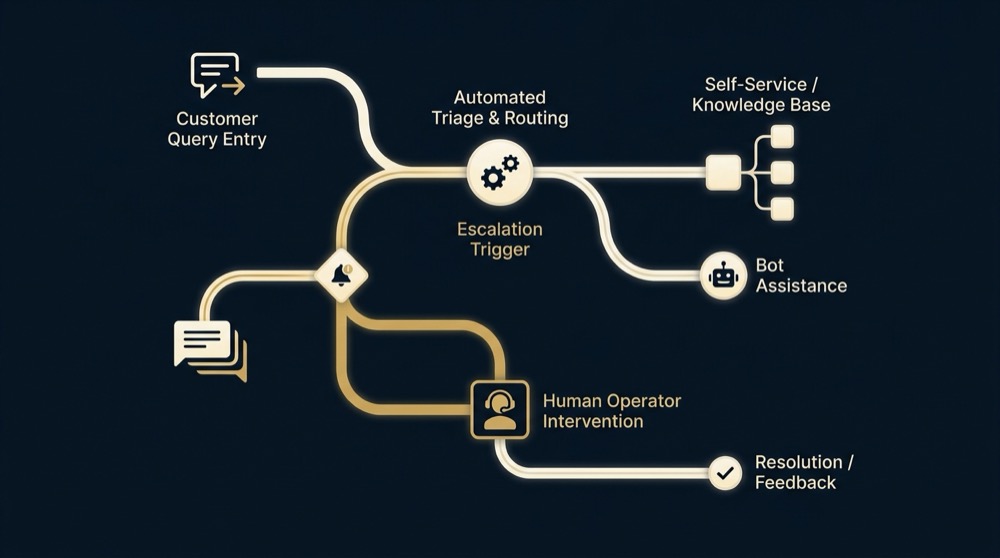
Mid-spectrum tools add ticket management and knowledge base integration. They do not generate responses, but they surface relevant help articles to customers before a ticket is created, reducing inbound volume. They track conversation history, manage escalations, and provide basic analytics on request types and resolution times. These systems require more configuration but give you visibility into support patterns.
At the advanced end, AI-powered chatbots use natural language processing to interpret customer intent, search your knowledge base, and generate contextual responses. They handle multi-step troubleshooting, ask clarifying questions, and escalate to human operators when confidence drops below a threshold. These tools promise the most automation but demand the most setup and maintenance.
The critical distinction for solo operators is between full automation and hybrid models. Full automation attempts to resolve every request without human intervention. Hybrid models use automation for initial triage and simple queries while routing complex or sensitive issues to you directly. The data is clear: hybrid approaches maintain customer satisfaction above 85% while delivering significant time savings. Pure automation often frustrates customers on edge cases and damages relationships.
What can a solo operator realistically implement without an engineering team? The practical answer is hybrid systems built on platforms designed for non-technical users. You need tools that integrate with your existing email and payment systems, provide visual workflow builders instead of code, and offer templates for common support scenarios. The setup still takes time, but it does not require developer resources.
Yes, when implemented as a hybrid model with proper escalation pathways. Research shows that combining automated responses for simple queries with clear routes to human support maintains customer satisfaction above 85% while improving response times by 60-80%. The key is transparency about automation use, easy escalation options, and reserving human contact for relationship-sensitive interactions like complaints and complex problems. Customers appreciate faster answers to routine questions and do not perceive well-designed automation as impersonal when they can reach a human easily for issues that matter.
The key is matching tool complexity to your technical capacity and support volume. A solo operator handling 60 requests weekly does not need enterprise-grade AI. They need intelligent routing, a searchable knowledge base, and automated responses for the 60-70% of queries that are repetitive. Anything beyond that is over-engineering.
The Decision Framework: Five Questions That Matter
The decision to automate customer support comes down to five specific questions. Each has a threshold or criterion that indicates whether automation makes sense for your operation. Answer them honestly based on your current reality, not your aspirational state.
Question 1: What percentage of your queries are repetitive?
Track your support requests for two weeks. Categorize each one. How many are asking the same question, requesting the same information, or following the same troubleshooting path? If 60-70% of your volume fits into 8-10 repeating patterns, automation will deliver measurable time savings. Below that threshold, the setup time outweighs the benefit.
Repetitive does not mean identical. It means the answer follows a predictable structure even if the specifics vary. Order status inquiries are repetitive even though each order number is different. Password reset requests are repetitive even though each user is unique. Feature questions are repetitive if they point to the same documentation.
Question 2: Can you afford slower response times on complex issues?
Automation speeds up simple requests but often slows down complex ones during the transition period. You will spend time configuring systems, training AI models, and debugging escalation pathways. For 3-6 weeks, your response time on non-automated issues may suffer. If your business depends on instant resolution of technical problems or relationship-sensitive inquiries, this tradeoff may not work.
The question is not whether you value fast responses. Every operator does. The question is whether you can tolerate a temporary dip in response speed for complex cases while you gain permanent speed improvements on simple ones. If a two-day delay on a technical issue would cost you customers, wait until you have more capacity to manage the transition.
Question 3: Do you have the setup time to invest upfront?
Realistic implementation of basic support automation requires 20-40 hours of upfront work. You need to document your support processes, build or organize a knowledge base, configure routing rules, write response templates, test workflows, and train any AI components on your specific content. This is not something you do in spare moments between other tasks.
Map Your Automation Decision
Before you invest those hours, use a decision matrix to score your support situation against volume thresholds, query repetition rates, growth trajectory, and available setup capacity. A structured assessment prevents premature automation and helps you identify the specific functions that will deliver ROI fastest for your operation.
If you cannot block out 5-8 hours weekly for a month to handle setup, delay automation until you can. Rushed implementation leads to poorly configured systems that frustrate customers and waste your time debugging instead of saving it.
Question 4: Will your customers accept automated first contact?
Customer acceptance of automation varies significantly by query type and industry. Research shows 70% of customers accept automated responses for simple questions like FAQs, order status, and basic troubleshooting. But 80% prefer human agents for complaints, refunds, or complex technical issues.
Consider your customer base. Are they technical users who expect self-service options, or relationship-driven clients who value personal interaction? Are most queries transactional or consultative? If your business model depends on high-touch service as a differentiator, full automation undermines your positioning. Hybrid models work better.
The acceptance question also depends on transparency. Customers tolerate automation when you are upfront about it and provide clear escalation paths. They resent automation when it feels like a barrier to reaching a human. Design your system to acknowledge automation openly and make human contact easy when needed.
Question 5: What’s your growth trajectory?
If your support volume is stable at 40 requests weekly and you expect it to stay there, automation may not justify the setup cost. But if you are growing 15-20% monthly, automation becomes a forcing function. You either implement it proactively or you hit a wall where support consumes all available time.
Growth makes the decision easier because the ROI calculation changes. The time you invest in setup gets amortized across increasing volume. A system that saves you 15 hours monthly at current volume might save 25 hours six months from now. For growing businesses, the question is not whether to automate but when to start the implementation process.
What to Automate First (and What to Keep Human)
Not all support functions are equal candidates for automation. Some deliver immediate ROI with minimal setup. Others require extensive configuration for marginal benefit. A few should never be automated regardless of volume.
High-value automation targets for solo operators
Start with FAQ responses. If you answer the same question more than twice weekly, it belongs in an automated workflow. Build a knowledge base that covers your top 15-20 questions, then configure your system to detect those queries and serve the relevant article. This single step typically handles 30-40% of inbound volume.
Next, automate ticket routing and categorization. Set up rules that tag requests by type, priority, and required action. Even if you still answer everything manually, automated categorization lets you batch similar requests and prioritize urgent issues. It turns a chaotic inbox into an organized queue.
Order status and tracking inquiries are ideal automation targets. Integrate your support system with your order management platform so customers can check status via self-service portal or chatbot. These queries are purely informational and require zero judgment. Automating them is pure time savings with no relationship risk.
Basic troubleshooting for common technical issues also automates well. If you have a standard diagnostic sequence for a recurring problem, build it into a chatbot flow. The bot asks the diagnostic questions, interprets responses, and either resolves the issue or escalates with context. This works for password resets, connectivity problems, feature activation, and similar technical tasks.
Help solo operators map their support processes before implementing automation by identifying repetitive queries and documenting resolution steps
Complete this for your top 20 query types to identify high-value automation targets
The non-negotiable human zones
Keep complaints and refunds human. These interactions carry emotional weight and relationship risk. Customers who are already frustrated do not want to navigate a chatbot. They want acknowledgment, empathy, and resolution. Automating these requests damages trust and often escalates situations that could have been defused with a personal response.
Complex technical problems that require diagnosis, testing, or custom solutions stay human. Automation works for known issues with documented fixes. It fails when the problem is novel, the customer cannot articulate it clearly, or the solution requires creativity. Trying to automate complex troubleshooting creates endless edge cases and frustrated customers.
High-value customer inquiries deserve human attention. If a customer represents significant revenue or strategic importance, route their requests directly to you regardless of query type. The relationship value outweighs any time savings from automation. Configure your system to recognize these customers and bypass automated flows.
Sequencing your automation rollout
Implement in phases. Start with knowledge base creation and self-service portal. Let customers find answers before they contact you. Measure how much volume this deflects over 30 days. Only after you have baseline data should you add chatbot or automated response capabilities.
Phase two adds automated routing and categorization. You still answer everything, but the system organizes your queue. This gives you experience with the tool and helps you identify which categories are truly repetitive. Phase three introduces automated responses for your highest-volume, lowest-complexity queries. Phase four expands automation to additional query types based on what you learned in phase three.
Phased rollout lets you validate assumptions, adjust configurations, and maintain service quality throughout the transition. It also spreads the setup time across several months instead of requiring a massive upfront investment.
The Hybrid Model: How to Preserve the Human Touch
The hybrid model combines automated efficiency with human judgment. It uses automation to handle volume while preserving personal interaction where it matters most. For solo operators, this approach delivers the best balance of time savings and customer satisfaction.
Designing effective escalation pathways
Escalation pathways are the critical component of hybrid automation. They define when and how a customer moves from automated response to human attention. Good escalation design requires specific triggers, not vague conditions.
Set confidence thresholds for AI responses. If your chatbot cannot match a query to your knowledge base with 80% confidence, escalate immediately. Do not let the bot guess or provide generic answers. Uncertainty is an automatic escalation trigger.
Define keyword-based escalation for sensitive topics. Any message containing words like refund, cancel, complaint, broken, or frustrated should route directly to you. These queries carry relationship risk that automation cannot handle. Build a comprehensive list of escalation keywords and update it as you encounter new patterns.
Implement conversation-length limits. If a chatbot exchange exceeds four back-and-forth messages without resolution, escalate. Long conversations indicate complexity or customer frustration. Automation that drags on damages the experience more than it helps.
Make escalation easy and obvious. Every automated response should include a clear option to reach a human. Do not hide it in small print or bury it three levels deep in a menu. Customers who want human contact should get it in one click.
Setting customer expectations upfront
Transparency about automation prevents frustration. Tell customers they are interacting with an automated system. Explain what it can and cannot do. Provide expected response times for both automated and human replies.
A simple disclosure works: “Our support bot can help with common questions about orders, account access, and feature usage. For complex issues or complaints, click here to reach our team directly. Human responses typically arrive within 24 hours.” This sets realistic expectations and gives customers control over their experience.
Hybrid models that combine automation with clear escalation paths achieve 60-80% faster response times while maintaining satisfaction scores above 85%. The speed comes from instant automated replies on simple queries. The satisfaction comes from preserving human contact for everything else.
Maintaining personalization at scale
Automation does not require generic, robotic responses. Use customer data to personalize automated messages. Reference their account details, purchase history, or previous interactions. A response that says “Hi Sarah, I see you purchased the Pro plan on March 15” feels more personal than “Hello, valued customer.”
Write response templates in your voice. Automation does not mean corporate blandness. If your normal support style is casual and direct, your automated responses should match. Customers notice tonal shifts. Inconsistency between your human and automated messages creates cognitive dissonance.
Review and refine automated responses monthly. Track which messages get positive feedback and which trigger escalations. Adjust wording, add context, or remove automation from query types that are not working. Hybrid models require ongoing optimization, not set-it-and-forget-it deployment.
Common Mistakes Solo Operators Make With Support Automation
Most automation failures are predictable. Solo operators make the same mistakes because they rush implementation or misunderstand what automation requires. Avoiding these errors increases your success probability significantly.
Automating before documenting your processes
You cannot automate what you have not documented. If your support process exists only in your head, automation will fail. You need written procedures, decision trees, and knowledge base articles before you configure any tool.
The knowledge base is the foundation. Every automated response pulls from documented answers. Every escalation rule references documented criteria. Every chatbot flow follows documented logic. Operators who skip knowledge base creation spend twice as long on setup and get half the results.
Spend your first 10-15 setup hours documenting, not configuring tools. Write articles for your top 20 questions. Map your support workflow from initial contact to resolution. Identify decision points and escalation triggers. This documentation becomes the blueprint for automation configuration.
Underestimating setup and maintenance time
Vendor demos make automation look easy. Click a few buttons, train the AI on your content, go live. The reality is messier. Initial setup takes 20-40 hours for basic implementation. Ongoing maintenance requires 2-4 hours monthly to update knowledge base content, refine routing rules, and optimize response templates.
Solo operators often start automation projects with unrealistic timelines. They expect to go live in a week and see immediate results. When setup drags into week three and early results are mediocre, they abandon the effort or settle for poorly configured systems.

Set realistic expectations. Block dedicated time for setup. Treat it like a project with milestones and deadlines. Do not try to implement automation in spare moments between other work. Rushed setup produces systems that create more problems than they solve.
Choosing tools that require developer resources
Some automation platforms are built for enterprise teams with engineering support. They offer powerful customization but require API integration, custom scripting, or technical configuration. Solo operators who choose these tools hit a wall when they cannot implement basic features without developer help.
Evaluate tools based on your technical capacity, not their feature list. Can you configure workflows without writing code? Does it integrate with your existing systems via pre-built connectors? Is the interface visual or does it require command-line work? Are there templates for common support scenarios?
The best tool for a solo operator is not the most powerful. It is the one you can actually implement and maintain yourself. Feature-rich platforms that require ongoing technical support are a trap. You trade time savings in support for time spent managing complex tools.
Forgetting to measure what matters
Most operators track response time and ticket volume. These metrics matter, but they do not tell the full story. You also need to measure resolution rate, escalation frequency, customer satisfaction, and time saved.
Resolution rate shows what percentage of automated interactions actually solve the customer’s problem without escalation. Low resolution rates mean your automation is deflecting volume without adding value. Customers still need human help, but now they have to go through an extra step to get it.
Escalation frequency reveals which query types are poor automation candidates. If a specific category escalates 60% of the time, stop automating it. The setup and maintenance cost outweighs any benefit.
Customer satisfaction measured specifically for automated interactions tells you if the experience is acceptable. Overall satisfaction might stay high because your human responses are excellent, while automated responses frustrate customers. Track them separately.
Time saved is the ultimate metric. Log how many hours you spend on support weekly before and after automation. If the number does not drop by at least 30% within three months, your implementation is not working. Adjust or abandon.
Running the Numbers: Time Savings and ROI Reality Check
The financial case for support automation rests on time savings, not cost reduction. Solo operators do not have support staff to eliminate. The value is reclaiming hours for higher-leverage work.
What 15-25 hours monthly actually means for your business
Realistic automation implementations deliver 15-25 hours of monthly time savings once fully operational. That is 3-6 hours weekly. For a solo operator, those hours represent significant capacity for product development, marketing, sales, or strategic planning.
The value depends on what you do with the reclaimed time. If you spend it on work that generates revenue or moves your business forward, the ROI is substantial. If you spend it on low-value tasks or personal time, the ROI is lifestyle improvement, not business growth. Neither is wrong, but be clear about which outcome you are optimizing for.
Translate hours into dollars based on your effective hourly rate. If your time is worth 150 dollars per hour and you save 20 hours monthly, that is 3,000 dollars in monthly value. Compare that to the cost of your automation tools and the amortized setup time to calculate payback period.
The 3-6 month payback window
Most solo operators see positive ROI within 3-6 months of going live. The first month delivers minimal savings because you are still learning the system and making adjustments. Month two shows improvement as configurations stabilize. By month three, time savings become consistent and measurable.
The payback calculation includes setup time as upfront cost. If you invested 30 hours in setup and your tools cost 100 dollars monthly, you need to save enough time to offset both. At 20 hours saved monthly and a 150 dollar hourly rate, you recover setup costs in the first month and generate net positive value from month two onward.
Growth accelerates ROI. If your support volume increases 20% over six months, your time savings increase proportionally without additional setup investment. The system you built for 60 weekly requests now handles 72 requests with the same time commitment from you.
Hidden costs most calculators miss
Setup time is obvious, but maintenance time is often overlooked. Your knowledge base needs updates when you change features, pricing, or policies. Your routing rules need adjustment as query patterns evolve. Your response templates need refinement based on customer feedback. Budget 2-4 hours monthly for ongoing maintenance.
Training overhead is another hidden cost. If you eventually hire support help, they need to learn your automation system. If you switch tools, you repeat the setup process. If you expand to new products or markets, you configure additional workflows. These costs are real even if they are not immediate.
Opportunity cost of poor implementation is the biggest hidden cost. If you rush setup and deploy a system that frustrates customers, you damage relationships and potentially lose revenue. The cost of a churned customer far exceeds any time savings from automation. This is why phased rollout and careful testing matter.
Making the Call: A Practical Implementation Checklist
If you have decided automation makes sense for your operation, implementation follows a specific sequence. Skipping steps or reversing order leads to poor results.
Pre-automation preparation steps
Step one is knowledge base creation. Document answers to your top 20-25 support questions. Write clearly, concisely, and in your voice. Include screenshots or examples where helpful. Organize articles by category. This is the foundation everything else builds on.
Step two is workflow mapping. Diagram how support requests currently flow from initial contact to resolution. Identify decision points, escalation triggers, and handoff requirements. This map becomes your automation blueprint.
Step three is query categorization. Review 100 recent support requests. Tag each by type, complexity, and resolution path. Calculate what percentage are repetitive versus unique. This data validates whether automation will deliver meaningful ROI for your specific volume and mix.
Choosing tools that match your technical capacity
Evaluate platforms based on setup complexity, not feature count. Can you implement basic workflows in under 10 hours? Does it require coding or API work? Are there templates for common support scenarios? Is training available?
Check integration requirements. Does the tool connect to your email, payment processor, and product platform via pre-built integrations? Or does it require custom development? Solo operators need tools that work with their existing stack without technical overhead.
Test before committing. Most platforms offer free trials. Use them to build one complete workflow from initial contact to resolution. If you cannot get a working example running in trial period, the tool is too complex for solo operation.
Prioritize tools with strong knowledge base and self-service portal capabilities over advanced AI features. The majority of your time savings will come from customers finding answers themselves, not from sophisticated chatbot conversations. Much like building a marketing system as a solopreneur, the key is starting with foundational elements that deliver immediate value before adding complexity.
Your first 30 days with automation live
Go live with limited scope. Automate 2-3 query types that represent 30-40% of your volume. Leave everything else manual. Monitor results daily for the first week, then weekly for the rest of the month.
Track resolution rate, escalation frequency, and customer feedback specifically for automated interactions. If resolution rate is below 70%, your responses need refinement. If escalation rate exceeds 30%, you may have chosen poor automation candidates.
Expect adjustment period. Your first configurations will not be perfect. You will discover edge cases, unclear responses, and routing errors. This is normal. Budget time for daily tweaks in week one, then weekly refinement for the rest of the month.

Month two focuses on optimization. Review which automated responses get the best feedback. Identify which query types escalate most often. Refine templates, adjust routing rules, and expand your knowledge base based on what you learned in month one. By month three, your system should be stable and delivering consistent time savings. The process mirrors content optimization systems where iterative refinement based on performance data drives long-term results. Similarly, applying proper analytics tracking to your support automation helps you measure what actually works and make data-driven improvements.
The break-even threshold is typically 50 weekly support requests or 10 hours spent on repetitive inquiries. Below this volume, the 20-40 hours required for setup and configuration outweigh the time savings. Above this threshold, automation can deliver 15-25 hours of monthly time savings once operational. The decision also depends on query repetition rate. If 60-70% of your requests follow predictable patterns, automation becomes viable even at slightly lower volumes.
Customer acceptance depends on query type and implementation approach. Research shows 70% of customers accept automated responses for simple questions like FAQs, order status, and basic troubleshooting. However, 80% prefer human agents for complaints, refunds, or complex technical issues. The key is hybrid implementation with clear escalation pathways. When you are transparent about automation, provide easy access to human support, and reserve automation for appropriate query types, customer satisfaction typically remains above 85% while response times improve by 60-80%.
Realistic implementation requires 20-40 hours of upfront work for basic automation. This includes documenting support processes, building or organizing a knowledge base with answers to your top 20-25 questions, configuring routing rules and response templates, testing workflows, and training AI components if applicable. Plan to spread this across 4-6 weeks at 5-8 hours weekly rather than attempting a rushed implementation. After go-live, budget 2-4 hours monthly for ongoing maintenance, knowledge base updates, and workflow refinement.
Implementation success depends on realistic expectations, phased rollout, and commitment to hybrid models that preserve human contact where it matters. Automation is a tool for handling volume efficiently, not a replacement for the relationship advantage solo operators have over larger competitors. Use it to reclaim time for work that moves your business forward, not to eliminate the personal touch that keeps customers loyal.
References
- https://www.gartner.com/en/customer-service-support/trends/automation-report-2025
- https://www.forrester.com/report/customer-preferences-automated-support-2024/
- https://blog.hubspot.com/service/customer-support-automation
- How to Build a Marketing System Without a Marketing Team
- orvus.net
- How to optimize a content for SEO? A systems guide
- What is SEO analytics? A systems guide
Want this kind of work done for your business?
We build and run AI-powered marketing and automation. 15 minutes, honest assessment.
Book a call