 Orvus
OrvusWhat is SEO analytics? A systems guide
February 14, 2026
This guide is systems-first and pragmatic. It shows how to set up GA4 and Search Console correctly, which KPIs matter in 2026, and how to convert anomalies into prioritised experiments with clear success criteria.
Quick summary: what this article covers
analytics seo
Who should read this
analytics seo is the systematic collection and analysis of search-derived signals that teams use to connect impressions, CTR, organic sessions, rankings, crawl signals, and conversion events to business outcomes. This piece focuses on a systems-first approach that helps operators, founders, and marketing teams build repeatable measurement and decision workflows.
Who should read this: operators and founders running ecommerce or service businesses, marketing teams with plateaued channels, and measurement leads who need clearer attribution and dashboards. The article assumes you can access Search Console and GA4 and are ready to validate event quality.
What you will be able to do after reading
After reading, you will be able to map common search signals to diagnostics, set up GA4 event mapping, link Search Console, consolidate crawl and ranking signals, and design a compact dashboard that aligns metrics to funnel stages. You will also have a short prioritisation rubric to turn anomalies into experiments with clear success criteria.
Recommended next step: validate your GA4 event map and confirm Search Console is linked to the same property so canonical search data flows into behaviour metrics.

Definition and context: what is SEO analytics and why it matters
A clear working definition
In practice, SEO analytics is the systematic collection and analysis of search-derived signals to inform content, technical, and measurement decisions, focused on linking search activity to business metrics. Teams use these signals to decide what to fix, what content to test, and how to attribute organic impact to conversions and revenue.
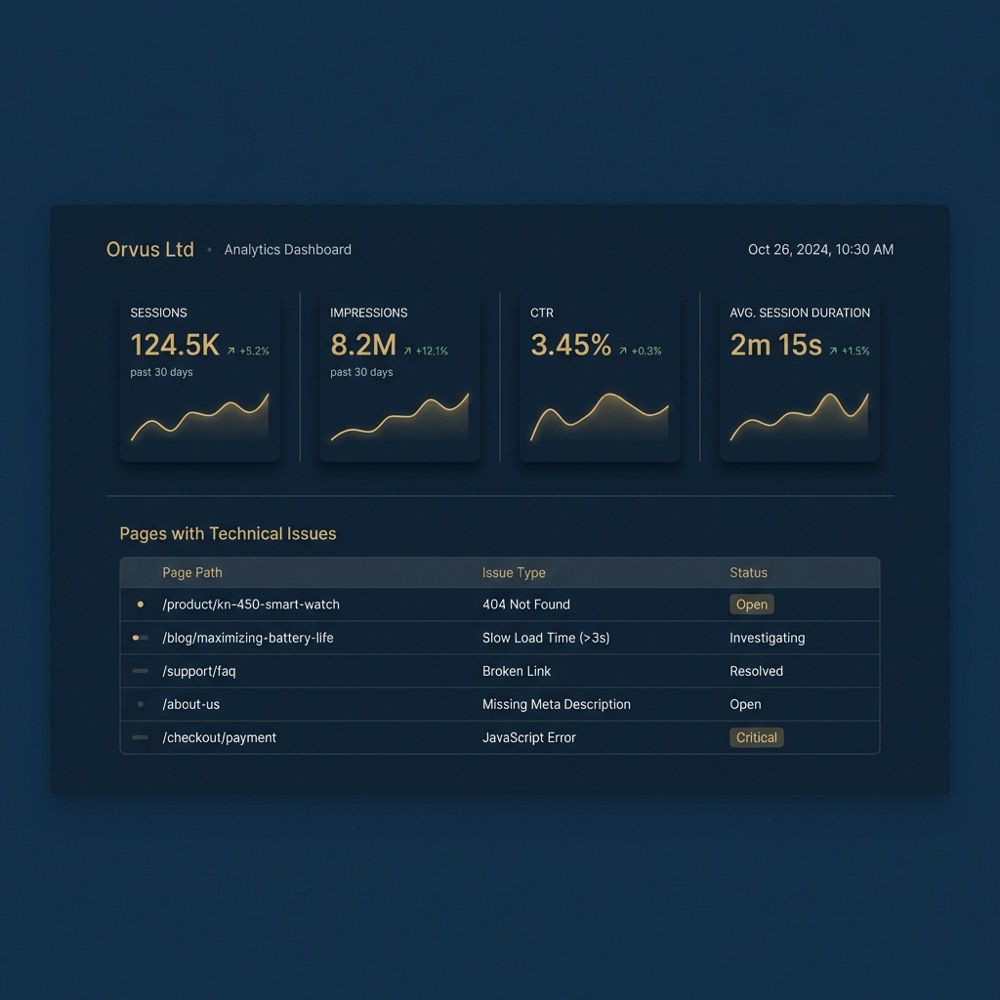
Primary, canonical sources in this discipline are Google Search Console and Google Analytics 4 because they provide the raw search impressions and on-site behaviour needed to tie search to outcomes; Search Console gives search performance signals while GA4 captures session and event data for attribution, and teams often start by ensuring these two are correctly connected for consistent reporting Search Console performance report.
How SEO analytics fits inside growth systems
SEO analytics sits inside a broader growth systems view. It feeds search architecture and content decisions, informs technical SEO priorities, and links through measurement to performance media and revenue attribution. When organised as part of a search architecture, analytics becomes an input to prioritisation cycles and experiment design rather than a reporting afterthought.
Privacy changes and the rise of server-side measurement since 2024 mean teams should validate event quality and triangulate signals from multiple sources, because single-source reliance can produce misleading conclusions. A practical setup tends to combine canonical tools with supplemental crawl and ranking data to improve confidence before acting on results Google Analytics 4 help article.
Core workflow: how to set up reliable SEO analytics
Step 1: GA4 event mapping and validation
Start by defining the conversion events that matter for organic traffic, then map those events in GA4 so organic sessions can be credited correctly. Common mappings include form completions, checkout steps, lead events, and user engagement signals that correlate with conversion intent.
Validate events by checking real-time and debug views, comparing server logs when available, and confirming that organic sessions show the expected events. Getting event mapping right first reduces confusion later and helps ensure experiments measure the outcome that matters.
Step 2: Link GA4 to Search Console
Linking Search Console to GA4 brings search impressions and CTR into the behavioural dataset, which helps diagnose whether traffic changes stem from search visibility or on-site issues. This link makes Search Console the canonical source for search queries and impressions while GA4 provides session and conversion context Search Console performance report (see a step-by-step integration guide here and Google's connect documentation here).
Discuss measurement and setup with Orvus services
Validate your GA4 event map and confirm Search Console is linked to the same property
Step 3: Consolidate crawl, ranking and on-page data
Bring crawl outputs, ranking trends, and on-page signals into the same workspace so you can cross-check visibility with indexability and on-site experience. Crawl data helps you spot indexability and canonical issues that Search Console alone might not surface.
When consolidating, include a simple column that maps pages to funnel stage and intent. That mapping lets you see whether a ranking change affects discovery pages or conversion pages, which changes how you prioritise fixes and experiments HubSpot on building SEO dashboards.
Step 4: Validate data quality before dashboarding
Before you surface metrics, run a short data-quality checklist: check for duplicated events, verify attribution windows, confirm filters do not exclude organic traffic, and reconcile organic session counts with Search Console impressions at a page level where possible. Data quality validation reduces time spent chasing false positives.
If you rely on server-side measurement, cross-reference server logs with GA4 events to detect dropped events or sampling issues. Where privacy controls limit granular user paths, corroborating signals become more important to maintain confidence in conclusions Google Analytics 4 help article.
Core metrics and reporting: the compact KPI set to track
Primary KPIs to include
A compact KPI set in 2026 should include organic sessions, impressions, CTR, keyword ranking trends, crawl and indexing errors, and conversion events tied to revenue attribution. These metrics are sufficient to diagnose visibility, engagement, and business impact without overwhelming stakeholders.
When describing these KPIs to others, clarify that Search Console provides canonical impression and CTR data while GA4 supplies session and conversion context, and that ranking tools supply supplemental trend signals. Use one clear source per KPI for reporting to avoid conflicting numbers Moz on measuring SEO performance.
Begin by confirming GA4 event mapping for conversions, link Search Console to the GA4 property, consolidate crawl and ranking data, validate metrics with server logs where possible, then build a compact dashboard and a prioritisation rubric to run experiments with clear success criteria.
Segmenting by intent and funnel stage
Segment KPIs by intent buckets, such as informational, commercial investigation, and transactional, and by funnel stage from discovery to conversion. This lets you see whether a traffic change matters to revenue or is a visibility problem for awareness content.
Dashboards should show the same KPI set across intent segments so stakeholders can compare CTR, conversion rate, and revenue attribution for pages serving different intents. That alignment reduces confusion and clarifies prioritisation.
Reporting cadence and who sees what
Match reporting cadence to decision cycles: weekly dashboards for operational fixes and experiment monitoring, and monthly summaries for prioritisation and roadmap decisions. Weekly checks help catch regressions early, while monthly reviews shape strategic prioritisation.
Keep audiences small. Operational teams need the detailed, segmented dashboard; leadership prefers a compact monthly snapshot that highlights revenue-impacting changes and recommended next steps. This division of detail supports clear accountability HubSpot on building SEO dashboards.
Decision criteria: mapping metric signals to prioritised work
From anomalies to diagnostics
When a KPI moves, map the anomaly to likely root causes: falling impressions often point to visibility issues, low CTR suggests meta or SERP relevance problems, drops in organic sessions with steady impressions suggest on-site UX or indexing problems, and missing conversion events can indicate GA4 mapping gaps.
Use a short diagnostic checklist for each signal. For example, low impressions: check Search Console query filters, inspect index coverage, review recent site changes, and scan for manual actions or penalties. Each diagnostic step refines the hypothesis before action.
Prioritisation framework for experiments
Prioritise experiments by weighing potential revenue impact, fix complexity, and measurement confidence. A simple rubric multiplies estimated impact by confidence and divides by effort to produce a prioritisation score that is easy to communicate.
Record expected outcomes, the measurement plan, and the decision threshold up front. When an experiment completes, write the result back into the dashboard so teams learn from each test and avoid repeated work Ahrefs guide to SEO analytics.
Tools and dashboards: pulling multiple signals together
Primary tools and their roles
Google Search Console and GA4 remain the canonical tools for search and behavioural data, while supplemental tools supply keyword trends, backlink context, and site-audit signals. Use the canonical pair for attribution and supplement with external signals to fill visibility and technical gaps Search Console performance report (see Using Search Console and Google Analytics Data for SEO guide).
Supplemental keyword and audit tools are useful for trend context and for prioritising content and technical work, but their numbers should be treated as indicative rather than canonical to avoid conflicting messages in reports Semrush on measuring SEO.

Designing a focused SEO dashboard
Build a dashboard that maps a small set of KPIs to funnel stages. Top-level tiles show sessions, impressions, CTR, conversion rate, and revenue attribution. Below, include a pages table that highlights pages with technical issues and traffic changes so teams can act.

Design dashboards to answer the key question for each tile, for example: did CTR change because of SERP features or because the meta description was altered? Include drilldowns to Search Console and crawl data to speed diagnosis HubSpot on building SEO dashboards.
Experiment design and measurement: run tests that produce trusted signals
Defining success and guardrails
Define success as a measurable change in a target KPI within a pre-specified window and with a clear attribution plan. Include guardrails that stop tests early if quality or traffic drops threaten user experience or revenue.
Make experiment criteria explicit: the metric to change, the required minimum effect size, the confidence level, and the observation window. That clarity helps prevent chasing noise and supports more reliable decisions Ahrefs guide to SEO analytics.
validate experiment setup and measurement
Run before launching any test
Sample size, time windows and attribution notes
Choose sample sizes and observation windows that account for seasonality and the traffic volume of the tested pages. Smaller sample sizes need longer windows or stronger effect sizes to reach confidence.
When cookies or sampling reduce direct attribution quality, use corroborating signals such as crawl stability, ranking trends, and server log events to strengthen conclusions. Combining evidence reduces the chance of false positives when main metrics are noisy Google Analytics 4 help article.
Common mistakes and how to avoid them
Overreliance on a single metric or tool
Relying on any single metric or tool can lead to misprioritisation. For example, a ranking tool may show a drop while Search Console impressions remain stable, suggesting a sampling or query mismatch. Use multiple corroborating signals before acting.
Make one tool the canonical source for each KPI and document that choice. For impressions and CTR, choose Search Console as canonical, and use GA4 for session and conversion metrics to keep reports consistent Search Console performance report.
Ignoring data quality and event validation
Common GA4 setup errors include missing or duplicate events, incorrect attribution settings, and filters that inadvertently exclude organic sessions. Regular validation reduces time spent debugging experiments and preserves confidence in decisions.
Schedule periodic audits of the event mapping and run quick recon checks that compare expected conversions from high-volume pages with GA4 totals and server logs when available Google Analytics 4 help article.
Misaligned reporting and decision cadence
Dashboards with too many metrics and no next steps create analysis paralysis. Reports should highlight a few KPIs and always include recommended diagnostics and the next experiment or fix to try.
Tie dashboard refresh cadence to decision needs. Weekly monitoring can spot regressions, while monthly prioritisation helps allocate development and content resources effectively HubSpot on building SEO dashboards.
Practical scenarios: 3 short examples you can apply
Scenario A: low impressions but high CTR
Diagnostic checklist: confirm Search Console query scope, check index coverage, review recent sitemap changes, and scan for robots or canonical changes. Low impressions with high CTR suggests your pages are relevant when they appear but are not being shown often enough.
Likely root causes include reduced visibility from indexing problems or shifts in query relevance. Next actions: run a targeted crawl, inspect index coverage in Search Console, and if indexability issues appear, prioritize fixes that restore discovery. Validate the hypothesis by watching impressions and clicks in Search Console and session counts in GA4 Search Console performance report.
Scenario B: traffic drops after a site migration
Diagnostic checklist: verify redirects, check canonical tags, confirm the sitemap and robots settings, and compare pre- and post-migration crawl logs. A migration can break indexability or change page parameters that affect query matching.
Start with crawl and server logs to confirm redirects are in place, then use Search Console to spot index coverage issues. If GA4 shows conversions falling but Search Console impressions remain similar, investigate on-site changes to templates or tracking that might stop events from firing Google Analytics 4 help article.
Scenario C: pages with conversions but low rankings
Diagnostic checklist: check whether conversions come from long-tail queries, direct traffic, or internal campaigns; inspect on-page relevance and backlinks; and run a technical scan for indexability or speed issues. Pages can convert from niche queries even if they do not rank for broad keywords.
Prioritised actions: map the converting queries from Search Console, tighten or broaden content around those queries depending on intent, and design an experiment that tests small content changes with conversion rate as the primary KPI. Use GA4 event data and a ranking trend snapshot to measure whether changes move both rankings and conversions Ahrefs guide to SEO analytics.
Next steps and closing: building a repeatable SEO analytics practice
Checklist for the first 30 to 90 days
30 to 90 day checklist: validate GA4 event mapping, link Search Console, consolidate crawl and ranking signals into a dashboard, prioritise one to three experiments using the prioritisation rubric, and run a measurement audit to confirm data quality. This sequence builds a foundation for dependable decisions.
Embed the practice into team routines by assigning an analytics owner, setting weekly monitoring checks, and keeping monthly prioritisation sessions limited to the compact KPI set. Over time, this creates a feedback loop where experiments inform the dashboard and the dashboard guides new tests Google Analytics 4 help article. Also see our articles for ongoing guidance useful knowledge.
How this ties into broader growth systems
How this ties into broader growth systems
SEO analytics is part of a broader growth systems approach that connects search architecture, content work, technical fixes, and measurement. When measurement is stable, teams can compound improvements with clearer prioritisation, fewer repeated mistakes, and better routing of resources.
Orvus Limited can act as a systems builder and strategic reference for teams that need help implementing these practices, focusing on search architecture, measurement, and workflow automation in a context-dependent way rather than offering one-size-fits-all solutions. See our services for details.
Start by validating your GA4 event mapping and confirming Search Console is connected to the same property so canonical search impressions and session events align.
A compact dashboard should include organic sessions, impressions, CTR, keyword trend snapshots, crawl/indexing errors, and conversion events tied to revenue attribution.
Use corroborating signals such as crawl data, server logs, and ranking trends, and be explicit about assumptions and confidence levels when modelling organic impact.
If you need an external collaborator, consider a systems builder that focuses on search architecture, measurement, and automation to help embed these practices into existing workflows.
References
Want this kind of work done for your business?
We build and run AI-powered marketing and automation. 15 minutes, honest assessment.
Book a call