 Orvus
OrvusWhat is canonicalisation in SEO? A systems-first guide
January 31, 2026
This guide explains how rel=canonical works in practice, when to prefer server side redirects, and a pragmatic audit and implementation flow. It is written for operators, founders, and marketing teams who need a stable, measurement friendly approach within a broader search architecture.
What canonicalisation means and why it matters
Definition in plain language, canonicalization seo
Canonicalisation is the process of selecting a preferred URL when substantially similar or duplicate content exists across multiple URLs. In practice this means picking one canonical URL that represents a content set so indexing and reporting refer to the same address.
Search engines use the rel=canonical link as a signal to consolidate indexing and ranking signals, rather than as an absolute instruction, so it helps reduce duplicate indexing and measurement noise Google Search Central
Canonicalisation is the process of choosing a preferred URL when similar content exists on multiple URLs. It matters because consistent canonical choices reduce duplicate indexing and improve the accuracy of analytics and revenue attribution.
Duplicate indexing can create real problems for measurement. When several URLs index for the same content, organic landing page attribution fragments. That makes it harder to tie search to revenue and to compare channel performance in analytics.
For operators this matters because canonicalisation affects indexing, crawl budgets, and reporting. Treating canonicalisation as part of search architecture keeps fixes aligned with measurement and attribution goals.
How search engines treat canonical signals
Search engines treat rel=canonical as a consolidation hint that guides which URL to index. Engines can consider other signals like redirects, sitemaps, and links when making a final choice Google Search Central
Because rel=canonical does not change the URL users see, it does not redirect traffic. That makes it suitable when content must remain reachable under several URLs but you prefer a single indexing target.
How rel=canonical works in practice
Rel=canonical as a consolidation signal
When a crawler discovers multiple pages with equivalent or near equivalent content, the rel=canonical tag points to the canonical URL the site prefers. The crawler then treats the tag as a signal to consolidate indexing choices and ranking signals to that preferred target Google Search Central
In most cases the crawler will use the canonical hint along with external signals such as backlinks and sitemap entries. If those signals conflict, the engine may choose a different URL for indexing.
Talk to Orvus about a focused canonical audit and consultation
Run a short canonical audit to identify high traffic duplicates before changing routing or tags.
Crawlers, indexing, and the hint model
The key practical implication is that rel=canonical is not a user facing redirect. The server continues to serve the original URL. That means rel=canonical helps indexing and ranking consolidation but does not change user journeys or server routing.
Operators should therefore weigh whether they need a server side 301 redirect, which changes the URL seen by users and is the definitive method to enforce a single canonical for both users and crawlers Google Search Central
Core best practices for canonical tags
URL format and self referencing canonicals
Use absolute URLs in the rel=canonical attribute. Absolute links remove ambiguity between protocol, host, and path and reduce errors during crawling MDN Web Docs
Include a self referencing canonical on the canonical page. That makes the intended canonical explicit and helps crawlers confirm the preferred target.
Quick pre deploy canonical QA checklist
Run on a sample of high traffic pages
Canonical targets must be crawlable and consistent
Ensure canonical targets return 200 status and are not disallowed by robots.txt. Pointing canonicals at blocked or non crawlable pages causes engines to ignore the hint or choose another URL for indexing Moz Learn SEO
Where possible keep canonical targets on the same preferred domain and protocol. Inconsistent protocol or host can create unnecessary confusion for crawlers and reporting systems.
A pragmatic audit and implementation flow
Discover duplicates with crawls and logs
Start discovery with a site crawl to list near duplicate URLs and parameter variants. Follow that with server log analysis to see which URLs bots and users actually request. These steps expose both indexing duplicates and practical traffic patterns Screaming Frog guidance
Search Console and equivalent indexing reports help confirm which URL search engines selected. Use those reports to prioritise fixes where indexing choices and analytics attribution diverge.

Decide canonicals using analytics and intent
Choose canonical URLs based on user intent and measurement clarity. Prefer the URL that best aligns with how users search and how traffic should appear in analytics. That choice reduces future attribution noise and aligns search architecture with revenue tracking Screaming Frog guidance
Document decision rules so future pages follow the same conventions. Small, consistent rules scale better than many one off fixes.
Implement and verify
Apply rel=canonical on near duplicate pages when content must remain available on multiple URLs. Use 301 redirects where the content should exist only at the canonical URL. The two tools can be used together when migration or user routing and indexing consolidation are both required Ahrefs practical guide
After deployment fix internal links and sitemaps to reference the chosen canonical. Then run a recrawl and check Search Console URL inspection to confirm which URL the index selected.
Choosing the canonical URL: decision criteria
Use intent and analytics first
Prioritise the page that matches user intent and produces the clearest measurement path. If one URL receives most organic clicks and has the intended content, it is usually the better canonical choice.
If analytics are thin, default to the URL that is indexable, returns 200, and is included in the sitemap. Those properties keep the measurement path simplest and reduce risk in reporting systems Google Search Central
Prefer user facing and indexable pages
Avoid selecting blocked or non HTML resources as canonical targets. Choose indexable pages that serve useful content to real users and that integrate into internal linking structures.
Consider backlink signals and sitemap inclusion as secondary tiebreakers when intent and analytics are inconclusive.
When to use 301 redirects versus rel=canonical
Redirects as the stronger enforcement
Use a 301 redirect when you want users and crawlers to converge on one URL. Redirects change the user visible URL and pass signals more definitively than canonical hints Google Search Central
Redirects are the right choice for content migrations, removed pages, or when two URLs should no longer both be accessible.
When canonical tags are the right tool
Prefer rel=canonical when content must remain accessible at multiple URLs for practical reasons, for example campaign tracking or filtered ecommerce states that are useful for users. The canonical hint guides indexing without breaking those user flows.
When both user routing and indexing consolidation matter, combining a 301 redirect for legacy URLs with rel=canonical on the remaining pages can be pragmatic. That combination maintains user experience while signalling the preferred indexable URL Ahrefs practical guide
Common implementation errors and how to fix them
Signals pointing to non crawlable pages
One frequent error is pointing canonical tags at pages blocked by robots or returning non 200 codes. Fixing this requires changing the canonical to an indexable URL or unblocking the target if it should be indexed Moz Learn SEO
Another common issue is inconsistent canonical targets across device variants or cached pages. Harmonise tags across variants so the same canonical is declared regardless of user agent.
Inconsistent canonicals across variants
Parameterised or paginated pages often get inconsistent canonicals. Decide on a rule for parameter handling and apply it uniformly. Where a parameter reflects a meaningful state, preserve the parameter URL as indexable and avoid pointing it to a base page without considering user intent.
After fixes recrawl the affected pages and use URL inspection to validate which URL the indexation process chose. Monitor traffic and landing page attribution for unexpected shifts.
Parameters, pagination, and canonical strategies
When parameters should have canonicals
If parameters only change presentation and do not alter primary content, canonicalise them to a clean base URL. That reduces duplicate indexing for filter states that do not need separate entries in the index Moz Learn SEO
When parameters reflect distinct content or are essential for user intent, keep them indexable and avoid blanket canonicalisation. Document which parameters are safe to collapse and which are not.
Pagination alternatives
For paginated series avoid pointing every page to a single page unless you provide a view all page. Rel=prev and rel=next were once recommended for pagination flows, but engines have shifted how they treat those hints. Consider offering a view all page or ensuring paginated pages are clearly discoverable and linked from the series index Screaming Frog guidance
Think about user intent for paginated content. If users expect to land on a specific page in the series from search, preserve that page as indexable rather than forcing everything to a single canonical.
Monitoring, reporting, and measuring canonicalisation outcomes
Key signals to track
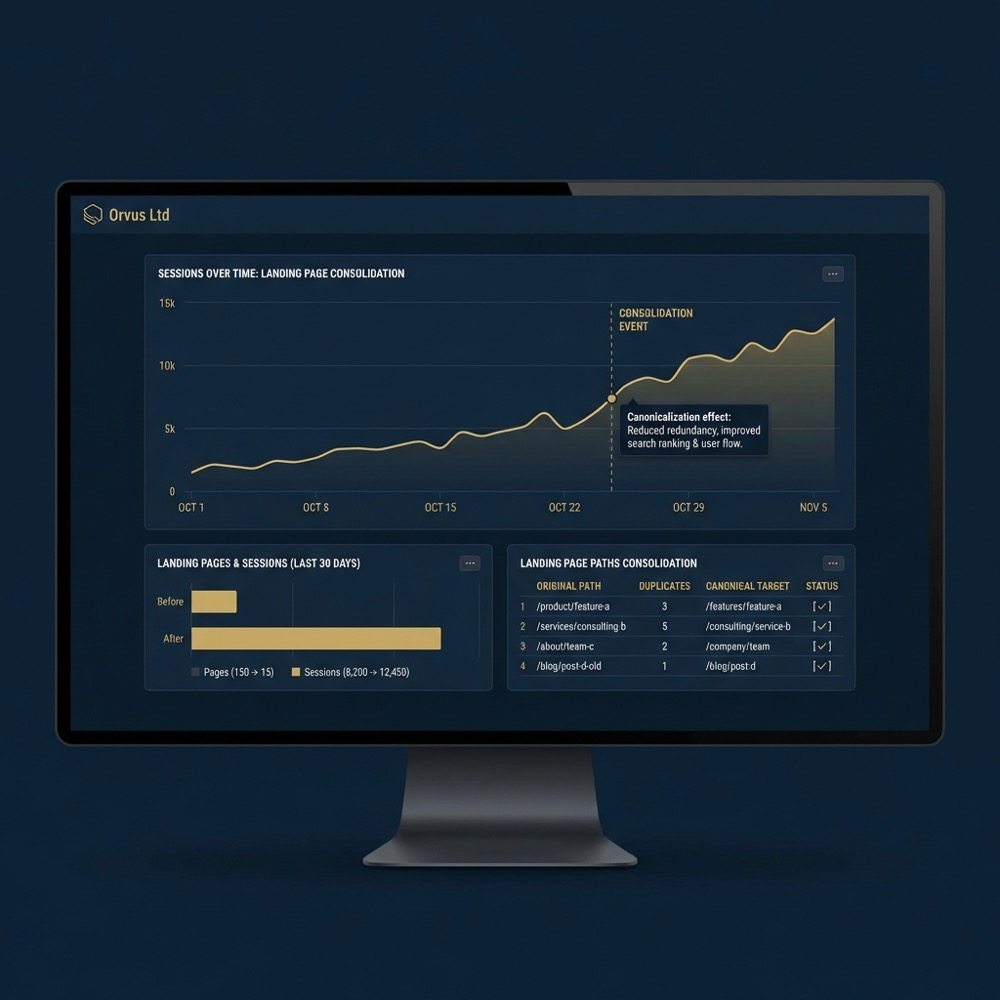
Track indexing status, crawl reports, and organic landing page attribution in analytics to see how canonical changes affect measurement. Shifts in landing page patterns often indicate an index selection change Google Search Central
Server logs help confirm which URLs bots requested after changes. Use periodic log sampling to validate that crawlers request the intended canonical targets.
Using tools and Search Console effectively
Use Search Console URL inspection to confirm the indexed URL and to check for errors. Combine that with automated crawl reports to detect regressions early.
Create alerts for sudden drops in indexed URL counts or unexpected increases in duplicate landing pages. That lets small teams focus on high leverage regressions quickly.
Practical examples and short scenarios
Ecommerce faceted navigation case
In ecommerce, faceted filters generate many parameter combinations. A pragmatic approach is to canonicalise filter combinations that do not change primary product content to a base category or a curated view all page Screaming Frog guidance
Where a filtered view represents a genuinely distinct shopping intent, keep the filtered URL indexable and ensure it is represented correctly in sitemaps and internal linking.
Blog article duplicates and tags
Editorial sites often create near duplicates via tag pages and slight article variations. Choose the article URL that best matches intent and traffic as the canonical, and remove tag pages from the sitemap if they are thin and not meant to rank Ahrefs practical guide
For migrations combine a 301 redirect from the old URL to the new final URL and leave a self referencing canonical on the target to make the migration clear to crawlers and to preserve link equity where possible.

A compact QA checklist for canonicalisation changes
Pre deploy checks
Before deploy, ensure canonical URLs are absolute, return 200, and are self referencing on canonical pages. Validate that robots rules do not block the target MDN Web Docs
Check internal links and sitemap entries so they point to the chosen canonical. Small mismatches can undermine the intended consolidation.
Post deploy validation
After deploy recrawl affected pages, check Search Console index selection, and sample server logs. Look for unexpected drops in indexed pages or sudden changes in landing page attribution Screaming Frog guidance
Use URL inspection and fetch as Google to confirm the rendered canonical is correct. Repeat checks on a short cadence after large changes.
How canonicalisation fits into broader search architecture
Linking, sitemaps, and structured data
Canonical tags are one part of search architecture that should work with consistent internal linking, accurate sitemaps, and structured data. When signals align, engines find it easier to pick the intended canonical target Google Search Central
Treat canonicalisation as a systems problem. Aligning it with sitemaps and linking reduces index noise and supports clearer measurement over time.
Measurement and revenue attribution considerations
Reducing duplicate indexing simplifies analytics attribution and makes revenue reporting cleaner. When canonical choices are consistent, landing page metrics reflect the right content and channels can be compared more reliably.
For teams focused on revenue attribution, include canonical checks in routine audits and reporting dashboards so regressions are visible early.
Conclusion: practical next steps for teams
Start by discovering high traffic or high measurement impact duplicates with a crawl and log review. Then decide canonicals based on user intent and analytics, implement rel=canonical or 301 redirects as appropriate, fix links and sitemaps, and monitor with Search Console.
Prioritise small experiments and measure outcomes before scaling changes site wide. That conservative approach reduces risk and gives teams evidence to guide larger architecture work.

A 301 redirect changes the user visible URL and is the strongest way to enforce a single URL. Rel=canonical is a hint to search engines that guides index selection without changing the served URL.
No. If the canonical target is blocked or returns a non 200 status, engines may ignore the hint. Use an indexable URL as the canonical target or unblock the page if it should be indexed.
Not always. If parameters reflect distinct user intent or distinct content, keep them indexable. Collapse only parameters that do not change primary content.
Treat canonicalisation as part of search architecture and include checks in regular audits so measurement stays clear as the site evolves.
References
- https://developers.google.com/search/docs/advanced/crawling/consolidate-duplicate-urls
- our knowledge base
- https://developers.google.com/search/docs/crawling-indexing/canonicalization
- https://www.screamingfrog.co.uk/duplicate-content/
- our services
- https://moz.com/learn/seo/canonicalization
- https://ahrefs.com/blog/canonical-tag/
- https://developer.chrome.com/docs/lighthouse/seo/canonical
- https://www.searchenginejournal.com/google-updates-relcanonical-documentation/508430/
- about Orvus
Want this kind of work done for your business?
We build and run AI-powered marketing and automation. 15 minutes, honest assessment.
Book a call