 Orvus
OrvusCan Google ignore canonical tags? A systems guide
January 31, 2026
This guide explains why Google might ignore a rel=canonical, how to diagnose the exact cause with Search Console, a crawler, and server checks, and how to roll fixes out in a low-risk, systems-first way suitable for teams with limited bandwidth.
What canonicalization seo means and why it matters
Basic definition
Canonicalization seo is the practice of indicating a preferred URL when multiple pages contain similar or duplicated content, usually by using a rel=canonical link element. The rel=canonical tag tells crawlers which version you prefer indexed, but Google treats that preference as a strong hint rather than a strict rule, so the declared canonical may not be the final selection Google Search Central consolidation guide.
How canonical relates to indexing and consolidation
Correct canonical selection helps consolidate indexing signals, focus crawl budget, and keep measurement accurate by steering traffic and conversions to a single URL. When Google accepts your canonical, it reduces duplicate URLs in the index and simplifies reporting. Use canonical tags for near-duplicate pages, parameter variants, and simple www versus non-www or https versus http cases to reduce fragmentation of ranking and analytics signals.
Keep in mind that a canonical is one part of an architecture that includes sitemaps, internal linking, redirects, and indexability settings. If those supporting signals contradict the declared canonical, Google may choose a different URL as the authoritative one.

How Google treats rel=canonical: the canonical hint model
Google's 'strong hint' concept
Google documents that rel=canonical is treated as a strong hint and not a mandate, meaning it can accept the user-declared canonical or select a different page when other signals are stronger or conflicting Google Search Central consolidation guide.
When Google will accept vs override a declared canonical
In many cases Google will accept a declared canonical, but it may override that choice if it sees redirects, indexability problems, or patterns in your internal links that point to another URL. Expect validation to be iterative: after fixes you should use Search Console to compare the user-declared canonical with the Google-selected canonical and monitor changes over time How to test and validate canonical fixes with Search Console.
Book a short diagnostic or download the checklist
Download a short diagnostic checklist or request a brief diagnostic call if you need a second pair of hands to triage complex canonical conflicts.
Common technical causes when canonicalization seo fails
Redirects and redirect chains
Pointing a rel=canonical at a URL that returns a redirect, or including redirect chains, is a common reason Google ignores the declared canonical and instead selects the redirect target as the canonical. Redirects change the effective target and can break the intended signal Google Search Central consolidation guide. GSQi analysis

Non-indexable canonical targets (noindex, 3xx, 4xx, blocked)
If the declared canonical points at a page that is blocked by robots rules, marked noindex, or returns a non-200 response, Google will usually not accept it as the canonical target. Ensure the canonical target is indexable and returns a 200 response before relying on the tag Canonicalization (Learn SEO).
Other contradictions can come from hreflang setups, sitemap entries, or consistent internal linking to an alternate URL. Those signals can be interpreted as stronger than the user-declared canonical in certain cases, so alignment matters.
How to systematically diagnose a canonicalization seo problem
Quick triage using Search Console
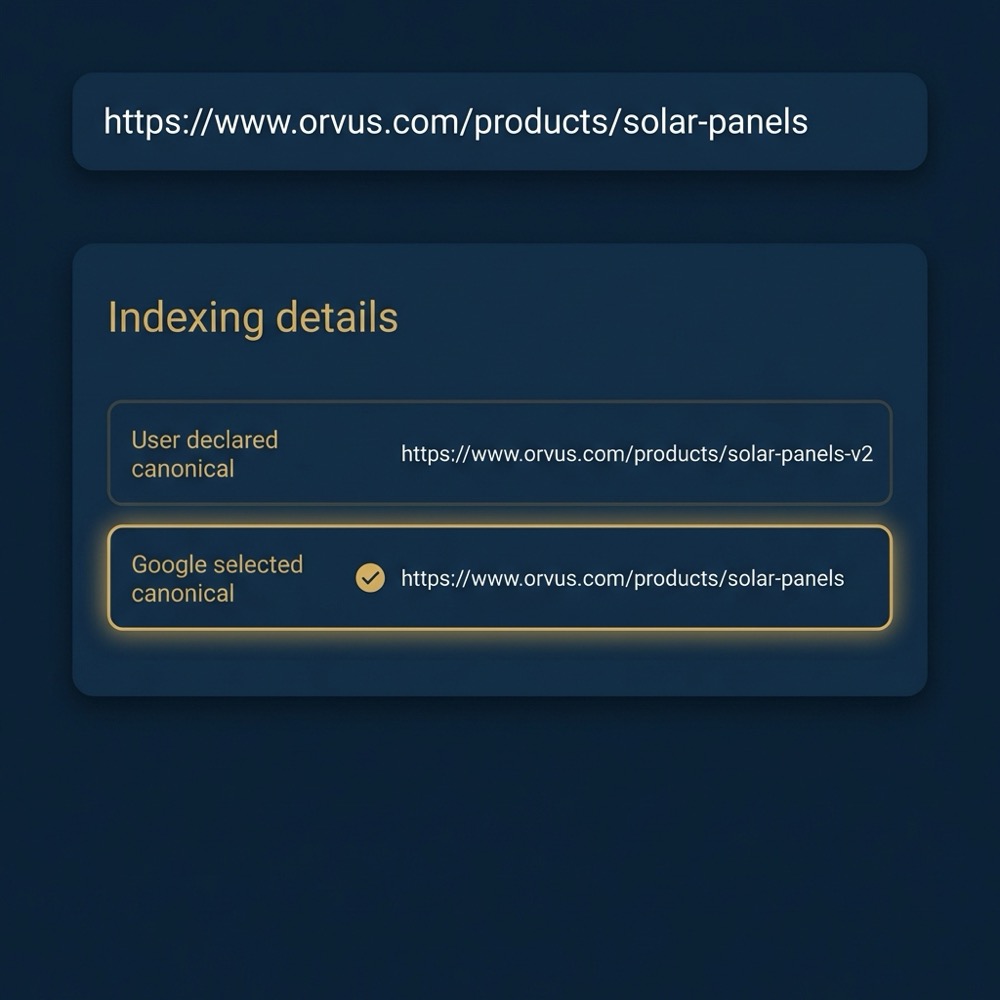
Start with URL Inspection to see the 'User-declared' canonical and the 'Google-selected' canonical for the URL in question. The URL Inspection view also surfaces indexability issues that explain why Google chose an alternate canonical Google Search Central consolidation guide.
Deep checks with crawlers and server responses
Next, run a site crawler to map on-page rel=canonical tags and to identify redirect chains across the set of affected URLs. A crawler helps you see mismatches at scale and flags redirect targets that differ from declared canonicals When Google ignores your canonical: technical causes and checks.
Use curl or server logs to confirm real HTTP responses for both the source and the declared canonical target. Confirm the canonical target returns a 200 and is not blocked, redirected, or marked noindex. Server-level checks catch CDN rewrites or edge redirects that a crawler running from a different network might miss.
Fixes and a safe rollout plan for canonicalization seo issues
Immediate quick fixes
Begin with the low-effort, high-impact items: point rel=canonical at the final indexable URL, remove noindex from canonical targets, and stop pointing canonicals at URLs that redirect. Making the canonical target indexable and stable is the most direct fix Google Search Central consolidation guide.
Staged rollouts and re-index requests
After applying fixes, request re-crawl via Search Console for a representative sample and monitor the Google-selected canonical in URL Inspection. Roll changes out in stages if the site is large: batch fixes by template or folder, then monitor each batch to reduce risk and isolate regressions How to test and validate canonical fixes with Search Console.
Keep internal links and sitemaps aligned to the intended canonical during the rollout. If you normalise parameters, update canonical decisions and sitemap entries together so all signals point to the same preferred URL. See related posts
Tools and checks to use now
Search Console reports to watch
URL Inspection and the Coverage report are the primary places to confirm how Google sees your pages. Use the URL Inspection output to compare the user-declared canonical with the Google-selected canonical and to find obvious indexability blockers that explain divergent choices Google Search Central consolidation guide.
Start with URL Inspection to compare user-declared and Google-selected canonicals
Run this for a sample set of high-traffic or problem pages
Lightweight crawl and curl checks
Run a crawler to extract on-page canonical markup and to map redirect chains, then corroborate those findings with curl or server logs to confirm the HTTP status and headers for both the source and target URLs When Google ignores your canonical: technical causes and checks.
For parameter-driven duplication, use the crawler to group similar URL patterns and test canonical responses after normalisation changes. Keep a tight loop between small changes and re-crawls so you can see the effect quickly.
Validation and monitoring: proving the canonical change stuck
What Search Console will show
After you request re-crawl, URL Inspection will show whether Google now lists the user-declared canonical as the Google-selected canonical for that URL. Use this indicator as the primary validation signal, but treat it as a snapshot that can change if new signals appear How to test and validate canonical fixes with Search Console.
Google treats rel=canonical as a strong hint and can choose a different canonical when redirects, non-indexable targets, or contradictory signals like internal links and sitemaps outweigh the declared tag. Start with quick fixes that make the canonical target indexable and stable, then re-crawl and monitor the Google-selected canonical.
How long to monitor and what can still change
There is no fixed time window for a canonical selection to stabilise. Google can change its selection later if stronger signals appear, so monitor the affected set for repeated changes over weeks and after major site updates. If you see reversions, re-check for new redirects, sitemap changes, or fresh internal links that contradict your intended canonical.
Maintain a list of the sample URLs you re-crawled and check them periodically after other site changes, especially template edits, sitemap updates, or navigation adjustments.
Monitoring signals and alerts to catch regressions
Key metrics to surface
Track counts of URLs where the Google-selected canonical differs from the user-declared canonical, spikes in non-200 responses for declared canonical targets, and unexpected drops in the number of indexed pages in a folder. These metrics flag regressions early when paired with crawl output Google Search Central consolidation guide.
Automated alerts and dashboards
Combine crawler exports, server log summaries, and Search Console data into a lightweight dashboard that highlights newly changed canonical selections and large sitemap mismatches. Configure alerts for sudden increases in redirected canonical targets or for many canonical targets returning non-200 responses so teams can act quickly.
Keep alerts pragmatic: focus on changes that affect traffic or a large number of URLs and assign clear ownership for investigation when an alert fires.
Frequent mistakes teams make with canonicalization seo
Pointing canonicals to redirecting URLs
A common error is leaving a rel=canonical that points to a URL which itself redirects. Google often follows the redirect chain and selects the final redirect target as canonical, effectively nullifying the original declaration Google Search Central consolidation guide.
Mixing indexability and canonical intent
Another frequent mistake is combining rel=canonical with noindex on the declared target. If the target is noindex or otherwise non-indexable, Google will not accept it as canonical, so ensure indexability settings match canonical intent before deploying site-wide changes Canonicalization (Learn SEO).
Finally, inconsistent internal linking and sitemap entries that point to different preferred URLs create noisy signals that can lead Google to ignore your declared canonical.
Parameters, CDNs, and edge rewrites: rare but tricky canonicalization seo causes
How parameters can fragment signals
Session IDs, tracking parameters, and other query-string variants create many near-duplicate URLs that fragment signals and make canonical selection harder. Normalising parameters in canonicals and sitemaps reduces the surface area of duplication and clarifies the preferred URL pattern Canonical tag: what it is and how to use it. Support thread
CDN and server-level rewrites that change visible URLs
CDN rewrites, edge redirects, or server-side URL normalisation can present a different URL to Google than the one your CMS emits. Use server logs and curl checks to detect these transformations and coordinate with engineering to align edge behaviour with your canonical strategy When Google ignores your canonical: technical causes and checks.
Server-side issues are often the hardest to diagnose and usually require developer or DevOps support to correct permanently.
Practical scenarios and quick playbooks for teams
Ecommerce product variants
When product pages create many variants by color, size, or tracking parameters, pick a canonical that represents the primary commercial page and ensure internal links, breadcrumbs, and the sitemap point to that canonical. If variant pages must remain accessible for filtering, use canonical tags plus consistent internal linking so Google sees the intended hierarchy Google Search Central consolidation guide. 5 common mistakes
Localized pages with hreflang conflicts
For localized content, ensure hreflang and canonical targets align and that every hreflanged page points to an indexable target. Mismatches between hreflang and canonical signals can cause Google to select a different canonical than intended, so validate both sets of tags together When Google ignores your canonical: technical causes and checks.
When in doubt, run small samples through the diagnostic flow: inspect, crawl, curl, fix, then re-crawl and monitor Search Console to confirm the selection.
How to prioritise canonicalization seo work within limited team bandwidth
Quick wins vs platform changes
Prioritise fixes that affect many URLs or those that impact high-traffic pages. Quick wins tend to be canonical tags that point to redirects, accidental noindex targets, and sitemap mismatches. Those are often low-effort and reduce noise quickly Google Search Central consolidation guide.
When to involve engineering
Schedule engineering time for parameter normalisation, CDN configuration changes, or server-level rewrites. These require developer access and testing and should be batched with clear acceptance criteria and monitoring to avoid regressions.
Communicate scope and impact to engineers: explain which URLs are affected, supply examples from crawler output, and request logs or curl checks to confirm changes.
Orvus approach: a systems-first way to resolve canonical conflicts
How a systems builder frames the problem
A systems-first approach treats canonical issues as part of search architecture and measurement, not as isolated fixes. That means aligning sitemaps, internal links, indexability, and canonical decisions together and tracking the effects in dashboards so the work compounds over time.

Operational handoffs and small automations
Orvus Limited often focuses on small automations and compact dashboards to reduce recurring manual checks and to make operational handoffs cleaner, while leaving engineering to implement server-level changes where needed. This reduces friction in repeated canonical audits without promising specific outcomes.
Quick checklist to run in the next 48 hours
High-impact quick checks
1) Use URL Inspection on a sample of affected pages and note the user-declared versus Google-selected canonical. 2) Run a crawler on the sample to list on-page canonical tags and redirect chains. 3) Curl the declared canonical targets to confirm they return 200 and are not blocked.
What to log and who to notify
Log the findings with a simple triage tag: urgent, medium, low. Assign ownership for fixes and re-crawl requests. After fixes, request indexing for representative pages and monitor URL Inspection for changes over the following weeks How to test and validate canonical fixes with Search Console.
Closing: next steps and where to get help
Recap of diagnostic flow
In summary, treat rel=canonical as a strong hint: diagnose with URL Inspection, crawl, and server checks; fix indexability and redirects; align links and sitemaps; then re-crawl and monitor. This flow reduces the common causes that lead Google to ignore a declared canonical Google Search Central consolidation guide.
Suggested next actions
Start with the high-impact quick wins today, monitor the Google-selected canonical for a sample set, and schedule larger platform changes when you have engineering bandwidth. If you need a systems-first partner to structure the work, consider a short diagnostic engagement to prioritise the backlog without assuming specific outcomes.
You cannot force Google; rel=canonical is a strong hint. Align indexability, redirects, sitemaps, and internal links to make your preferred URL the strongest signal.
Use Search Console URL Inspection to compare the user-declared canonical to the Google-selected canonical and corroborate with a crawler and curl checks.
It can fragment reporting. Fixing canonical mismatches and aligning sitemaps and internal links reduces fragmentation and simplifies measurement.
When server-level rewrites or parameter normalisation are involved, coordinate with engineering and keep monitoring until the Google-selected canonical stabilises.
References
- https://developers.google.com/search/docs/advanced/crawling/consolidate-duplicate-urls
- our services
- https://moz.com/learn/seo/canonicalization
- https://ahrefs.com/blog/canonical-tag/
- https://www.gsqi.com/marketing-blog/google-ignore-rel-canonical-different-content/
- https://developers.google.com/search/blog/2013/04/5-common-mistakes-with-relcanonical
- orvus.net
- our knowledge base
Want this kind of work done for your business?
We build and run AI-powered marketing and automation. 15 minutes, honest assessment.
Book a call