 Orvus
OrvusWhat is a canonical issue in SEO? A systems guide
January 31, 2026
This guide explains what canonical issues are, why they matter for visibility and measurement, and how to detect and fix them using a systems-first approach. It focuses on practical steps you can run with engineering and analytics to reduce measurement noise and align search architecture with business reporting.
What a canonical issue is and why it happens
Simple definition
A canonical issue happens when multiple URLs serve the same or highly similar content and a search engine must pick which URL to index. This choice can fragment search signals and analytics if the site does not consolidate intent, a point described in Google's guidance on consolidating duplicate URLs Google Developers.
How duplicate or near-duplicate URLs appear (canonicalization seo)
Duplicate or near-duplicate pages commonly appear through URL parameters, session IDs, faceted navigation, pagination, or CMS-created variants. These patterns generate many indexable permutations that look like separate pages to crawlers, and the proliferation is a frequent source of duplicate content canonicalization problems, as documented by SEO practitioners Moz.

When signals are inconsistent, a declared rel="canonical" may not be the final choice. Google and other engines will combine on-page signals with external linking and site structure before selecting a canonical, so a mismatched set of signals can lead to the engine picking a different URL Google Search Central Blog (see troubleshooting).
Why canonical issues matter for visibility and measurement
Indexing and organic visibility impact
When search engines index the wrong URL, ranking signals such as inbound links and content relevance can be split across several pages. That split makes it harder for a single URL to accumulate authority and for teams to reason about visibility. Google's documentation explains how duplicate URLs can fragment indexing decisions and reduce clarity about which page represents the content topic Google Developers.
A canonical issue occurs when multiple URLs serve the same or highly similar content and search engines must choose one to index, which can fragment rankings and analytics if you do not consolidate canonical intent.
How analytics and reporting get fragmented
Analytics and server logs may show a different dominant URL than the one you declared as canonical. Logs reveal which URLs users and bots actually request, and those actuals are essential for measurement and troubleshooting; a mismatch between declared and served URLs complicates attribution and reporting Screaming Frog.
Operationally, unresolved canonical issues increase crawl waste and require extra engineering effort to maintain sitemaps and redirects. Teams that treat canonicalisation as an afterthought often see recurring measurement noise and unclear link equity direction.
How search engines decide a canonical URL
Declared signals: rel="canonical" and redirects
Rel="canonical" and 301 redirects are primary ways to declare canonical intent. Google recommends these signals to indicate which URL should represent a content topic, but notes that they are part of a wider signal mix and not an absolute instruction Google Search Central Blog.
Other signals: internal links, sitemaps, external links and content similarity
Search engines combine rel="canonical" with internal linking, sitemap entries, external backlinks, and content similarity when choosing a canonical. If anchors and internal links consistently target a different URL than the declared canonical, the engine may prefer the URL that has stronger corroborating signals Google Developers.
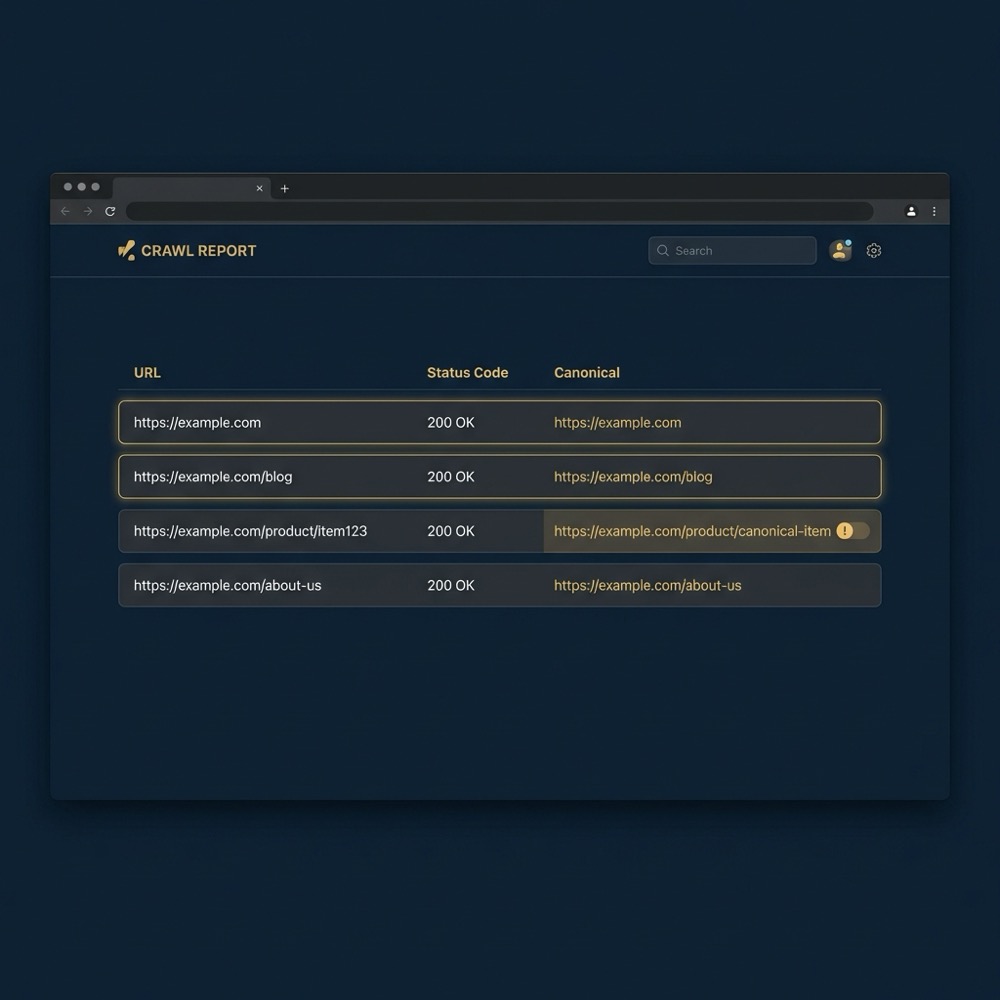
Practically, consistency across tags, redirects, sitemaps, and internal linking lowers the chance that an engine overrides your declared choice. That means aligning CMS output, link targets, and indexable XML sitemaps toward the same canonical intent.
Common technical causes of canonical problems
Incorrect or missing rel="canonical"
Missing, incorrect, or cross-page canonical tags are frequent technical causes. A canonical that points to the wrong URL, or pages that point at each other inconsistently, creates conflicting signals that engines may not trust, which is why audits often begin with a tag survey Ahrefs Blog. For a detailed guide see Sitebulb.
Parameter, session and tracking URL variants
URL parameter proliferation and session IDs create many indexable variants when they are left unnormalised. These variants can be harmless for user sessions but problematic for indexing and duplicate content canonicalization, so parameter handling should be deliberate rather than ad hoc Moz.

Pagination, faceted navigation and product variants
Faceted navigation and pagination generate near-duplicate pages by design. Some variants should be consolidated with a canonical or noindexed, while others may need unique URLs when differences are meaningful for users. The decision depends on the content differences and measurement needs, and it benefits from a documented approach Search Engine Journal.
When addressing product variants, consider whether the variant affects user experience or conversion. Small differences like locale-specific pricing often push the decision toward unique pages or parameter strategies rather than a blanket canonical tag.
A reliable detection workflow: crawls, Search Console, and logs
What to include in a full-site crawl
A full-site crawl should record rel="canonical" tag values, HTTP status codes, redirect chains, and internal link targets for every page. That crawl surfaces tag patterns, cross-page canonicals, and redirect loops so you can prioritise fixes for high-value URL clusters Screaming Frog.
Using Google Search Console to compare declared vs Google-selected canonicals
Google Search Console shows the URL Google selected as canonical in index coverage reports. Comparing the declared rel="canonical" to the Google-selected canonical reveals mismatches you must investigate; this step is a core part of a trustworthy detection workflow Google Developers.
map declared and chosen canonicals with a crawl and log parse
Re-run after fixes
How server logs and analytics confirm which URLs users and bots actually hit
Server logs show the actual requests from crawlers and users and confirm which URL variants receive traffic; see log file analysis. Logs help validate whether a declared canonical is the URL bots prefer, or whether a different URL receives the majority of requests and needs a redirect or structural fix Screaming Frog.
Combine logs with analytics to see both bot behaviour and user-facing traffic distribution. This combined evidence helps you assign priority to canonical fixes where they will reduce measurement noise and improve search architecture efficiency.
Practical remediation framework and testing plan
Declare one canonical per content topic
The primary remediation is to declare a single canonical per content topic using rel="canonical" or a 301 redirect, chosen based on user experience and link equity goals. Google recognises both rel="canonical" and 301 redirects as valid signals for canonical intent Google Search Central Blog.
When to use 301 redirects vs rel="canonical"
Use a 301 redirect when you want users and search engines to land on a single URL and transfer link equity clearly. Use rel="canonical" when multiple URLs must remain accessible to users but you want to signal a preferred version; the choice depends on UX, analytics, and whether URL consolidation needs a full traffic migration Ahrefs Blog.
Parameter handling, sitemaps and internal linking fixes
Normalise URL parameters through redirects, parameter handling, or documented rules and update sitemaps so they list canonical URLs only. Also update internal links to point to the canonical URL to strengthen the declared choice across the site and reduce conflicting signals Moz.
After applying changes, re-run the crawl and monitor Google Search Console to verify that Google-selected canonicals align with the declared URLs. Testing and monitoring complete the remediation cycle and reduce the chance of repeated issues Screaming Frog.
Decision criteria for edge cases and variants
When to create unique URLs vs canonicalise
Decide based on user intent and measurement needs. If a variant changes the core user experience, create a unique URL. If differences are superficial, canonicalisation or noindex may be better. Document the choice so teams understand the trade-off and can measure the outcome Search Engine Journal.
Localisation and pricing variations
Locale-specific pricing or inventory that materially affects users often merits unique URLs. When local differences are small, you can use canonicalisation paired with clear hreflang or parameter rules; the decision should be explicit in a site-level content and measurement plan Moz.
Documenting the decision and rollback plan
Record the decision, the expected impact on measurement, and a rollback plan before making changes. Because search engines may still prefer a different canonical, a rollback plan keeps operations safe and provides a quick path back if signals cause unintended indexing behaviour Google Developers.
Common mistakes, maintenance tips, and a concise next-step checklist
Frequent implementation errors
Common mistakes include conflicting canonicals, forgetting to update sitemaps after URL changes, not re-crawling after fixes, and leaving parameter rules undocumented. These errors lead to recurring confusion about which URL should accumulate authority and traffic, as discussed in practitioner guidance Ahrefs Blog.
Ongoing monitoring routine
Schedule periodic full-site crawls, watch Google Search Console for changes in Google-selected canonical URLs, and review server logs for crawling patterns. A regular routine prevents regressions and keeps your search architecture aligned with measurement goals Screaming Frog.
Request a canonical diagnostics consultation
If you want an operational diagnostic and a short remediation plan, request a systems review or consultation to map canonical issues and next steps.
Short checklist to hand to engineering or CMS owners
Share this short checklist with engineers or CMS owners: apply a canonical or redirect, normalise parameters, update sitemaps, re-crawl, and monitor GSC for Google-selected canonical changes. Keep the checklist simple and tied to measurable verification steps Moz.
Prioritise fixes where duplicate URLs affect key landing pages and conversion funnels. Small, repeatable changes to internal linking and sitemap hygiene often yield the clearest measurement improvements.
After applying changes, re-run the crawl and monitor Google Search Console to verify that Google-selected canonicals align with the declared URLs. Testing and monitoring complete the remediation cycle and reduce the chance of repeated issues Screaming Frog.
Check for multiple URLs serving the same content in a site crawl, compare your declared rel="canonical" to Google-selected canonicals in Search Console, and review server logs for which URLs receive crawler and user requests.
Not always; use a 301 redirect when you want users to land on a single URL and transfer link equity. Use rel="canonical" when multiple accessible URLs must remain for UX but you want to signal a preferred version.
Yes. Search engines may prefer a different URL when other signals conflict, so ensure consistency across internal links, sitemaps, redirects, and external backlinks.
If your team prefers, a compact diagnostic can surface the highest-impact clusters to fix and produce a short remediation plan to hand to engineering or CMS owners.
Want this kind of work done for your business?
We build and run AI-powered marketing and automation. 15 minutes, honest assessment.
Book a call