 Orvus
OrvusWhat's the difference between crawling and indexing? A pragmatic operator guide
February 1, 2026
Start with a diagnostic-first mindset: confirm whether a page was discovered and fetched before changing meta tags, canonicals or content. The sequence saves time and helps tie later changes to measured outcomes.
Crawling vs indexing: what crawling seo actually means
Crawling seo refers to the discovery and retrieval stage search engines use to find and request URLs on your site. Crawlers find pages via links, sitemaps, and submitted URLs, and treat discovery as a separate step from later indexing and storage Crawling and indexing - Google Search Central.
Indexing is the follow-up stage where fetched pages are parsed, analysed and stored so they can be returned for queries. A page can be crawled and never indexed if meta noindex, canonical rules or index selection prevent storage Crawling and indexing overview - Bing Webmaster Tools.
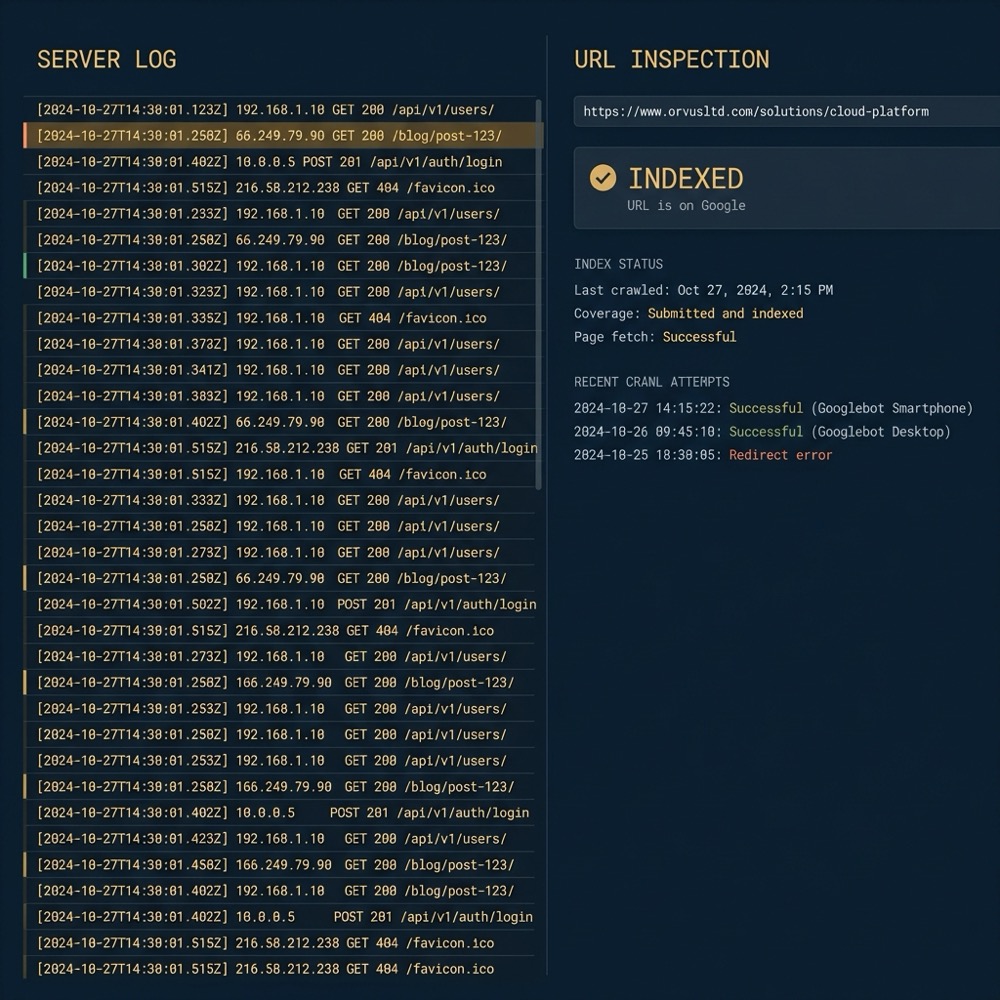
quick URL check using server logs and URL Inspection
Run after a sitemap check
Operationally the distinction matters because fixes differ. If a URL is not discovered you look at links, sitemaps and crawl access. If it is discovered but not indexed you check meta directives, canonicals and content quality Crawling and indexing - Google Search Central.
How search engines discover URLs
Search engines discover URLs in a few predictable ways. The most common channels are internal links, external incoming links, XML sitemaps and explicit URL submissions; these channels guide crawlers to pages to fetch How Googlebot crawls the web.
For large sites sitemaps are a practical complement to linking, not a replacement. A properly segmented, up-to-date sitemap helps crawlers prioritise canonical pages but does not guarantee crawling or indexing on its own Crawling and indexing - Google Search Central.
Discovery failures typically show as pages absent from crawl stats or never appearing in server logs as crawler requests. Start by checking sitemap reports and internal linking around the missing URLs to see if they are reachable from the site navigation or other indexable pages How Googlebot crawls the web.

Crawl behaviour and the rules that control it
Robots exclusion directives govern whether crawlers may request URLs. The REP standard specifies how robots.txt should be interpreted and remains the foundational protocol for crawler access control RFC 9309 - The 'Robots Exclusion Protocol' (REP).
Meta robots tags and X-Robots-Tag HTTP headers influence indexing and can also affect crawling in some implementations. A noindex directive prevents indexing, while a robots.txt disallow prevents fetching; they serve different purposes and must be used carefully Crawling and indexing - Google Search Central.
Consultation to tailor the crawl and index diagnostics
Run the checklist below to confirm crawl access and then use URL Inspection to re-request indexing where appropriate. Use the printable diagnostics checklist if you need a repeatable team workflow.
Crawler policies differ by engine and may handle edge cases differently. That means a directive or header that works as expected on one engine can be treated differently by another, so cross-check behaviour in the relevant webmaster consoles Crawling and indexing overview - Bing Webmaster Tools.
What happens during indexing
Indexing is the process of parsing fetched pages, extracting signals such as structured data and textual content, and storing a representation that the search engine will use when answering queries Crawling and indexing - Google Search Central.
Canonicalization and index selection determine which URL variants are stored. Even when a page is crawled, a canonical pointing to another URL or a noindex directive can prevent it from being indexed and served in results Crawling and indexing overview - Bing Webmaster Tools.
Signals such as structured data and perceived content quality influence whether an indexed page is later used for relevant queries. Operators should treat these signals as part of indexability work, distinct from earlier crawlability checks Crawling and indexing - Google Search Central.
How to check whether a page was crawled or indexed
Start in the webmaster console. Use URL Inspection and the Index Coverage report to see if a specific URL was requested and whether it was indexed. These tools explicitly distinguish states like discovered, crawled and indexed Crawling and indexing - Google Search Central.
Server logs and crawl stats provide the ground truth for crawler requests. A missing crawler entry in logs usually means the URL was never fetched; a 200-series response followed by a non-indexed state points to indexation issues rather than discovery problems How to check indexing and coverage with Search Console (practical guide).
Crawling is how search engines discover and fetch URLs; indexing is how they parse and store page content and signals so pages can be returned in search results. Treat them as separate steps and diagnose discovery before changing indexing signals.
When Search Console shows "Discovered - currently not indexed" it usually means the URL was found but not fetched for deeper analysis. When it shows "Crawled - currently not indexed" the engine did fetch the page and decided not to index it, often due to indexing signals or perceived low value Crawling and indexing - Google Search Central.
Use an ordered checklist: confirm discovery channels, verify crawler requests in logs, inspect response codes and rendering, then check URL Inspection for index reasoning. That sequence helps avoid speculative fixes How to check indexing and coverage with Search Console (practical guide).
Common crawlability problems and quick checks
Server errors and slow responses are frequent reasons crawlers fail to fetch pages. Check response times, error rates and timeouts in server logs or monitoring tools because throttled or erroring hosts reduce crawl frequency Crawlability vs Indexability: What's the Difference?.
Blocked resources in robots.txt or disallowed file types can prevent correct rendering and discovery. Make sure essential JS and CSS needed for rendering are not blocked and that robots.txt is intentional and precise RFC 9309 - The 'Robots Exclusion Protocol' (REP).
Weak internal linking or orphaned pages often lead to discovery failures. Run an internal link audit and prioritise indexable pages in navigation and sitemaps to improve discoverability How Googlebot crawls the web.
Typical indexability issues and how they differ from crawl problems
Meta noindex tags and conflicting canonical signals commonly explain pages marked as "crawled but not indexed". Verify HTML meta robots and any X-Robots-Tag headers before changing content or structure Crawling and indexing overview - Bing Webmaster Tools.

Low content value or thin duplicate content can make crawled pages unlikely candidates for indexing. Focus on improving unique, query-relevant content or consolidating duplicates with correct canonical signals Crawlability vs Indexability: What's the Difference?.
After making fixes, re-request indexing using URL Inspection and monitor Index Coverage for changes. Re-requests help the engine prioritise re-evaluation, though results depend on crawl budgets and site constraints Crawling and indexing - Google Search Central.
A diagnostic-first checklist: confirm crawl access, discoverability, then indexability
Step 1, confirm crawler access. Check robots.txt, ensure no unintentional disallows, and verify that essential assets are reachable. The REP standard explains the expected robots behaviour and where to place constraints RFC 9309 - The 'Robots Exclusion Protocol' (REP).
Step 2, confirm discovery. Review sitemaps for accuracy, test internal linking to avoid orphan pages, and prioritise relevant canonical URLs in navigation and indexable lists How Googlebot crawls the web.
Step 3, confirm indexability. Inspect meta robots, X-Robots-Tag headers and canonical elements. If content quality or duplication is the issue, iterate on content or canonicalization before re-requesting indexing Crawling and indexing overview - Bing Webmaster Tools.
Use URL Inspection to re-request indexing after fixes and watch the Index Coverage report for status changes. Record dates and actions so you can attribute later traffic shifts more responsibly How to check indexing and coverage with Search Console (practical guide). See our blog for guides.
Handling client-side rendering and other modern crawler challenges
Client-side rendering can introduce variability because some rendering steps happen after initial fetch. Crawlers have improved rendering but differences remain; test rendered output in URL Inspection and compare it to server-side rendered HTML How Googlebot crawls the web. See Google's JavaScript SEO guide.
For critical pages consider server-side rendering or prerendering so the crawler receives complete HTML quickly. This reduces ambiguity in whether a page was crawled and fully rendered for indexing decisions Crawlability vs Indexability: What's the Difference?. See Vercel's article.
Diagnose client-side issues with logs and rendered screenshots from URL Inspection rather than guessing. Rendering problems are often site-specific and need targeted fixes Crawling and indexing - Google Search Central. See a practical guide.
When and how to use sitemaps and URL submission for large sites
Sitemaps speed discovery for large collections of pages but do not guarantee crawling or indexing. Keep sitemaps focused on canonical, indexable pages and refresh them when the canonical set changes Crawling and indexing - Google Search Central.
Avoid submitting every low-value URL. For very large sites use segmented sitemaps and batch updates to help webmaster tools surface discovery problems without overwhelming reporting. Monitor sitemap reports to catch systemic omissions How Googlebot crawls the web.
Measuring impact and tying indexing to revenue signals
Use Index Coverage and search performance reports alongside analytics to measure changes after indexation fixes. Watch organic impressions and clicks for pages that were previously excluded to detect meaningful changes over time Crawling and indexing - Google Search Central.
Avoid assuming immediate business impact. Indexing changes often compound over weeks and their effect depends on funnel fit, content relevance and measurement quality. Document tests and dates to support later attribution How to check indexing and coverage with Search Console (practical guide).
Mistakes to avoid and common false assumptions
Do not assume that a crawled page is indexed. Always confirm with URL Inspection or an index coverage report before acting on the assumption that a page is in the index Crawling and indexing - Google Search Central.
Avoid over-relying on a single signal such as a sitemap entry. Cross-check server logs, Search Console reports and site architecture before making structural changes to canonicals or meta directives Crawlability vs Indexability: What's the Difference?.
Practical examples and short diagnostic scenarios
Scenario: ecommerce product pages discovered but not indexed. Check for duplicate product descriptions, incorrect canonicals to category pages, and meta noindex tags. Confirm crawler requests in logs and then correct canonicals or consolidate content before re-requesting indexing How to check indexing and coverage with Search Console (practical guide).
Scenario: service landing pages not discovered. Audit internal linking and sitemap entries, check robots.txt for accidental disallow rules, and prioritise key service pages in the navigation and XML sitemaps so they are reachable for crawlers How Googlebot crawls the web.
After fixes, verify changes by checking server logs for fresh crawler activity, using URL Inspection to request reindexing, and monitoring Index Coverage for status updates. Keep records of the steps you took and the dates you requested reindexing Crawling and indexing - Google Search Central.
Conclusion: a systems approach to crawlability and indexability
Distinguish discovery from index selection and follow a diagnostic-first workflow: confirm crawl access, validate discovery, then confirm indexability before making content or canonical changes. That approach minimises accidental removals and helps teams focus on high-impact fixes Crawling and indexing - Google Search Central. Orvus Ltd.
Measure changes with console tools and analytics and treat improvements as compounding effects rather than instant wins. When problems persist, escalate to site-specific diagnostics that blend server logs, rendered views and targeted content audits Crawlability vs Indexability: What's the Difference?. See our about page.
Use URL Inspection and Index Coverage in your webmaster console, and cross-check server logs for crawler requests and response codes to distinguish discovery from indexing issues.
No. Sitemaps help discovery but do not guarantee crawling or indexing; prioritise canonical, indexable pages and good internal linking instead.
Client-side rendering can add variability; test rendered views in URL Inspection and consider server-side rendering or prerendering for critical pages if rendering is inconsistent.
If issues persist after the checklist, plan a targeted diagnostic that includes rendered views, log analysis and a prioritized content or canonical remediation plan tailored to your site constraints.
References
- https://datatracker.ietf.org/doc/html/rfc9309
- our services
- our knowledge base
- https://developers.google.com/search/docs/crawling-indexing/javascript/javascript-seo-basics
- https://vercel.com/blog/how-google-handles-javascript-throughout-the-indexing-process
- https://ipullrank.com/javascript-seo-how-google-crawls-and-indexes-javascript-websites
- about Orvus
- orvus.net
Want this kind of work done for your business?
We build and run AI-powered marketing and automation. 15 minutes, honest assessment.
Book a call