 Orvus
OrvusWhat do meta tags look like? A guide to metatags
February 13, 2026
Operators and founders will find copy-ready snippets and a short checklist to embed into templates and CI. The goal is to make metatag work repeatable and measurable within existing growth systems.
What metatags are and where they live in a page head
Definition and role in HTML
Metatags are HTML elements placed inside the <head> that provide metadata about a document and can influence browser rendering and the text search engines show in results. This definition and the recommended placement are consistent with the HTML living standard and browser documentation, which describe the meta element and its intended uses MDN Web Docs.
The items commonly called metatags include the page title, meta description, robots instructions, viewport hints for responsive layout, and the character encoding declaration. Each of these elements has a specific role: some affect rendering, some affect indexing or snippets, and some simply describe the document. Treating them as distinct controls helps teams design predictable pages and tooling.
Why metatags still matter for browsers and search engines
Even in modern toolchains, metatags remain the standard way to declare simple, page-level metadata that browsers and crawlers read early in the document head. The HTML living standard and authoritative documentation explain expected syntax and placement so parsers and crawlers can behave consistently WHATWG HTML Living Standard.
For teams, that consistency matters. Small, predictable tags reduce edge cases in rendering, snippet generation, and automated audits. When a head contains clear title, description, robots, viewport, and charset declarations, downstream systems and reporting tend to be easier to maintain and debug.
Key metatags you will see in the head - title, description, robots, viewport, charset
Exact syntax snippets for each tag (metatags)
Below are concise, copy-ready examples of the common tags you will find in the head. These snippets belong in the document <head> and are intentionally minimal so they are easy to adapt.

Title element example, placed inside the head, not inside a meta tag: <title>Clear page title here</title>. The title belongs in the title element and follows search guidance on clarity and uniqueness Google Search Central.
Meta description example: <meta name="description" content="Short, descriptive summary written for users.">. The meta description does not directly change ranking but is used by search engines when building snippets, so write descriptions for clarity and relevance MDN Web Docs.
Meta robots example: <meta name="robots" content="noindex, nofollow">. For server-side control you can also use the X-Robots-Tag HTTP header as an alternative mechanism; both are supported options and each is appropriate in different deployment scenarios Google Search Central.
Viewport example to enable responsive layout: <meta name="viewport" content="width=device-width, initial-scale=1">. Placing this early in the head helps mobile browsers apply correct initial layout calculations MDN Web Docs.
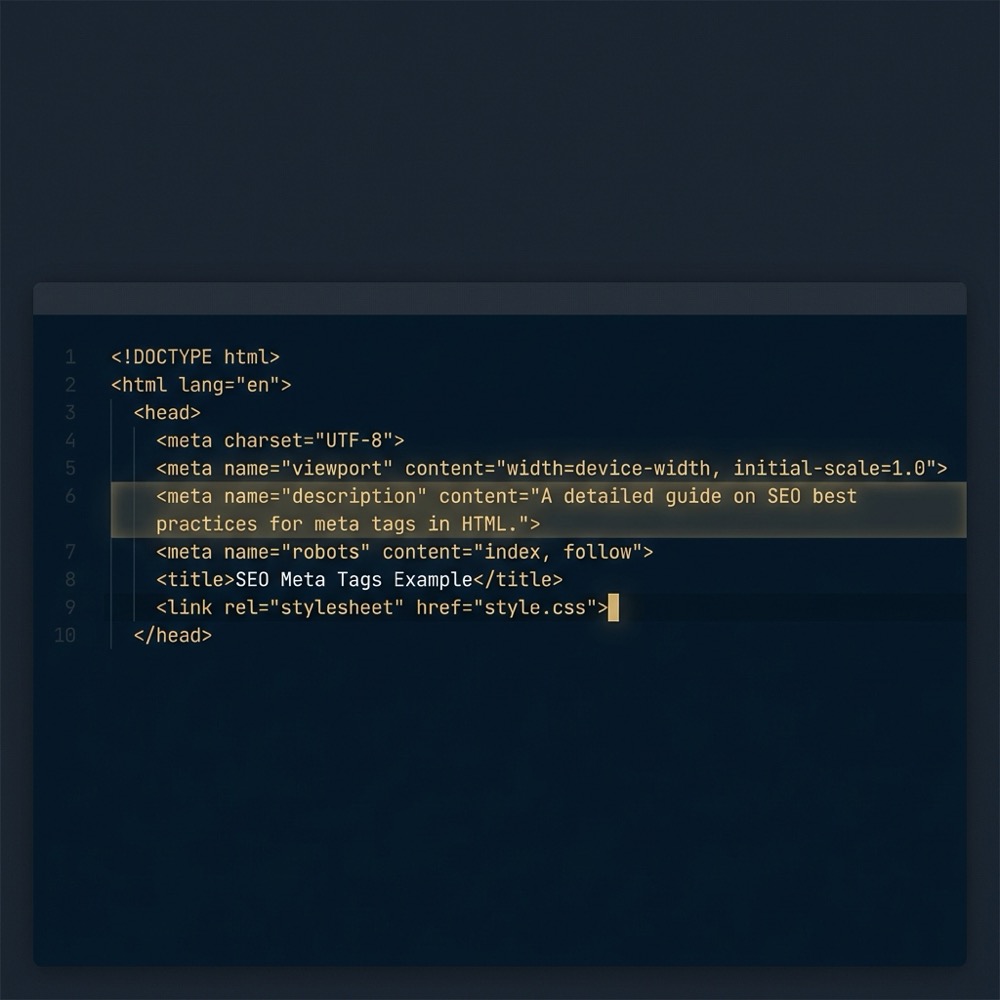
Charset declaration example to avoid encoding issues: <meta charset="utf-8">. Declare this near the top of the head so parsers know how to interpret byte sequences for predictable rendering MDN Web Docs.
Quick checklist for typical pages: include a single <title>, one meta description per page, a robots instruction only when you need to restrict indexing, a viewport for responsive pages, and a charset declaration at the top. Keeping this checklist in content templates reduces variation across a site.
Schedule a short metatag audit and template review
Consider running a short metatag audit across a representative set of pages to confirm presence and placement before automating template changes.
How to write titles and meta descriptions that support search snippets
Title best practices and common constraints
Set the page title in the <title> element and aim for clear, descriptive text that reflects page intent. Google Search Central recommends titles that are unique and informative; these guidelines help pages link users to the right content Google Search Central.
Length guidance can change and engines may truncate text visually, so focus on the most important terms first. Keep titles readable and avoid stuffing keywords. Clear titles tend to perform better in click-through because they set accurate expectations for users.
Writing description copy that encourages clicks without overpromising
Write meta description text to summarize the page for a human reader. Because descriptions are not a direct ranking signal, the practical goal is to improve relevance and click-through by aligning with user intent and page content MDN Web Docs. See Google Search Central for guidance on how snippets are generated.
Expect that search engines may replace or rewrite provided snippets when they deem other page text more relevant to a query. Because of that, descriptions should be concise, factual, and complementary to on-page headings rather than making claims that depend on search placement. See reported examples of changed snippets here.
Controlling indexing: meta robots, X-Robots-Tag, and practical rules
Differences between meta robots and X-Robots-Tag header
The <meta name="robots"> tag is an in-document instruction for user-agent behavior, while the X-Robots-Tag is an HTTP header that can express the same directives at the server level. Both mechanisms are supported; choosing between them depends on deployment needs such as static pages, server control, or resources delivered via non-HTML formats Google Search Central.
Meta tags are HTML elements placed inside the head, such as the title element and meta tags for description, robots, viewport, and charset; they should be placed early and in consistent order so browsers and crawlers can parse them predictably.
Use meta robots for per-page in-head control and X-Robots-Tag headers when you need to control non-HTML responses or apply rules from server configuration. For example, files served directly from a CDN or binary assets can be controlled only with headers, not document meta tags Google Search Central.
Common values include noindex to prevent a page from appearing in search results, and nofollow to suggest that links on the page should not be followed. Prefer explicit, minimal directives and avoid conflicting signals across headers and in-document tags.
Viewport and charset: mobile layout and encoding best practices
Why viewport matters for responsive design
Include the viewport meta tag early in the head to ensure mobile browsers compute layout correctly. A common, recommended value is width=device-width, initial-scale=1 to match the viewport to device width and set initial zoom behavior, which supports responsive CSS rules MDN Web Docs.
Missing or late viewport declarations can cause visual jumps during load on mobile devices, so place this tag close to the top of the head to reduce layout instability and improve perceived performance.
Why charset belongs early in the head
Declare the character encoding early in the head using <meta charset="utf-8"> so the browser interprets the document correctly from the first bytes it reads. This prevents garbled characters and ensures scripts and styles using text are parsed consistently MDN Web Docs.
Positioning the charset declaration within the first 1024 bytes of the document is a common practical rule because many browsers determine encoding early. If you rely on server headers to set encoding, ensure they align with in-document declarations to avoid conflicts.
Placement, order and performance considerations for metatags
Where in the head to put critical tags
Place <meta charset="utf-8"> as the first element in the head to avoid encoding detection issues. Next, include viewport for responsive layout, then title and descriptive tags. This order helps browsers and tools parse the most important signals first WHATWG HTML Living Standard.
Consistent ordering also helps automated scans, CI tests, and content templates behave reliably.

Impact on performance and when order matters
Metatags themselves are small, but placing critical tags early can marginally reduce layout shifts and parsing ambiguity. For performance-sensitive pages, place tags that affect rendering above heavy resources so the browser can decide layout behavior before downloading large CSS or scripts WHATWG HTML Living Standard.
Order matters most for charset and viewport. Title and description are important for tools and search snippets, so keep them present and consistent across templates to avoid unexpected changes in automated reports and interfaces.
Common mistakes, debugging steps, and troubleshooting metatags
Frequent errors that break snippets or indexing
Typical mistakes include missing charset declarations, placing viewport too late, malformed meta syntax, duplicate or conflicting robots signals between headers and in-document tags, and empty or misleading descriptions. These issues can cause rendering issues, snipped text that does not match intent, or accidental indexing of private pages MDN Web Docs.
A related error is relying on a meta tag to guarantee a specific search result. Since engines may rewrite snippets or ignore supplied text in certain contexts, write descriptions and titles to reflect page content and intent rather than assuming outcome.
Tools and processes for auditing metatags
Debugging flow to confirm metatag behavior: 1) view the page source to check in-head syntax; 2) inspect server response headers to verify X-Robots-Tag and charset headers; 3) crawl a sample set of pages and review Search Console or crawler logs for indexing signals and issues. These steps help isolate whether a problem is client-side, server-side, or caused by content rewriting Google Search Central.
Automate checks where possible. Add CI tests that validate head structure and compare templates against a standard checklist so regressions are caught before deployment.
Below are practical examples you can adapt. They are short and written to be editable in templates. Keep the text factual and aligned with page content so engines are less likely to rewrite snippets.
Examples and copy-ready metatag snippets for common page types
Homepage, product page, article, and indexable list pages
Homepage example: <title>Brand name - concise positioning</title> and <meta name="description" content="Brief summary of what the brand or site offers, aimed at searchers.">. Use a robots tag only if you need to prevent indexing of a staging or duplicate homepage Google Search Central. For a broader list, see Search Engine Journal.
Product page example: <title>Product name | Category</title> and <meta name="description" content="Short product summary, highlights, and a call to action aligned with page content.">. For canonical product pages, include indexable instructions; use X-Robots-Tag if assets are served from different backends MDN Web Docs.
Article page example: <title>Article title - Topic summary</title> and <meta name="description" content="A concise summary of the article that matches headings and subheadings.">. Articles often benefit from clear dates and author tags in structured data, but keep meta description focused on user intent so snippets are useful.
Quick page head validation checklist
Copy into CI or a browser bookmarklet
Indexable list pages and faceted pages often need more careful robots decisions. Use noindex for parameter pages or duplicates and control aggregation pages with consistent titles and descriptions so users and crawlers can understand the content intent Google Search Central.
Checklist and next steps for teams implementing metatags
A short audit checklist
Implementation checklist: confirm a single <title> per page, a meaningful meta description, an early charset declaration, viewport present for responsive sites, and no conflicting robots signals between headers and in-document tags. Keep this checklist in CI and content templates to reduce regressions MDN Web Docs.
Embed metatag tests into your deployment workflow: run automated checks after builds, sample pages for human review, and surface anomalies in reporting so teams can triage quickly. Small automated tests save time compared with ad hoc debugging when issues appear in search results.
How to embed work in workflows and measurement
Attach metatag checks to templates and editorial checklists so content creators see missing or empty fields before publishing. Add measurement to track when descriptions differ from displayed snippets and incorporate those findings into content guidelines.
For SEO-critical decisions, consult Google Search Central and browser documentation before making changes. Treat metatags as one part of a broader search architecture and measurement system rather than a single-point fix Google Search Central.
A meta tag is an HTML element in the head that provides metadata, such as the title, description, robots instructions, viewport settings, or character encoding.
No, the meta description is not a direct ranking signal, but search engines can use it to build search snippets, which may affect click-through rates.
Use X-Robots-Tag headers when you need server-level control or must apply directives to non-HTML assets; use meta robots for per-page in-head control.
For implementation work that needs systems design or measurement alignment, consider a compact diagnostic to map where head templates and server headers interact with your publishing flow.
References
- https://developer.mozilla.org/en-US/docs/Web/HTML/Element/meta
- https://html.spec.whatwg.org/multipage/semantics.html#the-meta-element
- https://developers.google.com/search/docs/appearance/title-link
- https://developer.mozilla.org/en-US/docs/Web/HTML/Element/meta#attr-charset
- https://developers.google.com/search/docs/crawling-indexing/special-tags
- our services
- https://developers.google.com/search/docs/appearance/snippet
- https://www.searchenginejournal.com/important-tags-seo/156440/
- about Orvus
- our knowledge base
Want this kind of work done for your business?
We build and run AI-powered marketing and automation. 15 minutes, honest assessment.
Book a call