 Orvus
OrvusIs Squarespace still good?
February 11, 2026
Quick answer: is Squarespace still a reasonable choice for SEO?
Short verdict: for many small sites Squarespace remains a reasonable, even convenient option for squarespace seo because it bundles hosting, templates and the standard on page controls most teams need to launch quickly, maintain metadata and generate sitemaps.
This packaging reduces setup work for teams that lack developer resources and want a predictable launch path, though trade offs exist around deep customization and scaling for complex commerce needs.
Squarespace continues to hold meaningful usage among hosted site builders, especially for creators and small businesses, which keeps it relevant for simple SEO workflows W3Techs usage statistics and see recent trends Squarespace SEO trends
Where teams run into limits is predictable: if you need plugin style extensibility, bespoke SEO plugins, or large catalogs with complex variants then a self hosted approach typically offers more flexibility and lower marginal costs as you scale PCMag review
For an initial site or a brochure site Squarespace can be a fast, supported route that covers core SEO needs without heavy engineering
Quick technical audit checklist for Squarespace sites
Use this checklist weekly during major content updates
What Squarespace is and how its SEO basics work
Hosted platform overview
Squarespace is an all in one hosted site builder that bundles hosting, templates and an editor so teams manage fewer moving parts and launch faster; this model is intentionally opinionated and designed for usability rather than extreme customization. See a recent evaluation Is Squarespace good for SEO?
The hosted approach means server maintenance, TLS and basic site performance settings are managed by the platform, which lowers operational overhead for small teams W3Techs usage statistics
Built-in SEO controls you get out of the box for squarespace seo
Out of the box Squarespace provides editable meta titles and descriptions, automatic sitemaps, clean URLs and canonical tag handling, which together cover most standard SEO tasks site owners perform during content launches and updates Squarespace Help Center
These controls can be managed in the site editor without custom plugins, and for many brochure and content sites they are sufficient to maintain metadata hygiene and basic crawlability.

What usually requires a workaround or an upgraded plan are advanced commerce features, deep API integrations and developer access points that some teams need as they scale PCMag review
For an initial site or a brochure site Squarespace can be a fast, supported route that covers core SEO needs without heavy engineering
Core Squarespace SEO controls and practical setup
On-page controls: titles, descriptions, headers
Where to start, practically: set clear meta titles and meta descriptions for every landing page, and check header structure on key templates to ensure H1s are unique and descriptive.
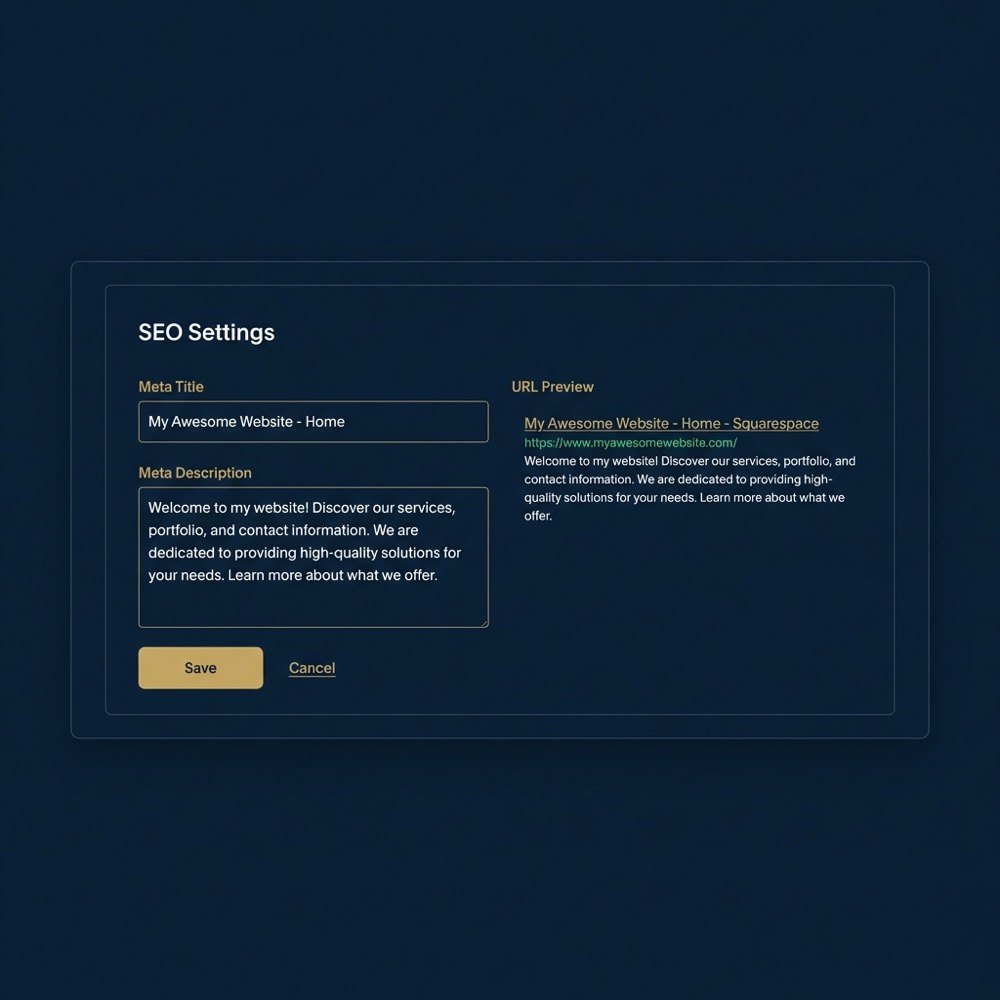
In the Squarespace editor you can edit page titles and descriptions in the page settings; do this before publishing to prevent poor defaults and make indexable copy intentional Squarespace Help Center
Use concise, intent focused language in titles and make sure internal headings reflect topic structure so content aligns with searcher intent rather than repeating the same phrase across pages.
Sitemaps, canonical URLs and redirects
Squarespace generates a sitemap automatically and includes canonical tags to reduce duplicate content risk, but you should still audit canonicals after structural changes and set redirects when URLs change Squarespace Help Center
When you rename or move pages, add 301 redirects through the URL mapping or redirect tool to preserve link equity and avoid orphaned pages.
Run the quick Squarespace SEO checklist
Run the quick technical checklist in the next section to confirm your site has clean sitemaps, canonical rules and basic page level metadata set.
For bulk URL changes plan a short redirect map and test it in a staging copy where possible, or schedule work during low traffic periods to reduce risk.
Structured data and template constraints
Squarespace supports adding structured data in limited ways, and you can add JSON LD for supported content types where the editor allows custom code injections; however site wide structured implementations may be constrained by template rules and access level Search Engine Journal guide
Work within template constraints by focusing structured data on key pages like products and articles where it is most likely to provide incremental visibility benefits.
Performance, templates and page speed - what to watch for
How templates affect page weight
Template quality is a common strength of Squarespace, but some templates include heavier styling and scripts which increase page weight and can slow metrics unless you actively manage media and third party code Search Engine Journal guide
Choose a template that matches your content density and avoid feature packed templates if you prioritize lean pages and fast rendering.

Choose a template that matches your content density and avoid feature packed templates if you prioritize lean pages and fast rendering.
Images, lazy loading and script management
Large or unoptimized images are a frequent source of slow pages; compress images before upload and use the platform's image format options to reduce transfer size where possible HTTP Archive reports
Audit third party scripts and tag managers, and remove or defer any that do not directly support your conversion funnel, because extra scripts add to main thread work and can harm Core Web Vitals.
Ecommerce on Squarespace: pricing tiers, limits and SEO implications
Squarespace places some commerce features behind higher pricing tiers, which means growing stores may face higher platform costs to access advanced checkout options or developer features PCMag review

Practical evaluation points for a merchant include product count, variant complexity and checkout customization needs because each of these can push you toward a higher plan or toward a platform with a deeper commerce ecosystem.
When estimating costs, include transaction fees, plan fees and the potential cost of moving off platform later if your catalog or integrations exceed the plan limits.
Developer access, extensibility and third-party integrations
Developer mode and code injection
Squarespace provides code injection and a developer mode that enables custom templates and some integration points, but these are more constrained than the plugin ecosystems and hooking points available in open source CMS platforms PCMag review
For teams that need advanced plugins, bespoke SEO automation or deep API integrations, a self hosted CMS often provides richer extension patterns and a larger marketplace of tools.
Limits to plugin-style extensibility
Expect to use third party services via tag managers and scripts rather than installable plugins, and plan for extra work to maintain integrations during template or platform updates Semrush comparison
When deep server side control or many custom plugins are required, consider whether the productivity cost of adapting those workflows to Squarespace is acceptable long term.
A pragmatic SEO framework for Squarespace sites
Start with intent mapping: list priority keywords and map them to pages so each landing page has a clear target and role in the funnel. This keeps content architecture focused and reduces duplicate coverage. See resources useful knowledge.
Squarespace is often the right choice when teams need a managed, fast to launch site with core SEO controls and limited developer resources. If you require deep extensibility, large catalogs, or custom server side integrations then a self hosted approach may be more appropriate.
Use measurement to validate that those pages attract organic traffic and convert, and iterate on the highest value pages first using small experiments and content tests Squarespace Help Center
An operational checklist helps maintain momentum: weekly metadata spot checks, monthly performance audits and quarterly content pruning based on intent and traffic signals.
Decision criteria: when to pick Squarespace and when to consider alternatives
Pick Squarespace when your constraints favor speed, predictable hosting and a small or medium catalog, and when developer resources are limited or you prefer a managed environment W3Techs usage statistics
Consider alternatives if you need custom plugins, server side SEO automation, large product catalogs, or advanced attribution setups that require deep analytics integration.
Create a simple decision checklist: team skills, feature needs, budget for higher plans and migration cost. If two or more technical signals point toward extensibility needs, plan for evaluation of self hosted options.
Common Squarespace SEO mistakes and how to avoid them
Duplicate content and canonical issues
Common mistakes include not reviewing canonicals after restructuring content and failing to add necessary redirects when URLs change, both of which can create duplicate content and dilute indexing signals Squarespace Help Center
Quick fixes are to run a URL mapping audit, set canonical tags where appropriate and implement 301 redirects for moved pages.
Overlooking media and template performance
Another frequent problem is uploading uncompressed images or using feature heavy templates without optimizing assets, which increases page weight and can hurt load metrics Search Engine Journal guide
Mitigations include compressing images before upload, using platform lazy loading where available and minimizing unnecessary third party scripts.
Migration and scaling: signals, planning and SEO checks
Signs you should migrate off Squarespace
Signals that justify migration include hitting plan limits that block essential features, escalating platform costs for commerce at scale, or integrations that cannot be implemented within Squarespace constraints PCMag review See migration tests LitExtension.
If migration looks likely, collect constraints and a prioritized features list so the next platform selection is driven by specific needs rather than assumptions.
SEO tasks to include in a migration plan
Essential migration SEO tasks are URL mapping and 301 redirects, sitemap updates, monitoring index coverage, and testing Core Web Vitals on the destination platform to confirm performance expectations HTTP Archive reports
Run staged migrations where possible and monitor organic traffic closely after the switch to catch and remediate unexpected drops quickly.
Practical examples: site types and recommended approaches
Blog, portfolio or brochure site
For a content focused site use intent driven content architecture, keep metadata tidy and run weekly checks on new posts to ensure proper titles and descriptions are set Squarespace Help Center
Performance checks should focus on image optimization and template choice, because these often produce the biggest gains on simple sites.
Small ecommerce store
For a small store prioritize clean product metadata, structured product descriptions and a sitemap that includes product pages, and confirm plan features match your variant and checkout requirements Search Engine Journal guide
If your product count is modest and integrations are limited, Squarespace is often a lower friction option for getting a store live and maintaining product level SEO.
A compact Squarespace SEO checklist you can run today
Technical quick audit
Check that the sitemap exists and updates after content changes, verify canonical tags on key pages and run a redirect audit for any removed or moved pages Squarespace Help Center
Spot check mobile performance and run a sampling of product and landing pages through a page speed tool to find obvious image or script issues.
Content and measurement checks
Audit meta titles and descriptions for the top 20 landing pages, confirm header structure and map pages to priority intent buckets to avoid duplication.
Confirm analytics is configured and that landing page conversions are tracked so you can attribute organic traffic to outcomes and prioritize experiments W3Techs usage statistics
How to measure success: reporting, attribution and next experiments
Track organic traffic trends for priority landing pages and measure conversions from those pages to tie search activity to business outcomes; keep naming and reporting consistent so trends are interpretable W3Techs usage statistics
Run small experiments: adjust a product page title or a hero image and measure impact on clicks and conversion over a defined timeframe, then iterate based on the signal.
Conclusion: practical next steps and when to call a systems builder
Recap: Squarespace covers standard SEO basics and is a reasonable choice for many small content sites and modest stores, but it trades deep extensibility and plugin style flexibility for simplicity and ease of use Squarespace Help Center (see Orvus services)
If you need help diagnosing platform constraints, prioritizing migration signals, or building measurement and automation to reduce operational friction, a strategic growth partner can provide a diagnostic and a roadmap based on your constraints and data. Or contact Orvus Ltd..
Yes. Squarespace provides core SEO controls like editable meta titles, sitemaps and canonical tags that cover most needs for small business brochure sites and simple blogs.
Consider migration when plan limits block essential features, when you need custom plugins or deep integrations, or when commerce scaling makes platform costs and constraints restrictive.
It can. Choosing a lighter template and optimizing images and scripts typically improves load times, but measure Core Web Vitals before and after to confirm impact.
References
- https://w3techs.com/technologies/details/cm-squarespace
- https://www.pcmag.com/reviews/squarespace
- https://support.squarespace.com/hc/en-us/articles/205812378-Search-engine-optimization-SEO
- https://httparchive.org/reports
- https://www.semrush.com/blog/squarespace-vs-wordpress/
- our services
- https://www.squarespace.com/blog/seo-trends
- https://www.outfy.com/blog/is-squarespace-good-for-seo/
- https://litextension.com/blog/is-squarespace-good-for-seo/
- orvus.net
- our knowledge base
Want this kind of work done for your business?
We build and run AI-powered marketing and automation. 15 minutes, honest assessment.
Book a call