 Orvus
OrvusHow to use Google Analytics SEO? A GA4 and Search Console playbook
February 10, 2026
The guidance assumes you already have a GA4 property and access to Search Console. It outlines what each tool contributes and how to link them, then walks through common gaps and governance practices so measurement stays reliable over time.
What is seo google analytics and why it matters
seo google analytics describes the combined use of Google Analytics 4 and Search Console to understand organic search performance and tie search signals to on-site engagement. In practice, Search Console provides query and impression data while GA4 gives engagement and conversion context, and teams use both to prioritise pages and queries for optimisation. For details on how Search Console surfaces queries and impressions see the Google Search Central SEO Starter Guide, which explains the data each product exposes Google Search Central SEO Starter Guide
The core value of this approach is clarity on intent and outcomes. Queries and impressions show what users are searching for and how often pages appear, while GA4 shows what those users do after they land and whether they convert. Google also documents how to link Search Console and a GA4 property, which is an important step when you want combined views that surface query-level signals alongside engagement metrics Link Search Console to a Google Analytics 4 property
Request a measurement review and consultation
Want a quick assessment of your GA4 and Search Console link and event setup? A short measurement review can show obvious gaps and next steps for prioritisation.
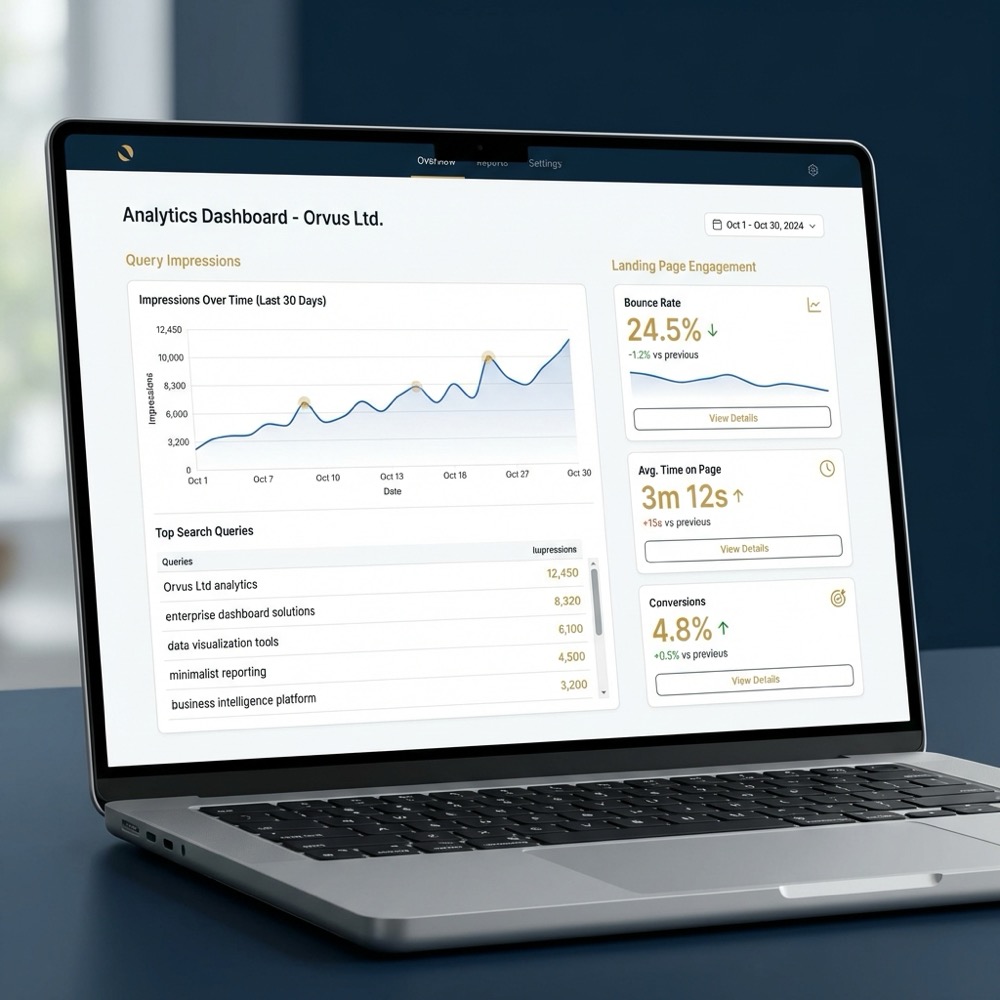
At a technical level, GA4 uses an event-based model, which changes how sessions and conversions are counted compared with earlier Universal Analytics. Because GA4 records page_view and custom conversion events, setting those events correctly is a prerequisite for reliable organic-channel analysis Get started with Google Analytics 4 properties
For operators and marketing teams, seo google analytics is not a single report. It is a small system: data collection accuracy, consistent naming, linked properties, and dashboards or exports that join query signals to landing-page performance. Getting those elements aligned makes it easier to prioritise work that supports revenue-related goals.
Core concepts to know
Start with two clear buckets: query and impression data from Search Console, and behaviour and conversion metrics from GA4. Treat Search Console as the source for what users search and GA4 as the source for what users do after they arrive. This division helps teams avoid misinterpreting query volumes as direct conversion signals.
When you explain seo google analytics internally, highlight three concepts: events, landing-page context, and attribution rules. Events are the atomic pieces of measurement in GA4. Landing pages connect query-level interest to page-level engagement. Attribution rules determine which session or channel gets credit for a conversion.

Which data lives in GA4 vs Search Console
Search Console provides queries, impressions, CTR, and click counts tied to search results, while GA4 captures page_view events, engagement metrics, and conversion events on the site. Because GA4 does not expose raw search queries due to product design and privacy constraints, Search Console remains the primary place to find query-level signals Google Search Central SEO Starter Guide
Linking the two lets you combine signals: use Search Console to surface queries and impressions, and use GA4 to show which landing pages for those queries have strong or weak engagement. That joined view is the practical heart of seo google analytics.
How GA4's event model changes seo google analytics measurement
GA4 measures user interactions as events rather than relying on the session-centric model in Universal Analytics. That change affects how you interpret traffic, engagement, and conversion numbers and means technical setup matters more than before.
Minimum configurations for organic analysis typically include page_view events, a set of conversion events (form submissions, purchases, lead completions), and consistent measurement across subdomains or cross-domain flows. Without those basics, organic-channel reporting can mislead decisions because conversions or pageviews may be missing or misattributed Get started with Google Analytics 4 properties
page_view and conversion events
At minimum, confirm that the page_view event fires on every page, and that conversion events reflect meaningful actions. For ecommerce that means purchase events; for services it often means booked consultations or lead form submits. Define conversions in GA4 using the same event names your tagging layer emits, and document them so ownership and interpretation are clear.
Treat conversion configuration as a maintenance item. When a form or checkout changes, the corresponding event or conversion definition often needs an update. Keeping an events inventory reduces false negatives when you compare Search Console impressions to GA4 conversions and engagement.
UTM consistency and channel attribution
UTM naming conventions and correct channel grouping are prerequisites for reliable channel reports. Inconsistent UTM values or unexpected campaign tags can push organic sessions into other channels, obscuring real organic performance. Agree on a naming standard and validate new campaign tags before major launches.
Consider automating a naming checklist in your release process, and run quick checks after launches to catch accidental UTM overrides. Those small controls often prevent bigger attribution errors when teams later join Search Console query data to GA4 landing-page metrics How to use GA4 for SEO: setup, segments and dashboards. Also see the GA4 Search Console Integration Guide for additional implementation notes GA4 Search Console Integration Guide
Linking Search Console and GA4: essential setup steps for seo google analytics
Linking Search Console and GA4 is a permissioned process that requires matched properties and admin rights or Search Console ownership. The link allows Search Console query impressions to be visible alongside GA4 page metrics for matching landing pages, which helps prioritise query-level work using engagement context. For steps, see the Connect Search Console to Google Analytics guide Connect Search Console to Google Analytics
Checklist to link properties
1. Confirm you have admin access in the GA4 property and ownership or verified access in Search Console for the same domain.
2. In GA4, go to Admin, Account Settings, and choose the Search Console linking option, then select the appropriate Search Console property and the GA4 data stream to connect.
3. Verify the domain or URL prefix in Search Console matches the domain captured by your GA4 data stream, including protocol and subdomain handling, to avoid mismatches.
4. After linking, allow time for Search Console data to populate GA4 reports at the landing-page level; check that landing pages line up and adjust property selection if needed Link Search Console to a Google Analytics 4 property
Link the verified Search Console property to the correct GA4 property, ensure page_view and conversion events are reliably tracked, then join query-level impressions to GA4 landing-page metrics in a dashboard or BigQuery export so you can prioritise pages and queries by both intent and outcome.
Common mistakes when the link does not appear include mismatched domain prefixes, missing Search Console verification, or insufficient permissions. When the link seems missing, recheck verification and the selected property mapping before deeper debugging.
Building SEO-focused segments and dashboards
Segments and cohorts let you filter GA4 to organic-only sessions or to groups of landing pages that match patterns. These views help teams find pages with high impressions but low engagement, or pages that attract buyers but have low impressions. Building these segments is core to seo google analytics workflows. For techniques to visualise and join the data, see the Using Search Console and Google Analytics Data guide Using Search Console and Google Analytics Data for SEO
Start with an organic-only session segment that uses GA4 channel grouping equals Organic Search. Then create landing-page cohorts based on URL path patterns or content type so you can compare behaviour across similar groups. These cohorts make it easier to spot outliers and test content or technical fixes GA4 and Search Console: how to combine data for SEO
Organic-only session segments
Create a segment in GA4 where session default channel grouping equals Organic Search and optionally add landing page filters. Use that segment in exploration reports to surface engagement metrics such as average engagement time, bounce-equivalent metrics, and conversions per session for organic users.
When you pair those segments with Search Console query lists for the same landing pages, you can prioritise queries that drive impressions but do not lead to engaged sessions or conversions.
Landing-page cohorts and engagement comparisons
Define cohorts by URL structure or template, for example product pages, blog posts, or service landing pages. Compare engagement metrics across cohorts to find templates that underperform relative to peers. Surface metrics such as engagement rate, conversions per 1000 sessions, and average engagement time to prioritise optimisations.
For dashboards, present query impressions from Search Console alongside GA4 landing-page engagement and conversion metrics. You can build this in a BI tool, a dashboard connector, or by exporting both sources to BigQuery and joining on landing page paths How to use GA4 for SEO: setup, segments and dashboards
Dashboards vs BigQuery exports
Dashboards are quick to assemble and useful for daily prioritisation. BigQuery exports are better when you need precise joins, richer attribution windows, or to store longer histories for cohort analysis. Use dashboards for operational triage and BigQuery when you need repeatable joins between Search Console queries and GA4 event streams GA4 and Search Console: how to combine data for SEO
Recommended engagement and conversion metrics to surface include impressions, clicks from Search Console, landing-page sessions, engagement rate, conversions per session, and conversion rate for organic cohorts.
Key measurement gaps in seo google analytics and how to diagnose them
Teams often see differences between Search Console clicks and GA4 sessions, and those gaps are expected given data models and attribution rules. Recognise the gap, then run simple diagnostics to identify likely causes before adjusting prioritisation or reporting logic Link Search Console to a Google Analytics 4 property
Diagnostic checklist to run quickly
1. Compare Search Console clicks to GA4 landing-page sessions for a matched date range and identify the largest discrepancies by URL.
2. Check for cross-domain or subdomain flows that might move sessions out of the property you are inspecting.
3. Validate canonical and redirect handling so landing pages in Search Console match the pages recorded in GA4.

4. Review UTM and campaign tagging that could attribute traffic away from Organic Search. 5. Inspect sampling or thresholding if pages have very low volumes, since small counts can lead to apparent mismatches.
These steps often surface the root cause. For example, cross-domain redirects or unverified subdomains commonly explain why clicks do not translate into sessions recorded in GA4, and canonical misconfigurations can split counts across variants. Learn more on our homepage Orvus
Click-to-session variance and reconciliation
Expect variance between clicks and sessions because a click in Search Console is an interaction with search results, while a GA4 session requires page load and event processing. For reconciliation, match by landing page and check for redirects or missing page_view events that stop GA4 from recording the arrival.
Keep a tolerance guide for your team that distinguishes noise from real problems. Use percentage thresholds informed by historical comparisons rather than absolute numbers, and escalate only when variance exceeds those tolerances consistently over multiple days.
Cross-domain, canonical and redirect impacts
Cross-domain setups and redirect chains commonly cause landing-page mismatches. If a search result directs to a URL that immediately redirects, GA4 may record the final URL while Search Console attributes the click to the URL shown in results. Verify canonical tags and redirect behavior to ensure landing pages align across both products Get started with Google Analytics 4 properties
Run quick tests: use a sample query, click the result, and confirm which URL loads and which page_view events are recorded. That simple manual check often explains large discrepancies before deeper instrument audits.
Decision criteria: what to measure and when to act
A short decision framework helps teams prioritise pages and queries. Use impression volume from Search Console, engagement and conversions from GA4, and simple rules to trigger actions. This keeps work focused on pages that matter to business outcomes.
Prioritisation rules to use
- High impressions with low engagement: investigate content relevance, on-page experience, and matching intent.
- High impressions and falling conversions: check landing-page funnels and conversion events in GA4.
- Low impressions but high conversion rate: consider boosting discovery through internal linking and structured data.
When setting tolerances for click-to-session variance, start with a pragmatic band informed by historical data and increase scrutiny for pages with business impact. Escalate to a diagnostic when variance persists beyond the tolerance window or affects key conversion pages How to use Google Analytics for SEO (practical guide)
Use SEO-focused segments and dashboards as triggers. For example, a dashboard can flag landing pages with impressions above a threshold but engagement below a threshold, prompting a focused content or technical review.
Common mistakes and a troubleshooting checklist for seo google analytics
Internal diagnostic runbook for SEO measurement
Run this checklist after major releases
Before running the checklist below, ensure the internal dashboard or utility that checks event firing is operational. The Tool above is a compact spec you can use to automate those checks on a nightly or weekly cadence.
Troubleshooting checklist
1. Verify page_view event fires on each page and that event timestamps align with expected traffic patterns.
2. Confirm conversion events are defined in GA4 and map to the actual events your tagging layer sends.
3. Audit UTM values for recent campaigns to ensure none accidentally override organic attribution.
4. Check property settings and permissions to make sure the correct GA4 property is linked to the verified Search Console property.
5. Inspect query and landing-page matches to avoid misreading Search Console data as site behaviour without confirming landing-page metrics in GA4.
These steps are short and targeted. Running them regularly reduces time spent chasing false alarms and keeps the focus on meaningful discrepancies rather than transient noise.
Practical examples and scenarios using seo google analytics
Scenario: low-volume page catalog. For sites with many niche pages, impressions may be small and GA4 sampling or thresholds can hide true behaviour. Combine Search Console queries with GA4 landing-page cohorts to identify pages with surprisingly high impressions but low engagement, then group similar pages for template or content fixes GA4 and Search Console: how to combine data for SEO
Steps for the low-volume catalog scenario
1. Export Search Console queries for the target subset of URLs and sort by impressions.
2. In GA4, build a landing-page cohort for the same URL patterns and measure engagement rate and conversions per session.
3. Prioritise pages with impressions but low engagement, and create a sprint plan to update templates or add clearer intent signalling.
Scenario: ecommerce product pages. Use Search Console to surface buyer-intent queries, then check GA4 landing-page behaviour and purchase conversion events for those product pages. Prioritise products with high impressions and low purchase conversions for on-page experiments or checkout checks How to use GA4 for SEO: setup, segments and dashboards
Scenario: service pages and leads. For lead-focused sites, define a reliable lead conversion event in GA4 and match it to search queries that include service or location qualifiers. Use organic-only segments to test whether leads from organic traffic behave differently than other channels, and tune content and forms accordingly.
Each scenario above uses the same pattern: surface queries in Search Console, match to landing pages, then use GA4 segments and conversion metrics to decide what to fix and in which order.
Next steps and governance for ongoing seo google analytics measurement
Routine cadence and governance keep seo google analytics stable over time. Adopt a regular audit rhythm, own event and naming documentation, and define when to escalate anomalies to a diagnostic process. These controls make measurement repeatable and reduce operational surprises. For background on the organisation and team roles see our About page About
Recommended cadence and ownership
- Weekly: dashboard sanity checks and critical page monitoring.
- Monthly: events inventory review and UTM audit.
- Quarterly: full link and property verification and a review of cohort definitions and thresholds.
Document event names, conversion definitions, and ownership in a lightweight internal playbook. Clear ownership means when a measurement change happens, the team knows who updates the event definition and who verifies the dashboard outcomes Get started with Google Analytics 4 properties. Additional resources are available in our useful knowledge hub Useful knowledge
Escalate to a diagnostic when multiple pages or a conversion funnel show persistent variance beyond agreed tolerances, or when a major site change may have affected event firing or landing-page stability.
Yes. Search Console provides query and impression signals while GA4 provides engagement and conversion context, so using both gives a fuller view of organic performance.
At minimum track page_view events and conversion events that reflect meaningful actions such as purchases or lead submissions, and document their names and owners.
Clicks and sessions differ because they are measured differently; clicks are interactions with search results while GA4 requires a recorded page_view event and event processing, so variance is expected and should be diagnosed using landing-page checks.
Over time, a consistent events inventory, clear ownership, and simple dashboards will reduce noisy troubleshooting and let teams focus on optimisations that matter.
References
Want this kind of work done for your business?
We build and run AI-powered marketing and automation. 15 minutes, honest assessment.
Book a call