 Orvus
OrvusIs keyword Surfer a reliable tool?
February 13, 2026
The goal is practical: show when the tool speeds work and where it falls short, so operators and marketing teams can include it in measurement-driven workflows with the right safeguards.
What keywordsurfer is and how it works
keywordsurfer is a free Chrome extension that surfaces estimated monthly search volume, CPC, and related keywords directly in Google search results, giving immediate context for quick checks and ideation. The extension is distributed by SurferSEO and its product page describes the core features and on-SERP presentation of numbers and suggestions SurferSEO product page. Surfer's blog also publishes related studies Surfer's blog.
The estimates you see in the SERP are not raw Google query logs. According to Surfer’s documentation, the extension reports scaled estimates drawn from Surfer’s internal index and the company updates the extension and its datasets periodically, which affects how fresh specific numbers are over time SurferSEO product page.
On the SERP you will typically see a small panel next to results showing volume and a list of related terms. Those related-term suggestions are convenient seeds for topic maps, though they are best treated as starting points rather than exhaustive lists. For quick orientation, think of Keyword Surfer as a rapid, surface-level signal for ideation and brief checks rather than a definitive enterprise dataset.
Quick extension install and first-check routine
Run one sample search per topic
A simple usage tip: install the extension, run a few representative searches for your priority topics, and note whether the on-SERP volumes align with your expectations before you build lists from the output.
When Keyword Surfer is useful in everyday workflows
For many small teams and solo operators, Keyword Surfer speeds up early-stage work. Use it to expand a seed topic with semantic suggestions, collect quick CPC signals for ad briefs, and perform on-page checks during content reviews. The extension is useful when you need rapid topical breadth without the overhead of paid tools.
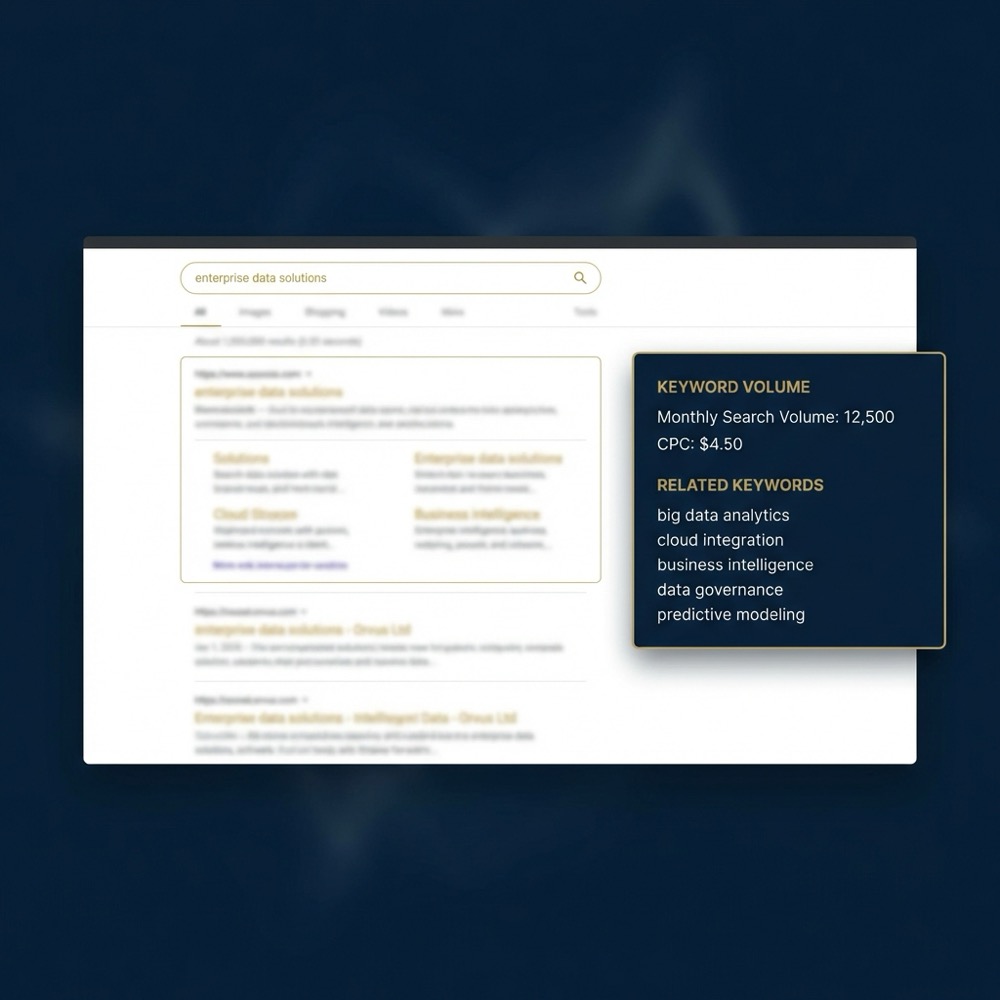
The related-term suggestions often surface common semantic variants that help shape content architecture and topic clusters. That makes the tool handy when drafting brief outlines or deciding which subtopics to cover within a pillar page. Practical teams use those suggestions to draft headings, internal linking ideas, and a prioritized seed list for testing.
Examples of low-effort tasks that benefit from the extension include creating a first-pass keyword list, checking CPC direction for short ad experiments, and validating whether a topic appears as an active search intent in the wild. For these quick tasks, Keyword Surfer offers a high-leverage signal that reduces friction in briefing and ideation workflows SurferSEO product page.
Keep in mind the suggestion lists are not as broad as enterprise datasets and they do not provide deep historical trend lines. When you need a full view of seasonality or long-term topic evolution, pair the extension with larger datasets or internal time-series data to avoid surprises later How free keyword extensions compare to paid datasets. See another hands-on comparison at this writeup this writeup.

How accurate is Keyword Surfer: tests and limitations
Independent comparisons from 2024 to 2025 report that Keyword Surfer shows moderate correlation with paid keyword providers on high-volume head terms but larger relative errors on low-volume and long-tail queries. These tests suggest the extension is reliable enough for quick checks on big, obvious queries but less dependable for precise counts on narrow phrases Search Engine Journal review and accuracy comparison.
Part of the accuracy gap stems from data provenance. Surfer reports scaled estimates based on an internal index rather than direct Google query logs, so the methodology is intentionally different from some paid providers and that opacity makes exact alignment harder to verify at scale SurferSEO product page.

Independent studies also highlight the tool’s limitations on low-volume queries and long-tail phrases, where relative error grows and small absolute differences can change prioritization in narrow funnels. When you need forecasting or strict budget allocation, those errors matter and require cross-checks before you commit to numbers Search volume estimate accuracy study.
Another constraint is limited historical trend depth. The extension focuses on current on-SERP signals, so it does not provide the same multi-year trend data or detailed seasonality that enterprise datasets include; teams that need that depth should plan to supplement the extension with broader sources and internal logs Limitations of on-SERP keyword tools.
How to validate Keyword Surfer for your team before baselining decisions
Validation is straightforward and can be run in a single day. Start by selecting a sample of 12 to 20 queries that represent head, mid, and long-tail intents for your domain. The aim is to measure variance, not prove absolute truth.

Step 1: Build the sample. Divide queries into three buckets: head (high intent, high volume), mid (moderate volume and competition), and long-tail (narrow, low volume). Make sure the sample covers your primary commercial and informational topics.
Step 2: Collect estimates from Keyword Surfer and one paid dataset you already trust. Record the extension’s on-SERP value, the paid dataset value, and any available internal truth such as Google Search Console impressions for the same queries when possible. Comparing side-by-side shows where the extension aligns and where it drifts Search Engine Journal review and accuracy comparison.
Step 3: Calculate relative error for each query and group results by bucket. For ideation and brief-level work, teams often accept larger error tolerances. For forecasting, require smaller error bands and prefer paid data or internal measurement if tolerances are exceeded.
Step 4: Decide acceptability rules. A simple framework is: use Keyword Surfer for ideation when average relative error is acceptable for list-building; require paid datasets when error materially affects budget or forecast decisions; rely on internal measurement for revenue attribution and channel mapping.
Finally, document the routine. Keep the sample and results in a shared sheet and re-run the check quarterly or when you notice unexpected changes in performance or apparent trend shifts. This sampling approach turns the extension into a measured signal rather than an untested authority Search volume estimate accuracy study.
Common mistakes teams make when using keywordsurfer
A frequent error is overtrusting raw on-SERP volumes for forecasting or budget allocation. Because the extension reports scaled estimates from an internal index, treating the numbers as absolute can produce misleading forecasts, especially on low-volume queries where relative errors are larger SurferSEO product page.
Teams also sometimes assume the related-term lists are exhaustive. The extension surfaces useful semantic suggestions, but it is not a replacement for deeper keyword discovery and historical trend research. That gap is especially relevant when building pillar content that must cover a full topical universe How free keyword extensions compare to paid datasets.
Keyword Surfer is a useful, high-leverage signal for ideation and quick checks, but it should not be the sole source for forecasting or revenue attribution; validate important queries with paid datasets or internal measurement.
Another common oversight is ignoring update cadence. If the extension’s underlying index updates intermittently, apparent jumps or drops in on-SERP numbers can reflect data refreshes rather than real search demand changes. Always confirm apparent trend changes against internal measurement or a stable paid source Limitations of on-SERP keyword tools.
Mitigations are simple: sample-check critical queries, avoid hard-coded forecasts from on-SERP numbers, and use the extension for rapid ideation while you lock forecasts to paid datasets or internal logs when precision matters.
Integrating Keyword Surfer into content architecture and briefs
Use the related-term suggestions as seeds for topic clusters and internal linking plans, but pair each suggested term with a verification column in your brief. The verification step is where you confirm volume direction, CPC relevance, and any intent signals with a paid dataset or Google Search Console.
A brief template can be minimal: term, intent category, Keyword Surfer volume, verified volume (paid or GSC), CPC note, priority, and notes. This approach keeps the extension’s output visible while preventing unchecked numbers from driving strategy. The extension works well as a high-leverage signal inside a broader measurement-driven brief process SurferSEO product page.
When planning pillar content, use Keyword Surfer to map common semantic variants and then expand that map with a paid dataset to capture less common queries and historical seasonality. That way you get quick breadth without losing the depth required for long-term content architecture How free keyword extensions compare to paid datasets.
Orvus often treats the extension as a lightweight input inside search architecture work, using it to reduce initial research friction while reserving paid datasets for channel-level planning and revenue attribution.
When you should switch to enterprise datasets and how to combine signals
Decision criteria for upgrading to paid datasets are pragmatic. Consider paid sources when you need strict forecasting, when revenue attribution is at stake, or when your error tolerance for low-volume queries is narrow. Enterprise datasets offer broader breadth and historical depth that on-SERP tools typically lack Search volume estimate accuracy study.
Combine signals using a simple weighting approach: treat Keyword Surfer as a lightweight prior for ideation, assign moderate weight to a trusted paid dataset for planning, and give highest weight to internal measurement for attribution. For example, you might use 20 percent weight for on-SERP signals, 50 percent for paid datasets, and 30 percent for internal logs when triaging topic priorities.
Schedule a short diagnostic or run the one-day validation routine
Run the one-day validation routine: sample 12 to 20 queries, compare on-SERP estimates with one paid dataset and your Search Console, and document average relative error to decide if the extension is fit for your workflows.
When combining datasets, avoid double counting by recording which source supplied each value and by normalizing units before averaging. For revenue mapping, fall back to internal conversion and funnel data rather than external volume estimates when possible Search Engine Journal review and accuracy comparison.
Prioritize data purchases based on decision impact. If forecasting and budget allocation are material decisions for your team, invest in a paid dataset first. If you only need quick ideation and briefs, continue using the extension with regular sampling checks.
Short workflows and scenarios for small teams
One-person workflow: 1) Install Keyword Surfer and run five representative searches for the domain's core topics. 2) Record on-SERP volumes and related terms. 3) Cross-check two high-priority queries in a paid tool or Google Search Console. 4) Create a brief with terms that pass the quick verification. This flow keeps time low while reducing guesswork SurferSEO product page. For a short list of free keyword research options, see this list this list.
Small-team brief workflow: the researcher collects Keyword Surfer suggestions and marks three validation candidates. A measurement owner cross-checks these against an agreed paid dataset or Google Search Console. The team agrees an error tolerance and either publishes the brief or escalates to a paid data purchase if tolerance is exceeded.
Small automations reduce repetitive work. For example, keep a shared sheet with a verification column and simple formulas that flag average relative error. Automate a quarterly reminder to re-run the sampling routine so the team does not treat the extension as a static truth.
Conclusion and a practical checklist
Summary checklist: use Keyword Surfer for rapid ideation and on-page checks; sample-check a representative set of queries before trusting numbers for forecasting; use paid datasets or Google Search Console when forecasting, budget allocation, or revenue attribution are involved; document validation routines and re-run them periodically SurferSEO product page.
Core limitations to remember are opaque data provenance, uncertain update cadence, limited historical trend depth, and weaker accuracy on low-volume queries. Treat the extension as a high-leverage signal inside measurement-driven systems rather than a source for precise forecasts Limitations of on-SERP keyword tools.
For teams building growth systems, Keyword Surfer can reduce friction and speed early-stage work when paired with sampling and internal metrics. If your decisions require tight tolerances, plan for paid data and rigorous attribution instead.
No. Use Keyword Surfer as a quick signal for ideation; for forecasting rely on paid datasets or internal measurement and sample-check critical queries first.
Keyword Surfer tends to have larger relative errors on low-volume and long-tail queries, so verify these queries against paid datasets or Google Search Console before acting.
Re-run a sampling routine at least quarterly or whenever you notice unexpected performance changes, and document results in a shared sheet.
Use the checklist here to make Keyword Surfer a useful part of your toolset while keeping critical decisions anchored to paid datasets or internal logs.
References
Want this kind of work done for your business?
We build and run AI-powered marketing and automation. 15 minutes, honest assessment.
Book a call