 Orvus
OrvusIs keyword Surfer free to use? Guide for teams
January 30, 2026
You will learn which metrics the free extension shows, how to install and test it safely, and how to decide if the free plan fits your workflows. The tone is pragmatic and operator focused, aimed at people who need clear criteria before adding a tool to their search architecture.
What Keyword Surfer is and who makes it
keywordsurfer is a Chrome extension that injects lightweight keyword metrics directly into Google search results so operators can run quick, on-the-fly checks while they browse. The extension is distributed and documented by Surfer, which maintains the product and publishes its official overview on its site Keyword Surfer - free Chrome extension.
The extension is intended as a compact research aid rather than a full desktop research platform. It displays short, actionable signals near search results to speed triage during content work and planning without leaving the browser Keyword Surfer - Chrome Web Store listing.
Quick provenance and install checks for a Chrome extension
Run before broad team rollout
Because Surfer operates a paid desktop platform alongside the free extension, some capabilities connect the two experiences. That means the browser extension is a distinct distribution channel but is related to Surfer's broader product family Surfer - Pricing & Plans.
A short product definition
The core idea is simple: surface estimated search volume, related terms, and CPC signals in the SERP so a user can make a faster judgement about a keyword's potential without switching tools. The values are presented as estimates to guide exploration rather than as definitive reporting numbers Keyword Surfer - free Chrome extension.

Who distributes and maintains the extension
Surfer is the publisher and maintainer of the extension on the Chrome Web Store; installing from the official listing ensures you get the supported version and update stream linked to Surfer's documentation Keyword Surfer - Chrome Web Store listing.
Is Keyword Surfer free to use - quick answer
Short answer: the core Keyword Surfer Chrome extension is free to install and use in Google Search for its inline metrics, so individuals can test the basic features without an upfront payment Keyword Surfer - free Chrome extension.
What free means in practice depends on the workflow. The extension provides on-page metrics without requiring payment, but several convenience and scale features are tied to Surfer accounts or paid plans, so teams should check Surfer's pricing and help pages for the current boundaries before committing to a broader rollout Surfer - Pricing & Plans.
What the free Chrome extension shows in Google Search
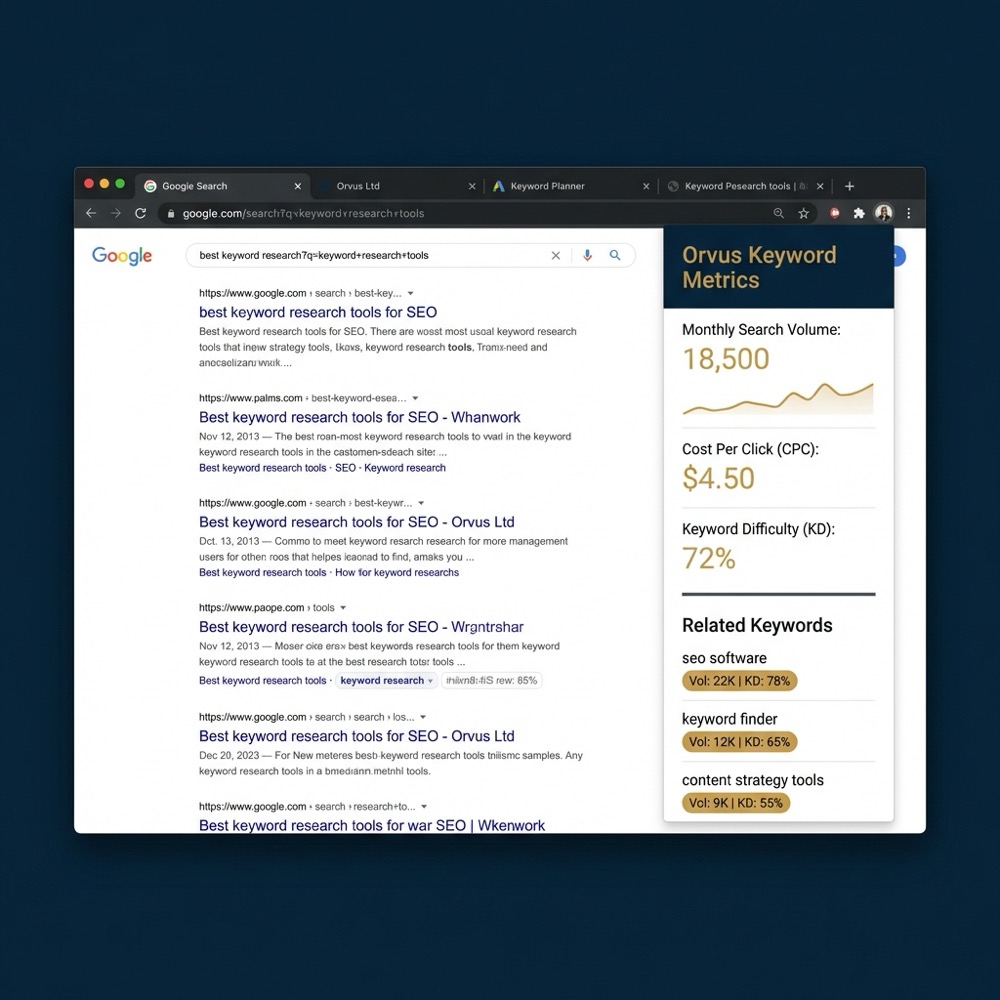
The free extension surfaces three core signals inline: estimated search volume for the term, a set of related keywords or terms for quick expansion, and an estimated cost-per-click figure where available. These appear near results or in a plugin panel depending on the Surfer UI version Keyword Surfer - free Chrome extension.
These numbers are presented as estimates to support exploration. Use them to prioritize ideas and create shortlists, not as final reporting metrics for budgets or attribution.
The core Keyword Surfer Chrome extension is free to install and use for inline keyword metrics, but certain features and integrations require a Surfer account or paid plan.
The interface is deliberately light. Values commonly appear next to each result and may also be available in a sidebar or pop-out panel, which lets you scan several queries quickly while keeping context in the SERP Keyword Surfer - Chrome Web Store listing.
Features that need a Surfer account or paid plan
For teams, other scale-oriented features such as batch exports, API access, and larger query volumes are generally offered on paid tiers rather than through the free extension. Confirm current limits and exact feature sets on Surfer's help and pricing pages before planning work that depends on exports or high-volume queries Surfer - Pricing & Plans.
How to test and install Keyword Surfer safely
Start by opening the Chrome Web Store and locating the official Keyword Surfer listing, confirming Surfer is the publisher. Installing from the official listing reduces the risk of spoofed or unsupported extensions Keyword Surfer - Chrome Web Store listing.
When you install, review the requested permissions. The extension needs permissions to read the pages you visit to overlay metrics in Google Search; make sure those permissions align with your security and policy expectations before enabling it for multiple users in a team environment.
Evaluate keyword tooling with a short consultation
Install the extension from the Chrome Web Store, run two representative queries for your business, and confirm that estimated search volume and related keyword panels appear without signing in.
After install, try a short checklist: run three queries you already track, note whether the extension returns volume and CPC, and verify the UI placement in the SERP. If those checks meet your immediate needs, test with a colleague to confirm consistent visibility in your environment.
Limits and rate or export constraints to check
Common constraints to verify include rate limits on queries, limits on exports or downloads, and caps on saved lists or projects. These operational limits affect whether the free extension fits a team's ongoing workflow or is only useful for ad-hoc checks Using Keyword Surfer: quick guide and limits.
Independent reviews and tool comparisons have repeatedly noted that Keyword Surfer is strong for quick, free checks but that larger scale research and team workflows often require paid products or additional tooling Keyword Surfer review: free Chrome extension for keyword research. Watch a video walkthrough here.
Because limits and enterprise integrations change over time, document the export and rate requirements your team expects and verify them on Surfer's pricing and help pages before you build processes that depend on sustained or automated data pulls Surfer - Pricing & Plans.
When the free plan is enough for a team
The free extension often suffices for single-operator workflows, quick keyword triage during content planning, and lightweight exploratory research where you do not need saved projects or batch exports Keyword Surfer - free Chrome extension.

Decision questions to confirm fit include: how many queries you will run per day, whether you need exportable data, whether multiple users need shared project access, and whether you require integration with content audits or reporting pipelines.
For a short trial, install the extension, run a set of representative queries, and log the results into a shared tracker to see if the free signals are actionable for your content architecture and planning needs.
When teams should consider Surfer paid plans or integrations
Signals that typically push teams to paid tiers include the need for batch exports, integration with Surfer's desktop content audits, API access, higher query volumes, and multi-user project management features Surfer - Pricing & Plans.
Paid features often enable smoother reporting, easier team collaboration, and automated audit workflows. Treat an upgrade as a trade off between convenience and ongoing cost, and verify the precise feature set and limits on Surfer's official pages before purchasing.
Common mistakes and practical pitfalls to avoid
A frequent mistake is treating inline estimates as definitive numbers for reporting or budget decisions. The extension is a fast signal, not a replacement for validated analytics or attribution data, so avoid using it as a single source for financial or media planning decisions Keyword Surfer review: free Chrome extension for keyword research.
Another pitfall is scaling processes without checking rate and export limits. Teams that assume parity with paid research platforms can end up with gaps in reporting or blocked workflows when limits are reached Using Keyword Surfer: quick guide and limits.
When accuracy matters, validate a sample of important queries against additional data sources and use the extension primarily for triage and early-stage filtering.
Practical scenarios and workflows for operators
Single operator quick check workflow: install the extension, run three target queries from a planned article outline, use the inline volume to prioritize one or two focus keywords, and note related terms for headline and subtopic ideas.
Small team workflow: use the free extension for initial triage, then export or log representative queries into a shared spreadsheet or dashboard. When a topic becomes a candidate for production, use your validated audit process and analytics before committing substantial content resources.
Tip: combine quick inline checks with search console or analytics samples to confirm that on-the-fly signals map to actual user behavior before prioritizing content that requires development effort.
How Keyword Surfer fits into search architecture and reporting
Keyword Surfer plays a tactical role in search architecture as a lightweight input to content architecture and measurement. It accelerates early decisions but should feed into structured measurement and attribution workflows rather than replace them.
Use inline metrics to accelerate content triage and then move validated ideas into your content architecture system and measurement pipelines so that choices are tracked and tied to outcomes in reporting and revenue attribution.

Complementary data and tools to combine with Keyword Surfer
Pair the extension's inline estimates with analytics, search console data, and SERP feature checks before making content or paid media decisions. This reduces the risk of acting on a single estimate and improves alignment with measurement goals.
Simple audit steps include sampling queries against analytics, checking for SERP features that affect clickthrough, and logging representative queries into a dashboard or spreadsheet for trend tracking and team review.
Conclusion and next steps
Recap: the Keyword Surfer Chrome extension is free to install and useful for quick inline keyword checks, while account sync, batch exports, API access, and some integrations typically require a Surfer account or paid plan Keyword Surfer - free Chrome extension.
Immediate actions: install the extension from the Chrome Web Store, run representative queries for your business, and verify current limits and billing on Surfer's pricing and help pages before scaling the tool across your team Surfer - Pricing & Plans.
The Chrome extension is free to install and use for basic inline metrics, but team features such as shared projects, batch exports, or integrations often require signing into Surfer or upgrading to a paid plan.
Basic inline checks are free, but batch exports and high-volume data exports are typically part of Surfer's paid tiers; check Surfer's pricing and help pages for current export limits.
The metrics are estimates intended for quick exploration; validate important queries against analytics or other authoritative data before using numbers for reporting or budgeting.
When a team needs stronger exports and integrated audits, verify the current Surfer pricing and support pages before budgeting for an upgrade.
References
Want this kind of work done for your business?
We build and run AI-powered marketing and automation. 15 minutes, honest assessment.
Book a call