 Orvus
OrvusHow to check Google ranking of a website?
December 11, 2025
Ready to know where your pages actually stand? If you're asking how to check Google ranking for my website, this guide walks you through reliable, repeatable steps that remove the guesswork and help you measure what matters.
Position on a search engine results page affects visibility and often traffic, but the simple number we all chase can be misleading. When you ask how to check Google ranking for my website, remember that the single-digit position you see in a browser might not equal the real share of attention your site receives. Google mixes ads, local packs, featured snippets, image carousels and other features that change the visual order and click likelihood.

Personalization and location add more noise. Two people searching the same phrase from different cities may see different results. Device differences - mobile versus desktop - often shift rankings and click behavior. So the honest answer to "how to check Google ranking for my website" starts with a simple idea: rank is a signal, not a single final score.
Three essential ways to check rank (and what each gives you)
There are three methods you should use together: manual SERP checks, Google Search Console, and dedicated rank tracking tools. If you want to learn how to check Google ranking for my website in a way that survives business scrutiny, combine them. For foundational SEO principles see the Google SEO starter guide.
1) Manual SERP checks - the human snapshot
Manual checks show what a single user sees at a single moment. Open an incognito window, clear cookies or use a fresh profile, and search your query. Ask: does your page appear? Is a featured snippet showing? Are ads, map packs or image carousels pushing organic results down?
Manual checks answer user-facing questions: how does your title and meta description display; is the snippet compelling; are rich results present? For anyone wondering how to check Google ranking for my website and how the listing looks, manual checks are indispensable.
2) Google Search Console - the authoritative aggregate
Google Search Console (GSC) ties impressions, clicks, click-through rate and an average position to the queries that return your pages. GSC is your single source of truth for aggregated, impression-weighted visibility. When you want to understand which queries drive visits and how those queries perform over time, GSC is the place to start if you're thinking about how to check Google ranking for my website.
Keep in mind GSC reports are aggregated and impression-weighted. Average position blends many queries and impressions. A page that ranks well for a handful of low-volume queries but poorly for a single high-volume query will show an average position that might not reflect its business value.
3) Rank tracking tools - repeatable, controlled samples
Dedicated rank trackers let you schedule checks, control location and device, and build historical trend lines. These tools are the logical choice when you must report consistently across markets or need time-series evidence. If you’re serious about measuring how to check Google ranking for my website across geography and devices, a rank tracker is the scalable option.
Trackers often detect SERP features, estimate visibility using CTR curves, and provide API access. Free checkers are fine for occasional questions, but paid tools give the reliability and depth companies need for reporting.
For teams that want help building a repeatable measurement system and tying rank to revenue, consider Orvus' services - a tactical partnership that focuses on architecture, measurement and quiet systems that scale.
Build a measurement system that ties rank to revenue
If you prefer to offload measurement design and tracking, learn more on our services page about tactical measurement and scalable systems.
How to combine the three: a practical workflow
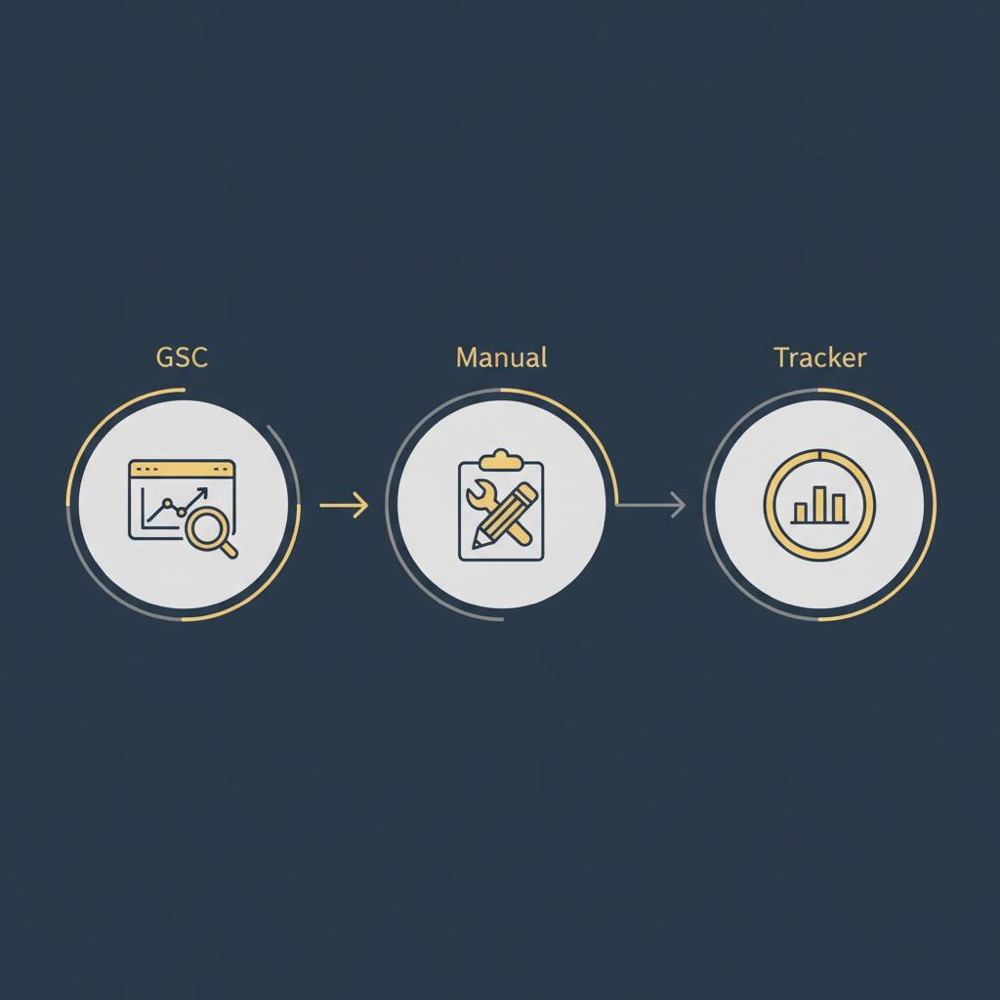
When someone asks how to check Google ranking for my website, give them a blended approach. Start with Google Search Console to identify key queries and pages. Then run manual SERP checks for representative queries to understand the live presentation. Finally, configure a rank tracker for repeatable sampling across the most important locations and devices. A small tip: keep your logo consistent across channels.
The practical sequence looks like this:
Step A: Find what matters in Search Console
In GSC, look at impressions, clicks and average position over a window that fits your site. Six to twelve weeks gives a stable view for most sites; shorter windows are fine for very volatile topics. Identify queries that drive impressions or clicks, queries with strange CTRs, and pages with sudden visibility changes.
Step B: Validate with manual checks
Run manual queries for the top candidates. Does the SERP include rich snippets, local packs or ads that change the visible order? Is the snippet compelling enough to generate clicks? Manual checks are your qualitative lens when you want to see what users see as they ask how to check Google ranking for my website.
Step C: Add controlled rank tracking
Choose your core set of queries and configure a rank tracker for the geographic areas and devices that matter. Set a cadence - daily for volatile or high-value terms, weekly for stable informational terms. Use the historical graphs to link ranking shifts to product changes, content updates or external events.
Start with Google Search Console to find your top queries and pages, then validate with a few manual SERP checks to see the live result and use a rank tracker for controlled, repeatable sampling - that three-step approach gives a balanced, defensible answer.
Common measurement mistakes and how to avoid them
Many teams make the same errors when they check rank. If you want a reliable answer to how to check Google ranking for my website, avoid these traps:
Relying on a single snapshot
A screenshot from a single moment is not evidence. Rankings fluctuate. Use aggregated measures and multiple snapshots before declaring victory or failure.
Ignoring device and location
National averages hide local variation. If your customers are mobile-first, desktop rankings will mislead you. Always define the geographic and device scope of your measurements.
Treating rank as the only KPI
Rank is not the business outcome - traffic, conversions and revenue are. Pair rank data with Search Console and your analytics platform to connect visibility with outcomes.
Not tracking SERP features
SERP features change the attention landscape. A lost organic spot that instead appears in a featured snippet might increase clicks. Track features so you can explain traffic shifts that rank numbers cannot.
How often should you sample rank?
There is no single correct cadence; choose based on volatility and business need. For high-priority, competitive queries, daily checks make sense. For most informational queries, weekly checks are enough. Monthly checks are fine for low-volume long-tail queries.
Daily or hourly checks increase noise. Short-term fluctuations are common and often meaningless. Use moving averages to see trends without overreacting to noise when you wonder how to check Google ranking for my website in a responsible way.
Reconciling Search Console with point-in-time checks
GSC reports average position over a window; rank trackers report exact positions at specific moments. Differences are expected. When you see divergence, ask:
- How broad is the query mix for that page?
- Are SERP features distorting the position measurement?
- What time window is the GSC average using?
The right explanation usually combines several of these causes. Use GSC to pick core queries, use a rank tracker to sample them, and present both aggregated and snapshot evidence when you report.
SERP features and attribution
SERP features are now central to attribution. A featured snippet can steal attention from the classic organic list, maps and local packs can redirect clicks, and carousels can surface other content types entirely. Use tools that detect SERP features, and include feature presence in your attribution models so that you don’t attribute traffic shifts to position changes alone. For a concise overview of current ranking factors see Google ranking factors for 2025.
Free tools: helpful but limited
Free rank checkers are great for ad-hoc checks on small sites. They answer the immediate question of whether a page appears for a query. But free tools usually lack scheduling, geographic depth, and historical depth. For ongoing reporting across markets, paid tools are more dependable. If you want a quick how-to on rank checking tools, see How to Check Google Rank in 2025.
How to pick queries to track without wasting time
Not every query deserves daily attention. Focus on queries that combine traffic, intent and business value. Start with queries that already show impressions in GSC. Add high-intent queries that are likely to convert. Finally, monitor a few aspirational queries you hope to rank for in the future.
Limit your tracked set to a manageable number - quality beats quantity when reporting. Too many keywords create busy dashboards that no one reads.
A short real-world example
A mid-size ecommerce team saw a sudden revenue drop. Manual checks showed mixed desktop/mobile results. Search Console showed a big impression drop for product queries. The rank tracker revealed a new image carousel and local pack occupying top real estate. The team fixed mobile performance, adjusted structured data, and aligned titles. Revenue recovered within weeks. The lesson: combine GSC, manual checks and a rank tracker to find the real cause when you ask how to check Google ranking for my website.
Step-by-step checklist: what to do today
If you want to know how to check Google ranking for my website and act on it, follow this short checklist:
- Open Google Search Console and identify top queries by impressions and clicks.
- Run manual SERP checks for representative queries in incognito mode.
- Note SERP features and visible placement.
- Configure a rank tracker for your core queries and set location & device targets.
- Choose a sampling cadence that matches volatility.
- Combine rank data with clicks, impressions and conversion metrics before drawing conclusions.
Tips for reporting to stakeholders
When presenting rank data, show both aggregated trends and live snapshots. Use GSC to explain overall changes and screenshots from manual checks or rank trackers to illustrate the user-facing reality. Explain SERP features and how they affect clicks. If you need background on the team or services, see our about page. And always connect rank changes to outcome metrics - traffic, leads or revenue.
Tool selection: what to look for
Pick a rank tracker that offers:
- Geographic and device testing
- SERP feature detection
- Historical reporting and export options
- Reasonable scheduling and API access if you need automation
Free tools can be useful early on, but paid trackers typically give the reliability and depth teams need for consistent reporting. As you grow, see practical guidance on our blog at useful knowledge.
Measuring success: metrics that matter
Rank matters only insofar as it affects your business. Track:
- Impressions and clicks (from GSC)
- CTR by query and page
- Organic sessions and conversions (from analytics)
- Visibility metrics from rank trackers (estimated share of clicks)
When you combine these, you'll answer not just how to check Google ranking for my website but also whether changes in ranking drove real business impact.
Small-team, low-budget approach
If you're a small team, start with GSC and manual checks. Use free checkers sparingly for quick answers. Focus limited budget on the queries with the most business value. As you grow, invest in a paid tracker and automation so you can scale measurement without adding noise.
Advanced considerations
For mature programs, add controlled experiments: use the rank tracker to create before-and-after snapshots across the same locations and devices, capture SERP context and test changes in title tags, structured data, or content. Correlate rank movement with organic conversion trends to validate the real impact.
Recap - a quick mental model
If you remember three things about how to check Google ranking for my website, keep these:
- Use GSC for aggregated, impression-weighted truth.
- Use manual checks for the live user perspective and qualitative context.
- Use rank trackers for repeatability, geography and device splits.
Frequently asked questions
Q: How do I check my website’s Google ranking without bias?
A: Combine data sources. Use GSC for aggregated insight, manual checks for the live view and a rank tracker for repeatable samples. Avoid conclusions from a single snapshot when you ask how to check Google ranking for my website.
Q: Are free google rank checker tools any good?
A: They are great for quick checks on small sites. But they have limits in scheduling, geography and history. For consistent, multi-region reporting, paid trackers are better.
Q: Should I worry if GSC average position differs from my tracker?
A: Not usually. GSC averages impressions over time; rank trackers report a point-in-time position. Use both to provide a fuller view and to reconcile differences.
Final thoughts
Measuring rank is technical but ultimately about decisions. If you want to answer how to check Google ranking for my website in a way that leads to better outcomes, blend GSC, manual checks and controlled rank tracking, watch SERP features and always connect visibility to actual business metrics.
Small, steady measurement wins more often than frantic chasing of daily noise.
Combine data sources: use Google Search Console for aggregated, impression-weighted insight, perform manual SERP checks for the live user view, and use a rank tracker for repeatable, geography-specific samples. Avoid decisions based on a single snapshot.
Free tools are useful for quick, occasional checks and for small sites. They usually lack reliable scheduling, geographic depth and historical reporting. For consistent multi-region measurement, a paid rank tracker is more dependable.
Yes - Orvus focuses on building measurement systems that tie search to revenue. If you need help selecting queries, configuring tracking, or tying rank movement to conversions, Orvus' services provide tactical support and implementation.
References
Want this kind of work done for your business?
We build and run AI-powered marketing and automation. 15 minutes, honest assessment.
Book a call