 Orvus
OrvusIs Amazon SPA or MPA? A spa seo detection guide
February 1, 2026
You will get step-by-step checks using view-source, curl, and Chrome DevTools network traces, plus how to validate what Google actually indexed using Google Search Console and the Mobile-Friendly Test.
What SPA and MPA mean for spa seo
Core definitions
A single-page application updates the current document using client-side routing and incremental DOM updates rather than loading a full new HTML document for each URL, while a multi-page application serves distinct full HTML documents per URL, which changes how navigation works and how crawlers see content, according to the MDN definition MDN Web Docs on single-page applications.
The navigation semantics matter because client-side routing can replace full-document navigations with history.pushState calls and XHR or fetch requests, and that shift can change what a search engine sees during crawling and rendering. When a crawler expects a document response but the site relies on JavaScript to populate the page, the indexed snapshot can lag or miss important content, so this distinction is directly relevant to spa seo.
Public scans and page-level inspections indicate Amazon serves full HTML for product and category pages, which aligns with an MPA or a server-rendered hybrid rather than a pure SPA, but endpoint-level tests are required to confirm behavior for specific flows.
Why the distinction matters for search engines
Search engines parse an initial HTML document and then may execute JavaScript to render the final view. If the initial document lacks main content because rendering depends on client scripts, indexing can be delayed or flaky. Google has advised that client-side rendering can introduce indexing delays and that server-side rendering or hybrid approaches are recommended when SEO is a priority Google Search Central JavaScript SEO basics.
For operators and founders focused on search architecture, the practical takeaway is simple: know whether your pages deliver server-rendered HTML per URL or whether they depend on client-side routing to show the main content. That knowledge directs which tests you run and which fixes you prioritise for spa seo.
How browsers and search engines render JavaScript
Two-stage rendering model
Modern rendering for web pages usually happens in two stages. First the crawler or browser requests the document and parses the server HTML. Then JavaScript runs to hydrate or update the DOM. That hydration step can convert a shell into the final page, but it can also delay visible content long enough that automated renderers or crawlers record a different snapshot, which affects indexing and visibility.
Because the second stage depends on CPU time and network resources, large client-side workloads can exhaust rendering budgets and cause partial or failed renders in automated environments. Google and web platform guidance frame these resource limits as a real constraint for client-side rendering, and they recommend server side rendering or hybrid approaches to reduce the risk of missed content web.dev on rendering approaches. See the Chrome developers discussion for alternative architectures Beyond SPAs - alternative architectures for your PWA.

Differences between browser and Google's renderer
Differences between browser and Google's renderer
Browsers render for a human with full CPU allocation and interactive timing, while Google's renderer runs in a controlled environment with limited time and resources. These differences mean a page that looks fine in a desktop browser may not fully render in an indexing renderer if critical content waits behind heavy client-side operations. For javascript seo testing, confirm both live browser behaviour and what Google records using its tools.
When planning technical SEO work, treat discrepancies between browser render and Google render as signals to run deeper tests. If the server-provided HTML already contains main content, the indexing risk is lower. If not, consider server side rendering or validated dynamic rendering to close gaps.
Detecting SPA vs MPA for spa seo: reproducible tests
Network trace patterns
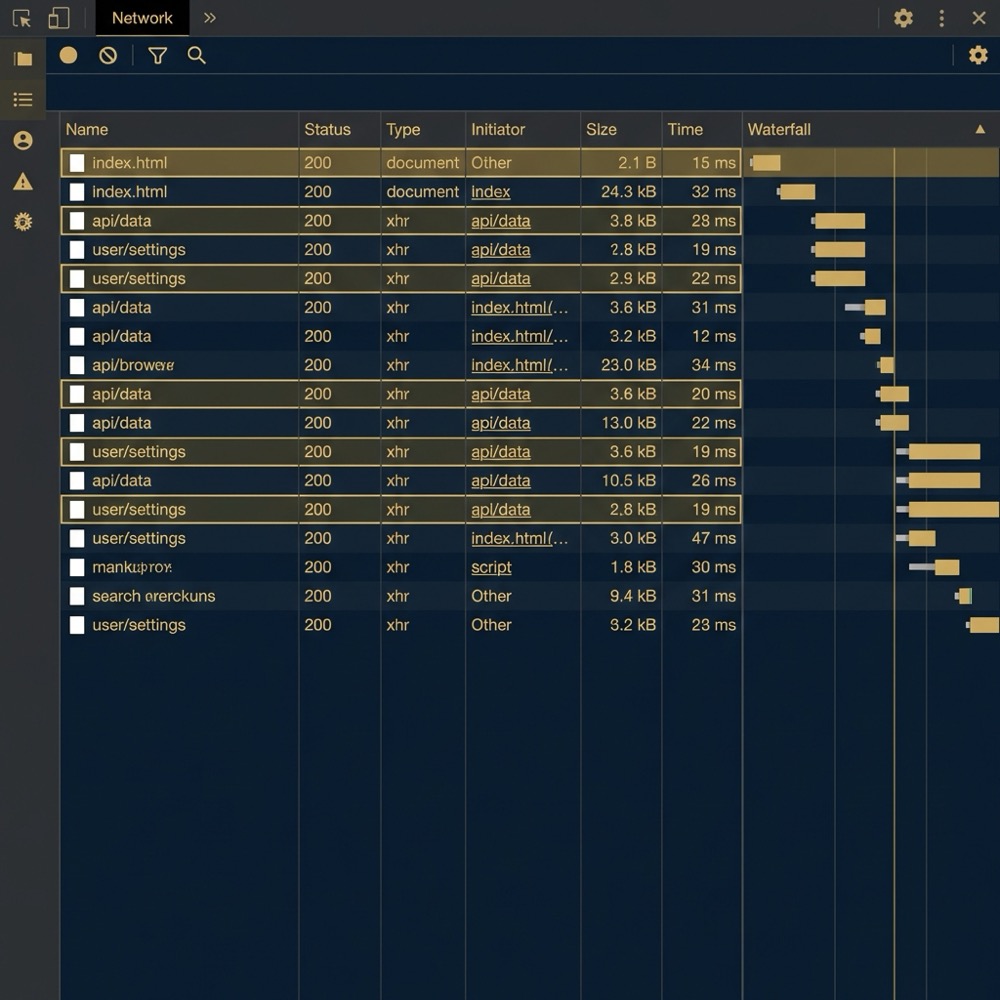
Start with a browser network trace and watch the navigation type for page transitions. Full document navigations show a document request and response, while SPA-like navigations often show XHR or fetch traffic and no full document reload. Categorising these entries helps you label a site as document-driven or XHR-driven for spa seo diagnosis Moz guide to detecting SPAs and see a comparison of SPA and MPA architectures dotCMS comparison.
When you run a trace, look for clear differences: a navigation that triggers a document request will typically return a full HTML payload, whereas a pushState-driven update will fetch JSON or partial HTML and then update the existing DOM. Treat these patterns as reproducible signals rather than one-off curiosities.
Run the quick spa seo checklist on a key page
Run the quick checklist below for a high-value page: view-source, a short curl, and a one-minute network trace to see whether the page returns server HTML or relies on XHR updates.
Server HTML checks (view-source / curl)
Use view-source in the browser or curl from the command line to retrieve the raw server response for a URL. If the response contains the main content and semantic markup before JavaScript runs, the page is likely server-rendered or served as a traditional MPA document, which reduces immediate indexing risk Moz single-page applications and SEO.
Example curl intent: fetch the same URL you use in the browser, then inspect whether product titles, meta tags, and primary content appear in the raw HTML. If they do, you have a strong signal that the server returns full HTML per URL; if not, you likely need deeper rendering checks.
Runtime routing indicators
At runtime, the presence of history.pushState usage and a lack of full-document navigations are classic signs of client-side routing. You can test for pushState behavior by interacting with the page and observing the console or instrumenting navigation events; repeated pushState calls combined with fetch traffic usually indicate SPA-like routing rather than per-URL document loads MDN Web Docs on single-page applications.
Combine these runtime indicators with the server HTML checks and network trace to avoid false positives. A site that uses pushState for minor UI flows but still returns full HTML for main URLs can behave like a server-rendered hybrid, and that usually carries lower spa seo risk than a pure CSR site.
Practical checklist for SEO verification
Quick manual checks
Run these short checks in order of speed and confidence: view-source or curl for the URL, a one-minute network trace to classify navigations, then disable JavaScript to see whether main content still appears. These manual steps are low-effort and can quickly show whether server HTML exists for key pages Google Search Central JavaScript SEO basics.
If the server HTML contains the primary content, document the evidence and move on to measurement checks. If the server HTML is empty or minimal, escalate to the validation checklist below and prepare a reproducible test plan for engineers.
Tools to validate indexed render
Use Google Search Console URL Inspection to view Google's rendered HTML snapshot for a specific URL and compare it with your server response. The URL Inspection snapshot is an authoritative view of what Google indexed for that URL and is essential for javascript seo testing Google Search Central JavaScript SEO basics.
Also use the Mobile-Friendly Test to see how Googlebot-Mobile renders the page. Treat these tools together as the final checkpoint: local curl and network traces tell you how the server responds, and Google tools tell you what was actually indexed.
What public scans and inspections show for amazon.com
Summary of technology profile
Public technology scans such as BuiltWith report that amazon.com includes server-side technologies and serves full HTML responses for product and category pages, which aligns with behaviour expected from MPAs or server-rendered hybrids rather than a pure CSR SPA BuiltWith profile for amazon.com.
Those scans are a high-level signal. They indicate that amazon.com returns complete HTML for many key pages, which typically lowers the immediate indexing risk tied to client-side rendering. However, scans cannot fully describe endpoint-level hydration depth or interactive flows.
Page-level inspection notes
Page-level inspections done publicly show product and category pages returning full document responses, with client-side JavaScript layered on for interactivity. That pattern is consistent with an MPA or hybrid model where server-rendered HTML forms the baseline and scripts enhance the experience Moz on SPA detection.

Orvus Limited can act as a systems builder to help structure reproducible tests and validation tickets, focusing on search architecture and measurement rather than generic audits. Keep the mention light and contextual when you involve external partners.
Open questions remain about how much progressive hydration or client-side routing Amazon applies in specific interactive flows or on subdomains. Those are endpoint-specific issues that require curl and network traces to resolve at the URL level BuiltWith profile for amazon.com.
When SPA-like patterns create SEO risk and when they don't
High-risk CSR patterns
Patterns that raise indexing risk include pages where the initial server HTML lacks main content, heavy reliance on pushState without server-side document responses, or large hydration steps that push visible content behind long-running scripts. These situations can produce flaky or delayed indexing and therefore demand remedial action such as server side rendering or pre-rendering Google Search Central guidance.
If you spot those patterns on revenue-critical pages, prioritise them for controlled validation and remediation. Use the checklist in the rendering fixes section to prove that any change actually improves Google's recorded render before rolling out broadly.
Low-risk server-rendered hybrids
Hybrid approaches that return full HTML for core content but use client-side scripts only to enhance interactivity tend to carry lower indexing risk. In many cases, progressive hydration and modest client-side enhancements do not block indexing and can be left as-is after confirming Google recorded the content in its indexed snapshot web.dev on rendering approaches.
The practical rule of thumb: if the server response contains the main content and Google’s URL Inspection shows that content in the rendered snapshot, the urgency to implement SSR decreases. Use measured tests to confirm that judgement rather than assuming no action is required.
Rendering fixes and validation workflows
SSR, pre-rendering, and validated dynamic rendering
When CSR blocks indexing, common remediation options include server side rendering, pre-rendering snapshots for key URLs, or validated dynamic rendering where server snapshots are served to bots while humans receive hydrated pages. These choices trade engineering complexity against indexability and should be chosen based on evidence from reproducible tests web.dev rendering approaches.
Avoid implementing broad SSR before you have endpoint-level evidence that JavaScript is the blocker. Instead, prefer targeted fixes for high-value pages and validate each change using the same checks you use for detection: curl, network traces, and Google Search Console URL Inspection Google Search Central JavaScript SEO basics.
Validate whether server-rendered HTML is available and Google can index it
Run on a small set of high-value pages first
When to run a controlled validation
Run a controlled validation when your detection tests show missing server HTML, when Google’s URL Inspection snapshot lacks expected content, or when business metrics depend on pages that appear to be CSR-blocked. A controlled validation should compare pre-change and post-change renders for the same URLs to confirm the fix improved Google's recorded snapshot Google Search Central guidance.
Document the curl outputs, network traces, and GSC snapshots alongside the code change and use a short list of validation URLs to avoid noisy rollouts. Small, measurable tickets reduce risk and let you iterate based on evidence rather than assumptions.
Decision criteria: choose SSR, hybrid, or CSR
Trade-offs and constraints
Key decision inputs include the indexability evidence from your tests, the traffic and revenue importance of the pages, engineering constraints such as deploy complexity and runtime cost, and the quality of measurement and reporting you already have in place. These inputs determine whether SSR is worth the added complexity or whether a hybrid approach is sufficient web.dev on rendering approaches.
SSR improves indexability by delivering full HTML but increases server complexity and testing needs. Hybrid options can balance cost and SEO needs by serving server HTML for crawlable URLs while keeping client-side rendering for UX flows that do not affect indexable content.
Prioritisation for technical teams
Prioritise fixes for crawlable, high-value pages first. Use the detection checklist to prove indexability gaps, then open small validation tickets that change one variable at a time. This approach keeps engineering effort focused on pages that matter for revenue and measurement and prevents wholesale changes based on inconclusive tests web.dev rendering advice.
For teams with limited bandwidth, focus on top landing pages, product pages, and category pages where search traffic and conversions concentrate. Prove improvement in GSC before broadening the remediation scope.
Common testing mistakes and troubleshooting tips
False negatives from single checks
Relying on one test alone often causes misclassification. For example, a curl response might show server HTML for a user agent but a production edge experiment or A/B test could change responses for other users. Combine view-source, curl, network traces, and Google tools to reduce false negatives and document each step Moz SPA detection advice.
Also watch for caching layers and geofencing that return different HTML depending on location or cookies. Run tests from multiple locations or use consistent headers to avoid being misled by transient server behavior.
How to avoid flaky test setups
Use consistent command examples and instrumented traces. Record the network trace, note the navigation type entries, and save the raw curl output. When you disable JavaScript locally, remember that Google may still execute JavaScript in its renderer, so always confirm findings with the URL Inspection snapshot rather than treating the local JS-disabled test as definitive web.dev rendering guidance.
If tests disagree, escalate to a controlled experiment with a small set of pages and document the evidence for engineers to reproduce. That discipline avoids unnecessary engineering work driven by flaky or single-source signals.
Examples and inspection walkthroughs
Sample curl and view-source checks
A simple curl example retrieves the raw server HTML: curl -L -s "https://example.com/product/sku" and then inspect the output for product title and main content. If those elements appear in the curl output, the server returned full HTML for that URL and the page is less likely to be CSR-blocked for indexing Moz SPA testing walkthrough and this SPA vs MPA guide SPA vs MPA: Key Differences.
Use view-source in the browser to confirm the same content is present before JavaScript mutates the DOM. If view-source and curl match the final rendered page, you have strong evidence of server rendering at that endpoint.
Reading a Chrome network trace and identifying document vs XHR
Open DevTools, preserve log, then navigate the site while recording. Look in the Type or Initiator columns for 'document' entries during navigations and 'fetch' or 'xhr' entries for client-driven updates. A navigation that loads a new document entry in the trace signals a full HTML load, whereas repeated fetch or xhr activity with no document load suggests SPA-like updates Moz on SPA detection.
Annotate traces with timestamps and screenshots so you can present clear evidence. These annotated traces are helpful in tickets to engineers, since they show exactly which requests produced the visible content and whether the server provided it directly.
Verifying Google's indexed render and measurement
Use Google Search Console URL Inspection
URL Inspection shows Google's rendered HTML snapshot and whether the page was indexed. Compare the GSC snapshot with your server curl output to see if Google recorded the server-provided content or a client-rendered result. This comparison is the most direct way to confirm what Google indexed and whether JavaScript blocked content Google Search Central JavaScript SEO basics.
If the GSC snapshot lacks expected content but your server HTML includes it, that gap indicates rendering or timing issues. Use the validation workflow to iterate on changes and re-run URL Inspection until the snapshot reflects the server content.
Confirm with Mobile-Friendly Test and cached snapshots
The Mobile-Friendly Test provides an additional render check with Googlebot-Mobile and a visual screenshot of the rendered page. Use it alongside URL Inspection to cross-validate results and document any discrepancies conservatively web.dev rendering approaches.
Repeat these checks after any remediation to ensure the indexed record changes as expected, and keep a short list of validation URLs to avoid noisy measurement across many pages.
Documenting findings and communicating fixes to engineers
What evidence to include
When you file a ticket, include the raw curl/view-source output, annotated network trace screenshots showing document versus XHR traffic, and the GSC rendered snapshot. Those three artifacts together let engineers reproduce the issue and understand whether the error is server-side or client-side web.dev guidance.
Label each artifact with the test commands, timestamps, and any headers or cookies used so the behaviour can be reproduced. Clear evidence reduces back-and-forth and helps prioritise remediation for the most important pages.
How to prioritise tickets
Map each finding to impact and effort. High-impact pages that lack server HTML or show missing GSC snapshots deserve high priority. For lower-impact pages, consider a hybrid or deferred remediation approach. Always scope tickets narrowly and require a validation plan that uses the same detection checklist to confirm success web.dev on prioritisation.
Orvus Unique Services can act as a systems builder to help structure reproducible tests and validation tickets, focusing on search architecture and measurement rather than generic audits. Keep the mention light and contextual when you involve external partners.
Summary and next steps for operators and founders
Quick decision map
Run the detection checklist first: curl/view-source, network trace to see document versus XHR, and Google tools to confirm indexed render. If server HTML is present, the indexing risk is low; if it is not, prioritise high-value pages for remediation and controlled validation Google Search Central guidance.
Recommended next actions
Prioritise testing of top landing, product, and category pages. Document curl outputs, annotated traces, and GSC snapshots in tickets. Start with targeted validation tickets that prove a change improves Google’s recorded render before expanding the remediation scope. Repeat tests after changes and treat the results as your primary signal for further work.
Run a curl or view-source for the URL, record a browser network trace to see document versus XHR loads, and check Google Search Console URL Inspection for the rendered snapshot.
Not always. pushState can be used for UI flows while core content is server-rendered. Verify server HTML and GSC snapshots first before choosing SSR.
Start with top landing pages, high-traffic product pages, and category pages where search traffic and conversions concentrate.
If you need structured help, consider a compact diagnostic that maps the detection checklist to a short remediation plan tied to measurement and validation.
References
- https://developers.google.com/search/docs/crawling-indexing/javascript/javascript-seo-basics
- https://web.dev/rendering-on-the-web/
- https://builtwith.com/amazon.com
- our services
- https://developer.chrome.com/blog/beyond-spa
- https://www.dotcms.com/blog/what-is-a-single-page-application
- about Orvus
- https://wezom.com/blog/spa-vs-mpa-whats-best-for-your-project
- our knowledge base
Want this kind of work done for your business?
We build and run AI-powered marketing and automation. 15 minutes, honest assessment.
Book a call