 Orvus
OrvusHow do I know my PageRank?
January 31, 2026
You will get a step by step operator workflow that starts with Search Console, uses one or two trusted third party metrics for comparison, and finishes with manual checks that often reveal index or canonical problems. The emphasis is on repeatable checks you can run weekly or monthly.
What seo page rank means today
The phrase seo page rank still appears in audits and team conversations, but it is most often shorthand for a page's link based authority rather than a single, public Google value. Google does not publish a user visible PageRank score; instead, search ranking is driven by many automated systems and public tools that surface link and indexing signals for webmasters, so you should expect to combine official reports with proxies when you check page authority How Search Works - Google Search Central
Start a consultation to build a monitoring routine
Try the short checklist below to see whether a page needs link work, content fixes, or crawling adjustments. It only takes a few checks and helps prioritise next steps.
In everyday workflows, teams use the term seo page rank as a compact label for link value, internal linking, and referring domain quality. The original PageRank idea remains a useful mental model for how links pass value, but it is not an exposed metric you can retrieve from Google for individual pages The PageRank Citation Ranking: Bringing Order to the Web
Because the raw PageRank values are not available, the practical approach is to treat Search Console link reports and one or two trusted third party metrics as complementary inputs. That combination gives operators both the canonical indexing view and comparative link authority signals for audits About links - Search Console Help
Why Google stopped exposing a public PageRank value
There are several operational reasons why Google moved away from exposing a raw PageRank number to users. Official guidance emphasises that ranking emerges from many automated systems, which makes publishing a single internal weight impractical and potentially misleading for site owners How Search Works - Google Search Central
In many cases, exposing raw internal weights also raises abuse and privacy concerns. Publicly available scores can be gamed by automated systems, and that changes the dynamics of link behaviour across the web. For audits, Search Console remains the canonical public source for links and index signals, not a single score from Google About links - Search Console Help
Engineering complexity is another factor. Modern ranking blends many signals beyond link propagation, so a simple number would omit important context and could lead teams to focus on the wrong fixes. That is why operators tend to rely on a combination of official reports, proxies, and manual inspection when they want to check page authority.
The original PageRank algorithm in brief
The core idea behind PageRank is simple and intuitive: links act like votes, and votes from well connected pages pass more value than votes from isolated pages. Brin and Page described the concept as a link vote propagation model that helps order information on the web The PageRank Citation Ranking: Bringing Order to the Web
In the model, a damping factor reduces the raw accumulation of votes so that the system converges. In plain language, this means links confer value but diminishing returns apply as votes spread across a large network. The concept helps explain why referring domain quality matters more than raw link counts.
Combine Search Console link and URL Inspection data with one trusted third party metric and manual checks of internal links, canonicals, and referring domain quality to form a practical view of link authority.
While the algorithm is foundational, it is a research starting point rather than a full description of modern ranking systems. Google built on the research and added many other signals, so PageRank is best used as a conceptual map for link based authority rather than a literal measurement of current systems.
How to use Google Search Console as your primary official check
Start every check with Search Console. The Links report shows which pages on your site receive external links and which external domains point to them. Open the Links report and inspect the list of referring domains and the top linked pages to understand where link value might concentrate About links - Search Console Help
Next, use URL Inspection to confirm index status, the chosen canonical, and whether Google can fetch the page as you expect. URL Inspection surfaces coverage and canonical signals that often explain why a page with links may not be receiving visible search benefit How Search Works - Google Search Central

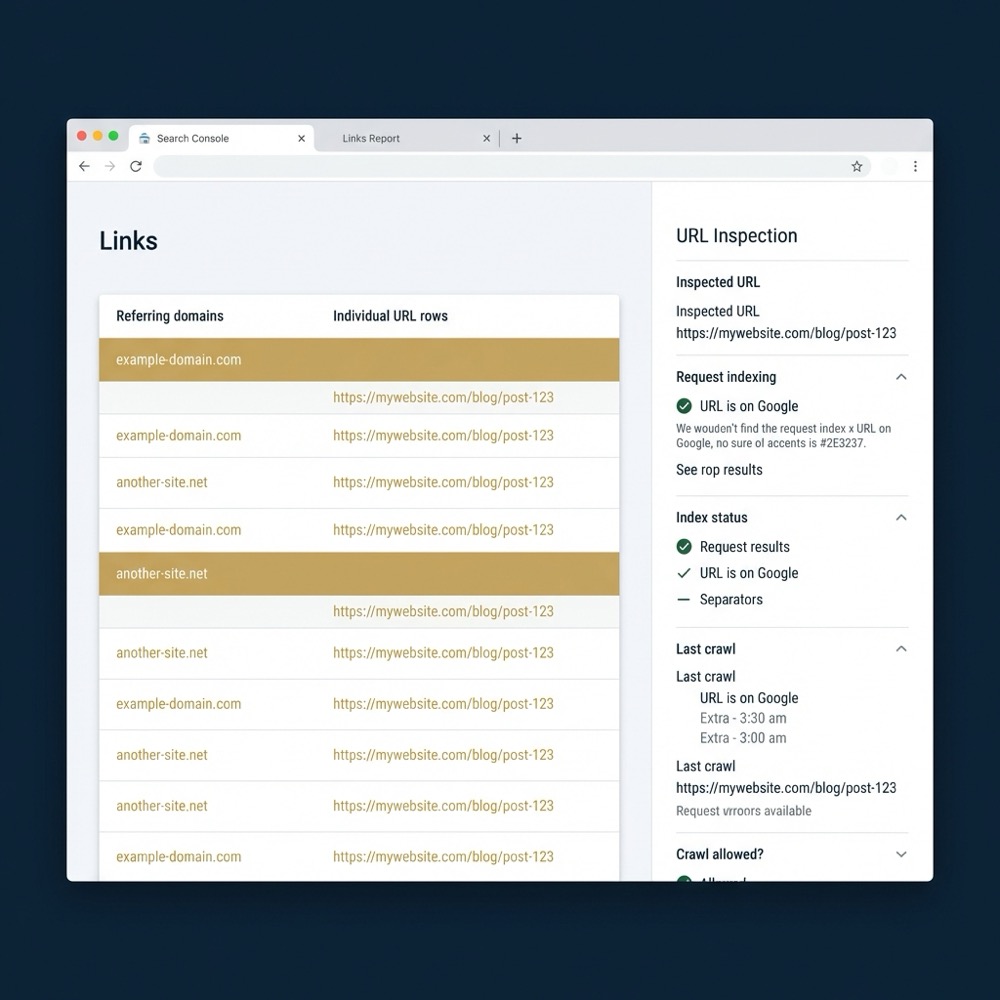
Remember the Limits: Search Console samples data and does not present a PageRank score. It is the canonical indexing view, but you still need additional context to assess link authority across the wider web.
Practical tip: export the top referring domains and match them against your content priorities. A small, manual table mapping high value pages to referring domains helps prioritise outreach or internal linking fixes.
Third-party link metrics: practical proxies and how to compare them
Third party tools publish proprietary authority metrics such as page authority that are commonly used as proxies for link based authority. These scores come from different indexes and formulas, so treat them as comparative signals rather than a replacement for Google's internal values What Is PageRank? How Google’s Original Link Metric Works (and what replaced it)
Pick one or two tools and use them consistently. Consistent tooling reveals trends and relative changes in a page's external visibility. Avoid switching tools frequently, because differences in index coverage can create false positives and noise in trend charts Is PageRank Dead? How PageRank Relates to Modern SEO

When you run comparative checks, compare the set of referring domains shown in the tool to the domains in Search Console. Large discrepancies suggest index differences or sampling limits in one source, which is why cross checking is important for reliable diagnostics.
Why browser extensions and legacy toolbars are unreliable
Many browser extensions and older toolbars surface either deprecated Google values or third party proxy scores. They can be convenient for quick checks, but their data often lags or reflects a different index, so validate anything you see against current third party tools and Search Console How to Check PageRank in 2025: Tools and Manual Signals
Quick verification steps: check the extension value, then open a trusted third party metric for the same URL and finally confirm Search Console's referring domains. If the three sources disagree widely, treat the toolbar value as noisy and investigate index coverage differences.
Avoid using a single toolbar number to make audit decisions. Extensions are a starting point, not a final authority.
Practical manual checks: what to inspect when link authority looks low
When a page's external links exist but perceived authority is low, start by checking internal linking and site structure. Ensure important pages are reachable within a few clicks and that internal links point to canonical versions of content. Internal links move value and help search engines find and prioritise pages How Search Works - Google Search Central
Confirm canonical tags, noindex directives, robots.txt and coverage report entries. A page blocked by robots.txt or marked noindex will not receive indexing benefits even if external links point to it, so these checks often explain perceived PageRank gaps About links - Search Console Help
Automate a short internal link and indexability check
Run this weekly
Assess the quality of referring domains, not just the counts. Links from relevant, well maintained sites typically carry more practical authority than many low quality links. Use a third party metric to prioritise which referring domains to evaluate further What Is PageRank? How Google’s Original Link Metric Works (and what replaced it)
Practical action: build a short internal report that highlights pages with external links but low impressions or index issues. That report guides whether to prioritise internal linking, canonical fixes, or outreach.
A simple framework to 'check' a page's PageRank-style authority
Step 1: Official data and indexing checks. Open Search Console, review the Links report for referring domains, and run URL Inspection to confirm index status and canonical selection. If the page is not indexed or the canonical is different, fix indexability first About links - Search Console Help
Step 2: Third party comparison and trend checks. Pick one trusted tool and compare its URL or domain score against Search Console referring domains, for example the Ahrefs Website Authority Checker. Look for trends over weeks rather than single day snapshots Is PageRank Dead? How PageRank Relates to Modern SEO
Step 3: Manual site and content inspection. Check internal links, page reachability, and the relevance of referring domains. Fix broken or non canonical internal links and ensure on page content matches the intent of referring anchors.
Step 4: Prioritise fixes and monitoring. Create a simple action list: urgent indexability issues, internal linking opportunities, then outreach or content improvements. Set a minimal monitoring cadence, for example a weekly check of Search Console and a monthly third party refresh, to track whether actions move the needle.
Decision criteria: when to invest in link fixes versus content or UX
Signals that favour link work include many external links from low quality or irrelevant domains, few referring domains overall, or clear evidence that internal linking is missing. If referring domain quality is the limiting factor, prioritise targeted outreach and better linking from relevant pages What Is PageRank? How Google’s Original Link Metric Works (and what replaced it)
Signals that point to content or UX include high impressions with low click through rate, poor content relevance for key queries, or user behaviour metrics that show rapid exits. In those cases, improving content and page experience is often the better investment.
Balance effort to expected impact. Use minimal experiments to validate whether link fixes or content changes move the metrics you care about, such as impressions, clicks, and conversions.
Common mistakes and pitfalls when people try to 'check PageRank'
Over reliance on a single third party metric or toolbar is a frequent mistake. Different tools use different indexes and formulas, so decisions based on one source can be misleading. Cross check with Search Console and at least one other trusted metric to reduce sampling error Is PageRank Dead? How PageRank Relates to Modern SEO
Ignoring canonical and noindex signals is another common error. A page may look well linked externally but be excluded from indexing or have a canonical that points elsewhere. Always confirm indexability before investing in link acquisition About links - Search Console Help
Simple corrective steps: use consistent tooling, validate index status early, and prioritise fixes that reduce friction for crawlers and users rather than chasing a single proxy number.
Practical examples: two short scenarios and what to check first
Scenario A, ecommerce product page with few referring domains. First checks: confirm the product URL is indexed using URL Inspection, export referring domains from Search Console, then review internal links to the product from category pages. If indexability is fine and internal links are weak, add contextual internal links from relevant high traffic pages About links - Search Console Help
Scenario B, service landing page with many low quality links. First checks: compare the domain level metric in your chosen third party tool with Search Console referring domains, assess the relevance of top referrers, and review on page relevance and conversions. If links are low quality, prioritise outreach to relevant sites and on page improvements rather than bulk link acquisition What Is PageRank? How Google’s Original Link Metric Works (and what replaced it)
In both scenarios, the diagnosis differs if the page is not indexed or if Search Console shows a different canonical. Always resolve indexing first, then iterate on linking and content changes.
Quick audit checklist and minimal monitoring template
One page audit checklist you can run in 30 minutes: 1) Open Search Console Links report and export top referring domains. 2) Run URL Inspection to confirm index status and canonical. 3) Check one third party tool for URL or domain authority. 4) Scan internal links and on page relevance. 5) Record the top three actions and assign owners About links - Search Console Help

Minimal monitoring dashboard suggestions: weekly Search Console link and coverage checks, a monthly refresh of one third party metric for trend detection, and a simple internal ticket list for fixes. Track impressions, clicks, and referring domains over time to spot changes.
Note: proxy scores are useful for trends and comparisons but are not equivalent to Google internal values. Treat them as signals, not proofs.
How Orvus Limited treats PageRank-style checks in a systems approach
Orvus Limited embeds link checks and indexability signals into search architecture and monitoring workflows without promising outcomes. The typical outputs are dashboards, automated alerts for indexability regressions, and prioritisation lists that help teams decide which fixes to run.
Small automations can reduce recurring audit work. For example, an internal routine that flags pages with external links but failing index status often shortens the time to remediate crawl barriers and clarifies prioritisation decisions.
In both scenarios, the diagnosis differs if the page is not indexed or if Search Console shows a different canonical. Always resolve indexing first, then iterate on linking and content changes.
Conclusion: practical next steps and a short reading list
Next steps for the next seven days: 1) Check Search Console Links and run URL Inspection for priority pages. 2) Run one third party metric for comparative context. 3) Inspect internal links and canonical settings and log the top three fixes.
For deeper background, read the original PageRank paper to understand the idea of link vote propagation, then review Google's How Search Works and the Search Console links documentation for practical guidance on official signals The PageRank Citation Ranking: Bringing Order to the Web and our short reading list.
No. Google does not publish a public PageRank score for individual pages; use Search Console and trusted third party metrics as proxies.
The Search Console Links report and URL Inspection are the primary official sources to review referring domains and index status.
No. Third party metrics are useful proxies with different indexes and formulas; treat them as comparative signals.
For teams that want embedded systems and tooling to reduce repetitive checks, a compact automation that flags indexability regressions and mismatched canonicals usually shortens remediation time.
References
Want this kind of work done for your business?
We build and run AI-powered marketing and automation. 15 minutes, honest assessment.
Book a call