 Orvus
OrvusWhat is Google My Business used for in SEO? A systems guide
February 10, 2026
Readers will get a diagnostic-first checklist and practical guidance on fields to prioritise, measurement stacks, and when to automate updates. The aim is operational clarity for operators and marketing teams who run local ecommerce or service businesses.
How seo google my business works: a concise definition and where it appears
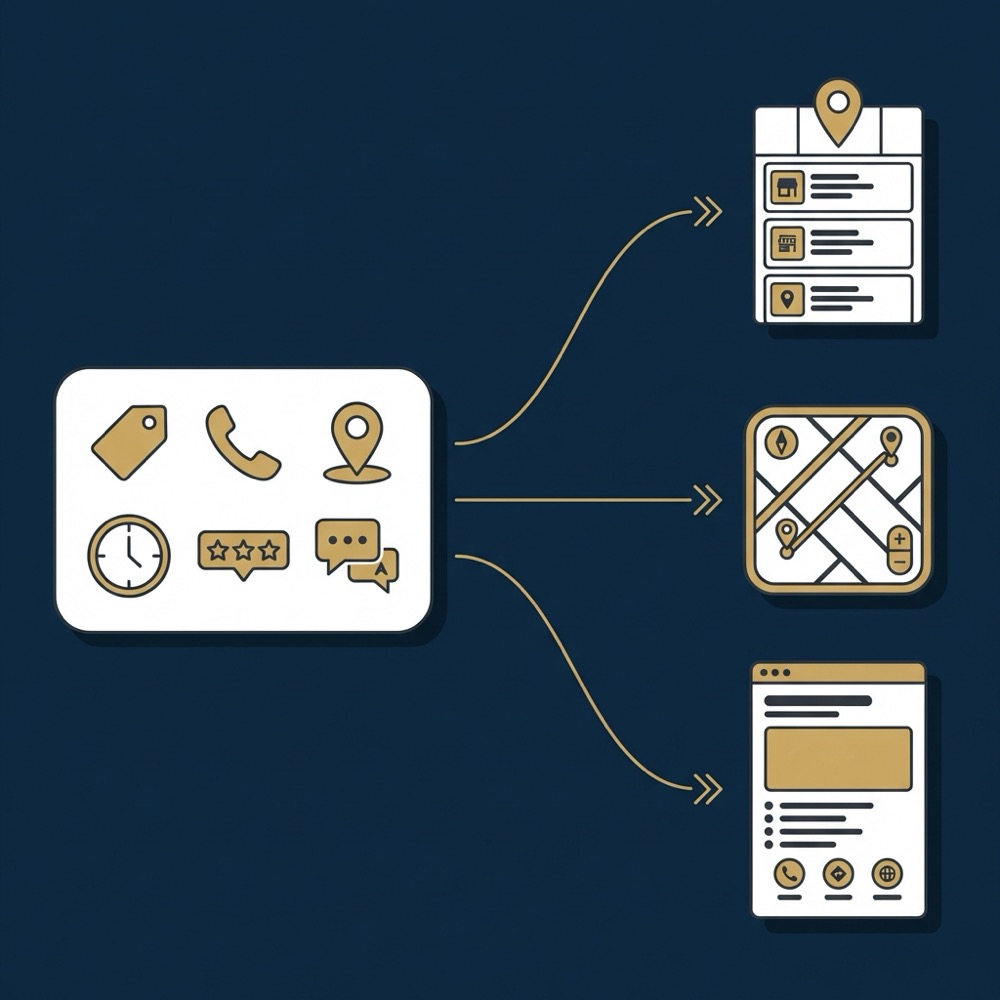
Google Business Profile is the canonical record Google uses to represent a local business online. The profile holds the official name, address, phone, categories, service areas, hours, and attributes that feed Google Maps and local search results.
In practice this profile populates three main surfaces you should watch: the Local Pack on search results pages, entries in Google Maps, and the knowledge panel that appears on some queries. The Business Profile is the place to supply structured local data that Google uses to populate those surfaces and to align a business with local intent Google Business Profile Help.
Start a short profile diagnostic
Run a short diagnostic: check verification, primary category, address format, and current hours to identify the most likely visibility gap.
Profiles presented in the Local Pack and Maps are assembled from the Business Profile data plus signals like proximity and user behavior. Treat the profile as the authoritative source for metadata, not a marketing page that can be freely altered without consistency checks.
What the Business Profile is in Google’s ecosystem
The Business Profile is a structured object in Google’s ecosystem that flags a physical presence or service area and provides machine readable fields for local ranking and display. It is the most direct place to control local metadata Google will surface in map and pack features Local search developer documentation.
Where profile data shows up: Local Pack, Maps, and knowledge panels
Data entered in the Business Profile is the primary source for what appears in the Local Pack, Map pins, and knowledge panels. Because those surface areas are high intent, small mismatches between profile and on-site data can reduce click share and cause attribution gaps.

Data entered in the Business Profile is the primary source for what appears in the Local Pack, Map pins, and knowledge panels. Because those surface areas are high intent, small mismatches between profile and on-site data can reduce click share and cause attribution gaps.
Why the Business Profile matters for local SEO and Maps
Google expects a single, accurate Business Profile for each real world business location. Structured fields such as primary category, additional categories, service areas, and geolocation are treated as primary signals for local ranking and Maps placement, so these fields should be the first optimization priority Local search developer documentation.
Proximity continues to be a core factor alongside profile signals. In many cases the algorithm combines distance with those structured fields to decide which businesses to show for a given query. That means good profile data improves relevance but cannot always overcome geographic distance constraints.
Primary algorithmic signals tied to the profile
Primary algorithmic signals are the structured elements in the profile: categories, service area, and precise geolocation. Setting the correct primary category helps Google map search intent to your business type, while additional categories broaden the range of queries where you may appear Business Profile APIs and developer documentation.
How profile completeness and correctness affect visibility
Complete, accurate profiles tend to be trusted by Google’s systems and therefore more likely to be used in local features. Profiles with missing attributes, inconsistent hours, or unverified status are at greater risk of reduced visibility and incorrect display in Maps.
Key profile fields that drive local ranking and what to prioritize
Start with the business name as it appears in the real world and avoid adding keyword phrases that are not part of the legal or commonly used name. The primary category is the next critical field; choose the narrowest appropriate category that reflects core services.
Google My Business, now Google Business Profile, is used to supply authoritative local metadata that Google uses to populate the Local Pack, Maps, and knowledge panels, and to measure on-profile actions like calls and direction requests.
After name and category, focus on geolocation accuracy, the service-area setup for non-storefront businesses, and NAP consistency across the web. Small address or coordinate errors can degrade relevance in proximity-weighted results Local search developer documentation.
Name, categories, attributes, and services
Use the business name exactly as it is used in signage and official documents. Pick a single primary category and up to several additional categories that reflect real services. Add a services list to capture service-level intent and map specific offerings to user queries Google Business Profile Help.
Hours, photos, and location data
Keep hours and holiday hours current, and upload photos that reflect the real location and offerings. Accurate hours reduce friction for users and are reflected in profile behavior metrics. Photos and attributes also help with conversion once users find a listing.
How reviews and citations influence visibility and consumer choice
Reviews serve two related roles. They correlate with visibility in the Local Pack and they strongly influence consumer choice once a listing is seen. Industry research finds review quantity, recency, and overall rating are linked to pack presence and click behavior, so a practical review approach is part of optimization planning BrightLocal Local Consumer Review Survey 2024.
While reviews correlate with visibility, they are also a direct conversion signal: recent positive feedback raises the likelihood a searcher will call or request directions. Track on-profile actions alongside rating trends to see the full effect.
Review quantity, recency, and sentiment as correlates
Collecting reviews consistently and responding to them is recommended. Review recency matters for consumer perception and is associated with higher engagement in many studies. However, correlation does not prove causation and review work should be combined with other local signals.
Citations, NAP consistency, and profile trust signals
Consistent NAP across directories and citations helps establish trust for the profile. Cross-source consistency reduces the chance of mismatches and supports long term visibility in local search analyses Moz local ranking research.
Practical optimization checklist for a Business Profile
Follow a clear sequence: claim or verify the listing, confirm the legal business name, set the correct address and phone, choose the primary category, add services, upload representative photos, and publish hours and attributes. These steps form the operational minimum for a healthy profile (guide) Google Business Profile Help.

For service-area businesses, configure service areas rather than a storefront address when appropriate (Orvus services). For multi-location operations, keep naming conventions and category choices consistent to avoid category drift across locations.
Step-by-step edits to prioritise
1) Claim and verify each listing. 2) Correct the business name to the legal or commonly used form. 3) Set the primary category logically. 4) Add services and attributes. 5) Update hours and add holiday exceptions. 6) Upload photos tied to locations. Implement these in order to reduce the chance of indexing conflicts.
Operational processes to keep the profile accurate
Set a regular cadence for checks: weekly for review alerts and hours around seasonal changes, monthly for photos and services, and quarterly for citation audits. Define owners for each task so updates are consistent and measurable.
Measuring impact: which metrics to track and how to attribute them
Use the Business Profile native analytics to see profile views, search queries that surfaced the profile, calls, direction requests, and photo views. Those native metrics are a primary signal for local performance and should be captured in reporting Google Business Profile Help.

Combine Business Profile metrics with Search Console data and rank tracking to triangulate visibility. A combined view helps separate on-profile conversions from broader organic traffic and clarifies whether changes to the profile correlate with downstream behavior.
Native profile analytics and what they show
Profile insights report how customers found the listing and which actions they took. Track trends in searches that led to the profile and the actions that followed, like calls and requests for directions, to assess the real world value of local visibility.
Combining Search Console, Business Profile metrics, and rank tracking
Link profile activity to Search Console queries and page-level analytics to assign conversion credit where possible. Rank trackers for local intent queries provide an independent signal of visibility shift, but expect attribution gaps and plan for a measurement blend rather than a single source.
Using APIs and automation to manage profiles at scale
The Business Profile API supports programmatic updates across locations and is useful when you manage more than a handful of listings. Programmatic updates reduce manual overhead for frequent tasks such as hours changes or bulk photo uploads Business Profile APIs and developer documentation.
Automations checklist for recurring Business Profile maintenance
Run weekly as part of maintenance
Build automations for the repetitive items: schedule hours and holiday updates, queue photo uploads, and send review alerts to an inbox or ticketing system. These automations should be monitored and audited so they do not introduce bad data.
When APIs make sense
Use the API when you have many locations, frequent updates, or complex ownership workflows (RioSEO guide). The API reduces human error and helps keep metadata consistent across hundreds of listings, but it requires developer time and adherence to Google’s policies.
Automations for maintenance and review monitoring
Common automations include scheduled hours updates for holidays, automatic photo ingestion from validated sources, review monitoring that creates internal tickets, and batch citation checks. Maintain a rollback and audit trail so programmatic changes can be reviewed.
Common setup and optimization mistakes and how to fix them
Incorrect business names that include marketing keywords, wrong category selection, inconsistent NAP across listings, and unverified or duplicate listings are frequent problems that reduce trust and confuse Google’s matching. Correcting those items restores trust and often improves consistent display Google Business Profile Help.
Fixes range from straightforward edits to deeper audits. Immediate corrections include matching the name to official documents, updating hours, and merging or removing duplicates. More complex issues like widespread citation inconsistencies may require a coordinated audit and rectification plan.
Frequent errors that reduce visibility
Common errors include category mismatch, service area misconfiguration, and mismatched phone numbers. Each can cause incorrect serving or lost opportunities in the Local Pack.
Quick fixes vs deeper structural problems
Quick fixes: verify the listing, correct obvious name or phone errors, and update hours. Deeper problems: inconsistent citations across many directories or an on-site structure that does not mirror the profile, which can require a multiweek remediation plan.
Aligning local landing pages and on-site signals with the Business Profile
Mirror NAP, categories, services, and hours on location landing pages to create cross-source consistency. On-site signals do not replace the Business Profile but complement it by providing context and conversion pathways for users who reach the website Moz local ranking research.
Apply schema.org localBusiness markup to location pages and ensure canonicalization and mobile friendliness. These technical checks help search engines reconcile profile data with on-site content and reduce attribution gaps.
Location pages should include the exact address format used in the Business Profile, the main category or service types, a services list when applicable, hours, and links to directions. Keep the text factual and consistent.
What to mirror on location pages
Location pages should include the exact address format used in the Business Profile, the main category or service types, a services list when applicable, hours, and links to directions. Keep the text factual and consistent.
Technical and content considerations
Check for duplicate content issues, correct canonical tags, and ensure location pages are fast on mobile. If you use hreflang for international sites, keep local pages aligned with the profile language and address formats.
Audit framework: diagnosing Business Profile issues and prioritizing fixes
Start audits with verification status, primary category correctness, NAP consistency, presence of duplicates, and coverage of key fields like services and hours. These checkpoints provide a compact diagnostic to quickly identify high-risk items Local search developer documentation.
Use a simple scoring approach that weights visibility impact, conversion impact, and ease of fix to prioritize work. Record findings in a shared document and assign owners for remediation steps to avoid duplicated effort.
Compact diagnostic checklist
Checklist example: 1) Is the listing verified? 2) Does the name match signage or legal name? 3) Is the primary category correct? 4) Are NAP and coordinates accurate? 5) Are reviews and responses monitored?
Prioritization rules based on impact and effort
High impact, low effort items like verification, name correction, and category selection should be done first. High effort items with lower immediate impact, such as full citation audits, can be scheduled and assigned to later phases.
Decision criteria: when to invest in Business Profile optimization versus other channels
Prioritize Business Profile work when a meaningful share of your search impressions or conversions are local. If profile impressions and on-profile actions are already material, optimizing the profile tends to be a high leverage activity relative to small paid tests Moz local ranking research.
If local queries are a tiny fraction of your funnel and paid channels show clearer near-term returns, then a short term allocation to paid may make sense. Use a 30 to 90 day diagnostic to validate assumptions before committing to a larger investment in either direction.
Signals that make profile work high priority
Signal examples: steady local impressions, frequent on-profile calls or direction requests, or mismatches between location pages and profile data. These indicate profile optimization will likely impact visibility and downstream conversions.
When channel mix changes are a better bet
If your main demand is national or the business does not rely on walk in traffic, investing in site architecture, paid search, or performance media may yield clearer returns. Choose based on funnel position and measurement clarity.
Case scenarios: three practical examples for different business types
Single-location retail: prioritize photos, accurate hours including holidays, and a location landing page that mirrors the Business Profile. Local customers rely on accurate directions and current hours when deciding to visit BrightLocal Local Consumer Review Survey 2024.
Service-area business: focus on service area settings, select precise categories that reflect work types, and build a repeatable review collection workflow tied to completed jobs. Avoid using a storefront address if you do not receive customers there.
Multi-location enterprise: implement programmatic updates and validation processes, use consistent naming and category conventions across locations, and consider the Business Profile API to reduce manual work Business Profile APIs and developer documentation.
Next steps and summary: building a repeatable local SEO playbook
30-day checklist: verify the profile, correct business name and primary category, confirm geolocation and NAP consistency, set up measurement for profile actions, and start a simple review workflow (useful knowledge) Google Business Profile Help.
Embed profile maintenance into your regular workflows by assigning owners, setting a reporting cadence, and automating routine updates (see About us).
It provides the authoritative local metadata Google uses to populate the Local Pack, Maps, and knowledge panels, so keeping the profile accurate helps visibility and user conversion.
Primary category, geolocation, service area, business name, and consistent NAP are the highest priority, followed by hours, services, attributes, and photos.
Combine Business Profile insights with Search Console and rank tracking, and track on-profile actions like calls and direction requests alongside downstream conversions.
If you need a focused diagnostic or help embedding these checks into your workflows, a short consultation can help determine the next practical steps based on your constraints and data.
References
Want this kind of work done for your business?
We build and run AI-powered marketing and automation. 15 minutes, honest assessment.
Book a call