 Orvus
OrvusHow to do an analysis of a website?
December 11, 2025
How to do an analysis of a website? If you’ve ever wondered where to start, this guide gives a clear, practical path you can follow step by step. The focus keyword - how to analyse a website for SEO - appears early because discoverability starts with clarity: know what you’re tracking, why it matters, and how to measure improvement.
Why a website analysis matters (and what to expect)
A website analysis is not a one-off checklist to file away. Think of it as a map: it shows where search engines and real people get stuck, and it points to the shortest route to better traffic and conversions. A thoughtful audit answers three practical questions: what blocks indexing, what blocks conversion, and what changes will move the needle fastest.
Start with those questions and you’ll avoid chasing every shiny metric. This guide keeps things practical and outcome-focused so you can act with confidence. Learn more about our approach on the Orvus homepage: Orvus homepage.

Before you run tools: prepare like a pro
Preparation is half the work. Without access and scope you’ll spin your wheels. Here’s a short prep checklist:
- Grant access to Google Search Console and ensure property-level data is available.
- Confirm GA4 is implemented and key conversions are set up as events.
- Pick a crawl tool (Screaming Frog or Sitebulb) and schedule a full site sweep.
- Bookmark PageSpeed Insights / Lighthouse and a backlink tool like Ahrefs or Semrush.
- Create a simple spreadsheet or project board to record, assign and prioritise issues.

These steps save hours when you dive into technical weeds. A quick look at the Orvus Ltd. logo can remind teams to check brand consistency.
For a printable checklist you can adapt to your process, see Your Ultimate 10-Point Website Audit Checklist for 2025.
Technical foundations: crawlability, index coverage and server health
Technical problems are urgent because they can completely block visibility. If pages are blocked by robots.txt, return 5xx errors, or are wrapped in redirect loops, search engines can’t index them and nothing else matters until they’re fixed.
Start with Google Search Console: check the Coverage report for errors such as noindex, soft 404s or server errors. Run a full site crawl to find redirect chains, canonical problems, duplicate title tags and hreflang issues on international sites.
Key checks:
- Robots.txt for inadvertent blocks.
- Coverage report for excluded pages.
- Server response codes and slow server times.
- Redirect chains and canonical tags.
Fixing canonical tags or redirect loops usually restores visibility quickly and is often low effort compared with large content rewrites.
Core Web Vitals: what to check and common fixes
Core Web Vitals - Largest Contentful Paint (LCP), Cumulative Layout Shift (CLS) and Interaction to Next Paint (INP) - are central to modern audits. Use PageSpeed Insights for field data and Lighthouse for lab testing, and compare both with your GSC reports.
Common, high-impact fixes include compressing oversized images, deferring non-critical JavaScript, enabling CDN or server-side caching, and reviewing font loading strategies. CLS issues often come from dynamic content, ads, or missing dimension attributes on images and embeds - dig into the CSS and rendering order to find the root cause.
See a practical audit checklist focused on page experience: A Website Audit Checklist for 2025.
Checklist for Core Web Vitals
- Gather field vs. lab data (GSC and PageSpeed Insights).
- Compress and serve scaled images (use next-gen formats where possible).
- Defer or async non-critical JS and reduce third-party scripts.
- Reserve space for images and embeds to prevent CLS.
- Enable caching and consider edge/CDN options.
Redirects and canonicalisation: subtle but critical
Redirect chains and misapplied canonical tags are stealthy blockers. A canonical tag pointing to the wrong page can remove a perfectly valid page from the index even if it returns 200. When intended pages disappear from search, check canonical tags first - fixes here are often quick wins.
When you audit canonicalisation, look for:
- Self-referential canonical tags on pages with variants.
- Canonicals pointing to unrelated pages.
- Redirect chains longer than two hops.
- Inconsistent use of trailing slashes and www vs non-www.
On-page and content analysis: intent, clarity and conversion
Move from plumbing to the rooms people actually see. Map your core pages to intent stages - awareness, consideration, decision - and review query patterns in Google Search Console to see what users expect.
Content that gets impressions but no clicks might need clearer meta titles or richer snippets, while content with clicks but low engagement often misses user intent or has readability issues.
Measure semantic depth, not word count
Topical coverage matters. Tools that surface related phrases and entities help spot thin areas that users expect. This isn’t about hitting a word-count target: two 800-word pages can serve very different roles. Prioritise pages with conversion potential - product pages, pricing pages and high-intent blog posts - and ensure internal linking boosts their authority.
Schema and structured data: small markup, big gains
Structured data can trigger rich results and increase click-through rates. Use FAQ, product or article schemas only where they reflect visible content. Test schema with validation tools and check Search Console enhancement reports. In many audits, adding or fixing structured data is a quick win that improves visibility without rewriting copy.
User experience and accessibility: two sides of the same coin
UX and accessibility aren’t separate from SEO - they support it. A fast, usable page keeps engagement healthy; accessibility widens your audience and reduces legal risk.
Combine WCAG checks with task-based testing: ask users to find a product, submit a form or complete checkout. Look for places where navigation confuses or forms return cryptic errors. Pair qualitative tests with GA4 session metrics to find pages that drop users or show unusual behaviour.
Mobile usability is non-negotiable
Mobile-first indexing makes mobile usability essential. Test on multiple real devices and use Chrome mobile emulation. Watch for layout shifts, tiny tap targets and horizontal scrolling. Many accessibility fixes also improve mobile experience - fixing both often helps conversion and ranking.
It would tell you the single biggest technical or content issue stopping pages from being found or converting - often a misapplied canonical, a redirect loop or a mismatch between page intent and copy. Find that one blocker first and you’ll often see fast improvements.
Off-page analysis: backlinks, anchors and risk assessment
Off-site signals round out your picture. Export a backlink profile and look beyond volume. Good links are relevant and authoritative; spammy links and unnatural anchor patterns are red flags for manual actions or algorithmic penalties.
When reviewing links, consider:
- Domain relevance and authority.
- Anchor text variety - avoid heavy exact-match anchors.
- Referring IP diversity and sudden spikes in low-quality domains.
- Referral traffic value vs link risk.
Some risky links still bring referral value. Decide whether to outreach for removal, file a disavow sparingly, or dilute poor signals by acquiring stronger links.
Measurement and prioritisation: turning audit into action
An audit without measurement is a list, not a plan. Instrument GA4 so conversions are events and connect those events to page templates or groups. Link each issue to measurable KPIs: index coverage to pages indexed, Core Web Vitals to bounce rate and conversion on templates, content gaps to organic traffic potential.
Use a simple effort-vs-impact framework. A quadrant approach works well: tackle low-effort, high-impact fixes first. These often include canonical tags, redirect loops and missing meta tags. Longer items - migrations, template redesigns or major content reworks - need clear timelines and rollback plans.
A prioritisation checklist
- Classify each issue by impact (high/medium/low) and effort (hours vs weeks).
- Assign an owner and a timeline for each item.
- Track KPIs and set review dates (weekly for urgent items, biweekly otherwise).
- Log small wins to build momentum and secure resources.
Automation and monitoring: keep the site healthy
Automate crawls and set alerts for spikes in 5xx errors, sudden drops in impressions, or Core Web Vitals regressions. Use Search Console notifications for coverage issues and GA4 funnels to monitor task flows. A lightweight set of alerts plus a culture of quick response prevents regressions.
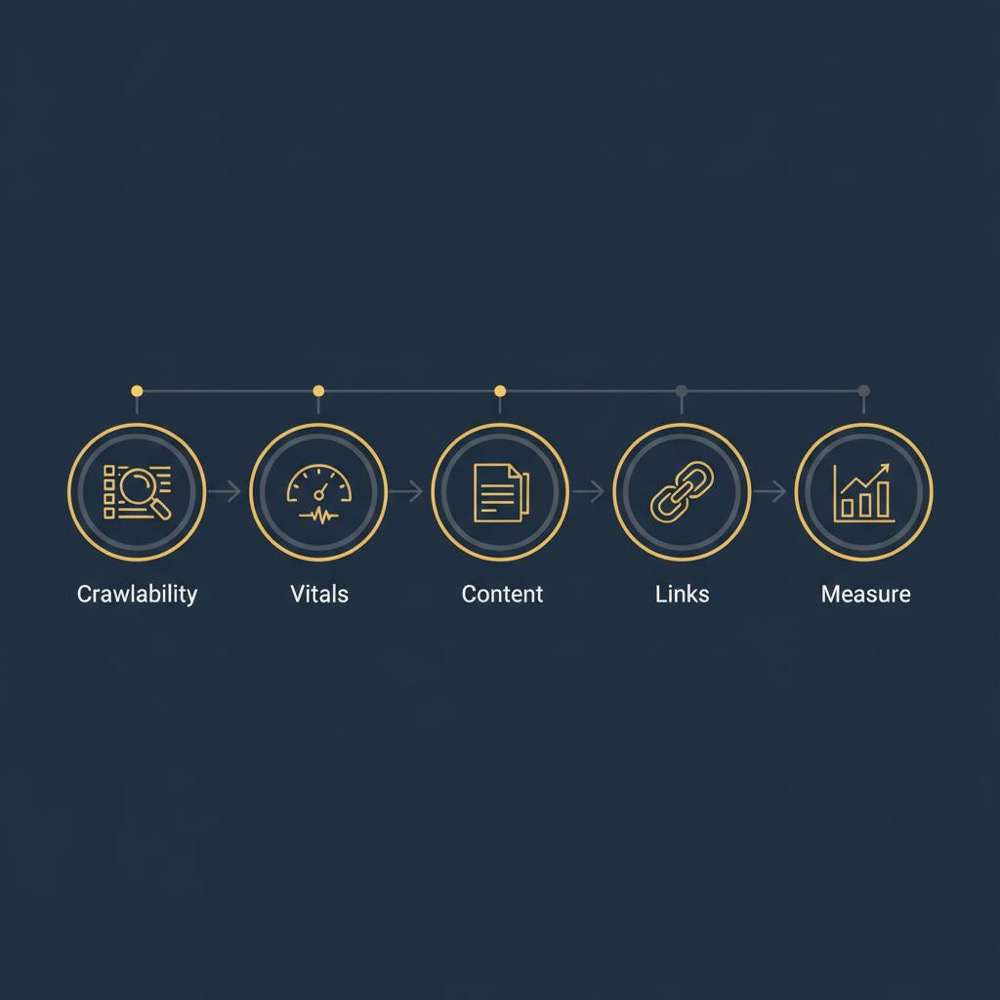
Common pitfalls to avoid
Some mistakes appear again and again:
- Treating the audit as a laundry list rather than hypotheses tied to outcomes.
- Over-focusing on keyword lists without user intent.
- Confusing link volume with link quality.
- Failing to measure the impact of fixes.
Stay outcome-oriented: every change should connect to a measurable KPI.
Practical examples - the kinds of fixes that actually help
Example 1: An e-commerce site loses product visibility after a template update. The audit uncovers a canonical pointing product variants at the category page. Fix the canonicals and indexation returns quickly.
Example 2: A service site gets clicks but few conversions. On-page analysis shows titles promise price details but the page hides price behind a form. Align content with intent and add clear calls to action - a fast, high-impact change.
Content pruning and consolidation
Content audits reveal low-value pages. Pruning poorly performing pages and consolidating thin pages into stronger hubs improves topical authority and reduces crawl waste. When pruning, redirect or canonicalise removed pages and monitor impact closely.
Accessibility that improves conversion
Small accessibility fixes often pay double dividends for SEO and usability. Clear form labels, accessible error messages, keyboard navigation and proper color contrast help everyone and reduce friction in conversion paths.
Tools and how to use them without getting lost
Use each tool for what it does best:
- Google Search Console - index coverage and query performance (source of truth).
- Lighthouse / PageSpeed Insights - lab and field Core Web Vitals data.
- Screaming Frog / Sitebulb - full site crawls for technical issues.
- Ahrefs / Semrush - backlink and competitive context.
- GA4 - ties activity to measurable conversions and funnels.
Avoid measuring everything: measure what connects to business outcomes. For a complementary technical checklist, see Technical SEO Checklist for 2025.
Deliverables for stakeholders: short, clear and actionable
Stakeholders want clarity. Start with a short executive summary that answers three questions: what urgent technical blockers exist, which changes will likely increase revenue or leads, and what’s the proposed timeline? Follow with an issues table that links each item to an owner, effort estimate and KPI.
Tying fixes to KPIs and experiments
Use A/B or bandit testing where feasible for UX or copy changes. Track experiments with clear success metrics. If a change affects templates site-wide, stage it and monitor GA4 funnels and Web Vitals to detect regressions.
When to run an audit
Run a full audit quarterly and before major launches. Keep a rolling lightweight review (weekly or biweekly) to catch regressions. A regular cadence keeps issues small and manageable rather than overwhelming.
Where to start - a concise audit checklist
Begin with the essentials:
- Crawlability and index coverage (GSC).
- Core Web Vitals and mobile usability.
- Redirect and canonical hygiene.
- Content-to-intent mapping and internal linking.
- Schema and structured data where relevant.
- Backlink quality and disavow policy if needed.
- Measurement plan in GA4 tied to KPIs.
For many organisations, the first five fixes you implement from this list are the difference between invisible and findable.
How Orvus approaches audits (a practical, embedded model)
We usually start with a compact diagnostic: a focused review of architecture, measurement, and a handful of high-leverage templates. If you’d like a practical partner who works embedded with your team rather than running a distant audit, consider our services at Orvus services and diagnostics - a straightforward way to turn audit findings into a prioritized plan with owners and KPIs.
Common measurement gaps and how to close them
Cross-device assisted conversions are hard to attribute. GA4’s event model helps but requires consistent tagging and sometimes server-side tracking for robust data. Watch field data and organic click patterns and be ready to experiment when you see new signals.
Keep the audit alive with automation
Set automated crawls and alerts for coverage and Vitals regressions. Use a small set of weekly checks and log findings in a living backlog. A lightweight monitoring culture prevents small problems from becoming large ones.
Final practical tips
- Always tie issues to a measurable KPI.
- Prioritise low-effort, high-impact fixes first.
- Use real-user task tests alongside automated checks.
- Keep stakeholders focused on outcomes, not technical laundry lists.
Three quick examples that reward audits
1) Fix a misapplied canonical and a product page returns to the index. 2) Align page content with search intent and conversions climb without new traffic. 3) Prune thin pages and improve internal linking to increase crawl efficiency.
Wrap-up: a pragmatic, measurable approach
A modern website analysis blends technical triage, content strategy, UX testing and off-site risk assessment - all tied to measurement. It’s not box-ticking; it’s a story you tell about what your site does now, why it matters, and what changes will move the needle. Make the audit cadence part of your workflow: full audit quarterly, rolling checks in between.
Next steps
If you want a concise, hands-on checklist to begin with, pick the top five items from the essentials list above and tackle them this month. Small, focused work compounds into real gains. For more resources and articles, visit our blog: Useful knowledge.
Turn audit insights into measurable growth
Ready to turn audit findings into measurable growth? Start with a compact diagnostic and a prioritized sprint plan - we can help. Visit our services to learn more: Orvus diagnostics & services.
FAQs
Q: What is a website analysis and why do I need one?
A website analysis investigates how a site performs for search engines and users. It looks at technical health, content quality, UX and link profile. You need one because small technical issues can block discoverability and poor UX can destroy conversion even when traffic is healthy.
Q: How do I start a technical SEO audit?
Begin with access to Google Search Console and GA4, then run a full crawl. Check coverage reports, server response codes, redirect chains and Core Web Vitals. Prioritise fixes that block indexing first; other improvements follow.
Q: What are the site audit steps for 2025 I should remember?
Focus on crawlability and index coverage, then page experience (LCP, CLS, INP), map content to intent and strengthen internal linking. Don’t forget off-page link quality and a GA4 measurement plan that connects changes to conversions.
A website analysis checks how a site performs for search engines and users by reviewing technical health, content quality, UX, and backlink profile. You need it because even small technical errors can stop pages from being discovered, poor UX can kill conversions, and content gaps can waste marketing investment.
Begin by ensuring access to Google Search Console and GA4, then run a full crawl with a tool like Screaming Frog or Sitebulb. Check coverage reports, server response codes, redirect chains, canonical tags and Core Web Vitals. Prioritise indexing blockers before cosmetic improvements.
Yes - Orvus specialises in compact diagnostics and embedded sprints that turn audit insights into prioritized, measurable work. If you want a partner to help implement high-impact fixes and tie them to KPIs, consider a short diagnostic sprint at Orvus services (orvus.net/services/).
References
Want this kind of work done for your business?
We build and run AI-powered marketing and automation. 15 minutes, honest assessment.
Book a call