 Orvus
OrvusWhat is the Moz tool used for?
December 10, 2025
What is Moz Pro used for? If you’ve ever sat through a meeting where someone shouted “DA!” or stared at a site health percentage and wondered what to do next, you’re not alone. This guide unpacks Moz Pro-its core tools, where it shines, and how small teams can use it to get steady, sensible gains without overcomplicating the day.

What is Moz Pro used for? - Core features and a quick map
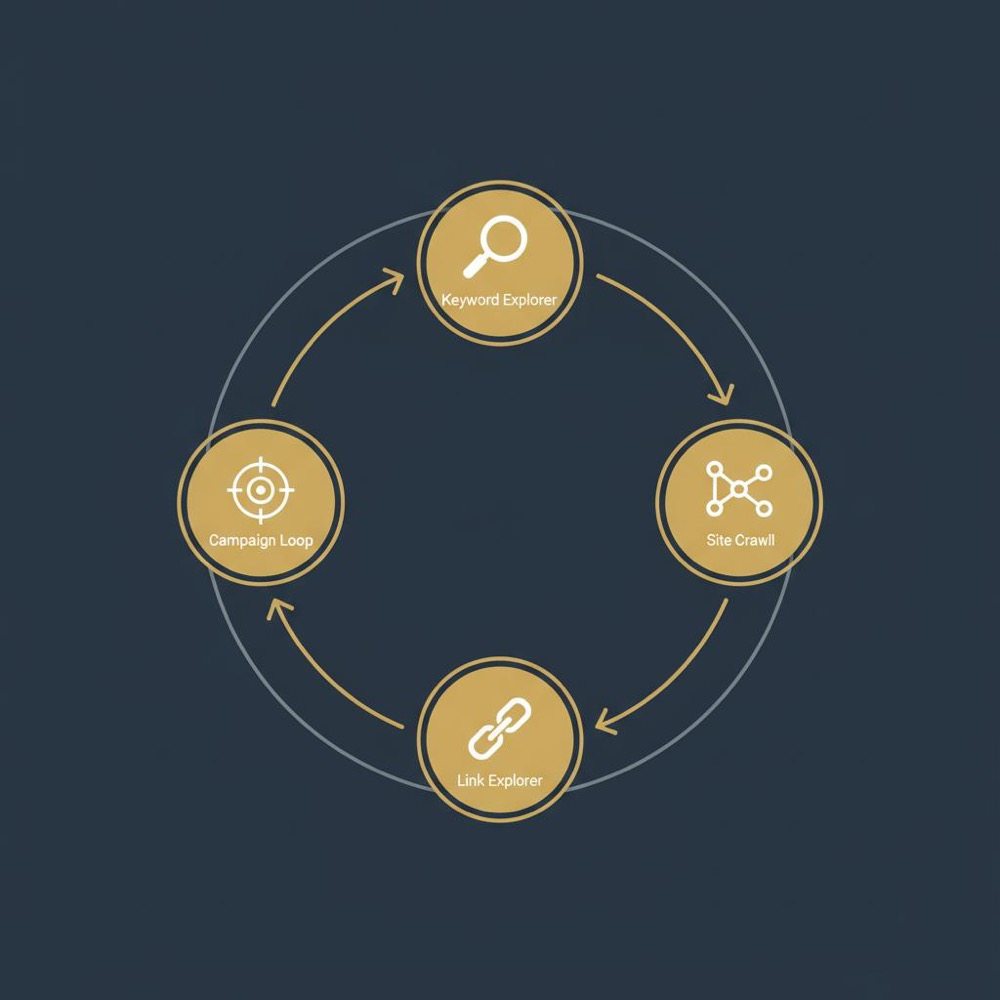
Moz Pro is an all-in-one SEO platform built to help teams find keyword opportunities, diagnose site health, evaluate backlinks, and track rankings over time. The most useful pieces are:
Moz Keyword Explorer - keyword ideas, volume, difficulty and opportunity scores plus SERP context.
Site Crawl - a site audit crawler that converts hundreds of raw signals into a readable site health score and prioritized issues.
Link Explorer - backlink data, Domain Authority (DA) and Spam Score for quick link hygiene and outreach screening.
Rank tracking and campaigns - position tracking organized by campaigns, with alerts and reporting that fit regular workflows.
Why small teams and in-house SEOs like Moz Pro

For many small teams the hardest part of SEO isn’t the theory - it’s keeping the work focused. Moz Pro is designed to reduce noise: instead of dumping a spreadsheet of hundreds of issues onto your desk, it presents prioritized tasks, readable reports, and a clear crawl → fix → verify loop.
How to start: a simple month-one plan
Start with three practical moves that create momentum:
1. Run a Site Crawl and note the top 5 issues by impact. Triage these into your ticketing system.
2. Use Moz Keyword Explorer to pick a handful (3-6) of realistic target keywords for a single category or page cluster.
3. Create a campaign for that site and add those keywords for rank tracking and reporting.
Do these steadily and you’ll have a repeatable loop: crawl → fix → re‑crawl → measure. That loop is the practical value of Moz Pro for most in-house SEOs and small agencies.
Moz Keyword Explorer: more than numbers
Moz Keyword Explorer gives you three core signals for each term: volume, difficulty, and opportunity. Combined, those metrics help move decisions away from hunches and toward simple economics:
- Volume shows potential searches.
- Difficulty estimates how hard it will be to earn a top position for that keyword.
- Opportunity weighs realistic gains against competition to highlight the best bets.
Perhaps the most useful part is the SERP analysis: you can see what kinds of pages currently rank, whether featured snippets or local packs appear, and whether the result set favors review pages, product pages, or long-form guides. That context often tells you more than raw volume.
Site Crawl and site audit SEO: turning noise into action
Raw crawls can be overwhelming. A plain crawler might hand you a CSV with hundreds of issues and no sense of priority. Moz’s Site Crawl turns that output into a site health score and a prioritized ticket list. Instead of wondering which “duplicate meta” matters most, you get an ordered set of fixes that move the needle on indexability and user experience.
Key practical features:
- Prioritized issue lists: fix the highest-impact items first.
- Re-crawl to verify fixes: close the loop and show progress.
- Readable reports for non-technical stakeholders: fewer meetings, more approvals.
Real-world use: why that matters
Imagine a two-person marketing team where one person handles content and the other handles product updates. Instead of asking the product manager to interpret raw crawler logs, you send a concise Moz report: “Top 3 indexability issues - here’s what to fix and why.” That clarity often gets faster sign‑off and reduces friction between teams.
Link Explorer and domain metrics: reading DA and Spam Score
Moz’s Link Explorer offers backlink data and quick checks for link health. Two metrics you’ll see often are Domain Authority (DA) and Spam Score. Important clarifications:
- DA is a comparative metric-useful for prioritizing outreach targets or benchmarking, but not a Google ranking signal.
- Spam Score highlights potentially risky links. It isn’t perfect, but it’s a useful screening tool.
For small outreach efforts, Link Explorer is often good enough: sort targets by DA, check Spam Score, and do a quick manual content check before outreach. If you need massive historical link analysis or the deepest possible index, Moz’s index may be slightly shallower than specialist heavyweights-but for everyday outreach and hygiene it usually does the job.
Rank tracking and campaign workflows: focus where it matters
Rank tracking in Moz Pro is organized around campaigns. That structure is practical: you create a campaign for a brand, site, or collection of pages and track keyword groups over time. Combined with alerts and prioritized issue lists, campaigns let you set a steady cadence: crawl → review → fix → re‑crawl.
For a typical in-house SEO juggling analytics, product updates, and content deadlines, a campaign-centric layout feels less like a tool and more like an assistant.
How Moz Pro fits into common workflows
Here’s a simple, repeatable loop that reflects how many teams use Moz Pro:
1. Run Site Crawl - get a health score and 5 prioritized fixes.
2. Put fixes into your task system - assign to product or development.
3. Use Keyword Explorer to build a content cluster - write content using on‑page recommendations.
4. Publish, add keywords to a campaign, and monitor rank movement.
5. Monitor Link Explorer for suspicious link growth and outreach opportunities.
This loop scales upward: you can add automation, bulk exports, or other specialized tools, but the readable priorities are the constant that keeps small teams moving forward.
Example 1: A two-person in-house SEO team used Site Crawl to triage technical issues, fixed top priority items across a sprint, and re‑crawled to verify results. The visible site health improvement helped reduce urgent tickets and increased organic landing page counts.
Example 2: A small agency used Keyword Explorer to build an editorial calendar focused on mid-volume, lower-difficulty terms. The content gained traction faster than high-volume, high-competition pieces and delivered steady traffic growth for clients.
Example 3: A consultant used Spam Score in Link Explorer to flag suspicious referring domains. Manual review found automated comment links that were cleaned up, improving link profile hygiene before a major campaign.
Think of Moz Pro as the practical teammate who runs a morning crawl, hands you a short prioritized to‑do list, highlights a handful of real keyword opportunities, and pings you when something critical changes-less chatter, more action. It helps small teams stay focused by turning noisy data into clear, doable steps.
Questions to ask before buying Moz Pro
Before subscribing, answer these practical questions:
- How many keywords will you track across campaigns?
- How often will you run crawls and need re‑crawl verification?
- Do you require heavy API usage for automated reporting or custom pipelines?
- How deep must backlink data be for your outreach or competitive research?
If link index depth or API throughput is critical, run sample exports and test API endpoints during a trial. That upfront testing prevents workflow headaches later.
Tips to get the most from Moz Pro
Start small and build habit: run an initial Site Crawl and use the prioritized results as your first task list.
Use Keyword Explorer to pick realistic wins: mix mid-volume, lower-difficulty keywords with a few stretch targets.
Report for humans: translate technical findings into one-line explanations and suggested fixes for product or content owners.
Use DA and Spam Score wisely: treat DA as a comparative measure, not an absolute ranking truth; use Spam Score as a flag to inspect links manually.
Test API limits: if automation matters, run sample exports and check the API throughput for your likely workflows.
On balance: who should try Moz Pro first?
Moz Pro is especially useful for:
- Small in-house teams that need clear priorities and readable reports.
- Small agencies that want an affordable, coherent toolkit for keyword research, audits and outreach screening.
- Consultants who need a campaign view and simple reporting for clients.
If your work centers on enterprise-scale link intelligence or heavy automation, consider pairing Moz Pro with a deeper link-specialist tool or a custom data pipeline.
For a practical, hands-on check of how Moz Pro maps to your actual workflow, consider a short diagnostic with Orvus’s services. We help teams test API limits, sample link exports, and integrate Moz Pro into existing ticketing and reporting systems-no pressure, just clarity.
Pricing and plans: Moz Pro pricing 2024
Moz Pro offers tiered plans to suit solo SEOs through to small agencies. Public price ranges in 2024 typically span roughly $99-$599 per month, depending on limits like tracked keywords, crawl budgets, and API access. That means:
- Small teams often find lower tiers cover keyword research, regular crawls, and basic link checks.
- Larger teams that track hundreds of keywords or need extensive API access will likely need higher tiers to avoid hitting limits.
Practical tip: test the specific limits you care about on a trial-API calls, bulk export sizes, and crawl allowances vary by plan and are the places teams most often run into friction.
Where Moz Pro shines-and where it doesn’t
Strengths:
- Readable site audits and prioritized fixes.
- Campaign-focused workflows that help small teams keep a cadence.
- A keyword tool with actionable context (volume, difficulty, SERP analysis).
Limitations:
- Link index depth may be shallower than specialist link tools for very deep historical analysis.
- API and export limits on lower tiers can constrain heavy automation.
Bottom line: if your primary need is clear priorities, workable keyword context, and readable audits, Moz Pro will likely be an excellent fit. If you need the deepest backlink bank or heavy automation, treat Moz as part of a toolkit rather than the entire solution.
Common scenarios where Moz Pro is the best practical choice
1. A small e-commerce brand that needs prioritized technical fixes and a handful of strategic content pieces.
2. A content agency that wants clear keyword signals and SERP context for mid-volume opportunities.
3. An in-house team that values readable, shareable audits over raw data dumps.
Practical examples from the field
Example 1: A two-person in-house SEO team used Site Crawl to triage technical issues, fixed top priority items across a sprint, and re‑crawled to verify results. The visible site health improvement helped reduce urgent tickets and increased organic landing page counts.
Example 2: A small agency used Keyword Explorer to build an editorial calendar focused on mid-volume, lower-difficulty terms. The content gained traction faster than high-volume, high-competition pieces and delivered steady traffic growth for clients.
Example 3: A consultant used Spam Score in Link Explorer to flag suspicious referring domains. Manual review found automated comment links that were cleaned up, improving link profile hygiene before a major campaign.
Final practical checklist before committing
Run through this checklist during a trial:
- Verify crawl frequency and the time to re-crawl fixed pages.
- Export a sample backlink report to evaluate index depth.
- Test API calls for any automated reports or dashboards you plan to build.
- Confirm tracked keyword limits and reporting cadence fit your needs.
That wraps the practical view: Moz Pro is a readable, actionable toolkit that helps small teams create a steady SEO routine. If you want help mapping Moz Pro to your team’s work and testing limits,
Quick diagnostic: test Moz Pro with Orvus
See how Orvus can help: book a short diagnostic to test Moz Pro’s API and link exports and get a concise plan for integrating Moz into your workflows-explore Orvus services.
Next steps and a simple promise
If you’re unsure whether to trial Moz Pro, pick one project: run a Site Crawl, pick a small keyword set, and measure results across 6-8 weeks. That small experiment will reveal whether Moz’s readable priorities and keyword signals actually save you time and help your team make better decisions.
Whether Moz Pro becomes a daily tool or part of a broader stack, the biggest payoff comes from forming a steady routine: a short crawl, a shortlist of fixes, focused content work, and consistent follow-up. Tools help-habits win. See more notes on our blog: useful knowledge.
Thanks for reading-now go run a crawl and pick one realistic keyword to win this quarter.
Moz Pro is used for keyword research, site audits (site audit SEO), backlink research, rank tracking, and on‑page optimization guidance. It bundles these features into campaign-focused workflows that are particularly useful for small to mid-size teams because it turns raw data into prioritized, shareable tasks.
For many SMBs and small agencies, Moz Pro's Link Explorer provides sufficient backlink visibility for outreach and link profile hygiene. If you require very deep historical link analysis or extremely large-scale link research, verify the index depth with sample exports during a trial and consider pairing Moz with a link-specialist tool if necessary.
Public Moz Pro pricing in 2024 typically ranges roughly from $99 to $599 per month depending on plan limits like tracked keywords, crawl budgets and API access. Exact pricing and feature caps change over time, so check Moz's current plan details and test the specific limits you need before committing.
References
Want this kind of work done for your business?
We build and run AI-powered marketing and automation. 15 minutes, honest assessment.
Book a call