 Orvus
OrvusHow do I know if my URL is canonical? A diagnostics guide
February 14, 2026
This guide explains canonicalization seo as a signals-based process, shows the quickest checks to confirm Google’s choice, and provides a prioritized audit checklist you can use during releases and diagnostics.
What canonicalization seo means and why it matters
Canonicalization as a set of signals, not commands
Canonicalization seo is the practice of indicating a preferred version of a page to search engines so they can consolidate indexing and attribution. In practice, canonical signals are hints, not commands; search engines may weigh rel=canonical, sitemap entries, and hreflang alongside other signals when choosing a canonical URL. Google Search Central guidance on duplicate URLs
That signals-based model means you can provide strong guidance, but the final choice can change if other signals conflict. For example, a rel=canonical that points to a URL that is blocked from indexing or redirected can be ignored in favour of a version the engine can index or follows through redirects.
Who needs to check canonicalization and when
Operators, founders, and marketing teams should check canonicalization when launching a site, after major template edits, when parameterised URLs multiply, and whenever hreflang or sitemap changes are deployed. Unexpected canonical selection can affect which URL appears in search results and how clicks and conversions are attributed.
Check canonicalization quickly after any release that touches templates, routing, or internationalisation so reporting and revenue attribution remain consistent. If Search Console shows a different canonical than you expect, it is usually a sign to run the diagnostics below.

How to check which URL Google considers canonical (quick, practical checks)
Use Google Search Console URL Inspection
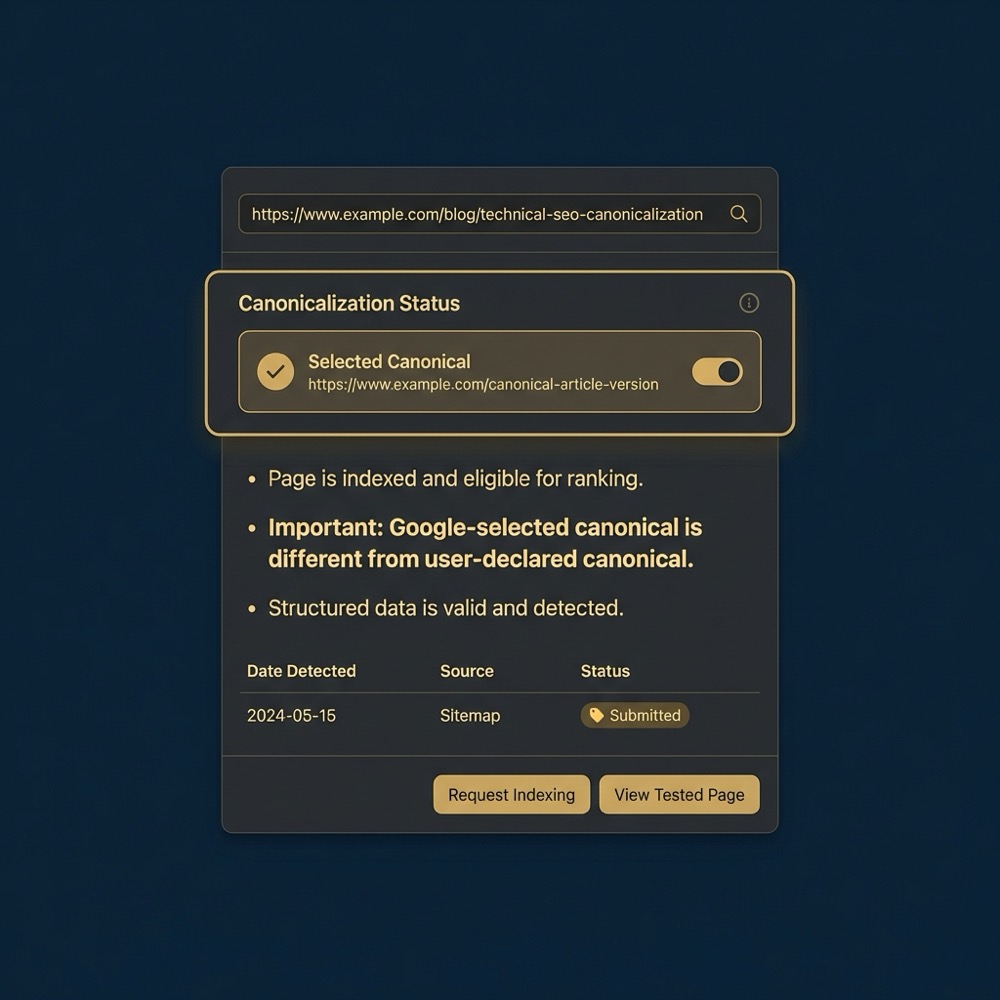
The fastest single check is the URL Inspection tool in Google Search Console. It reports which URL Google selected as canonical and lists diagnostic information that helps explain why a different URL was chosen. Google Search Console, Inspect a URL
Open URL Inspection, paste the URL you care about, and review the selected canonical and the diagnostic notes. Those notes commonly point to redirects, non-indexable targets, or content similarity as reasons, so start troubleshooting from the diagnostics the tool provides.
Cross-check with live HTTP headers and HTML
After you know which URL Google selected, confirm what your server and page are actually sending. Inspect the page source for an HTML rel=canonical link element and use a live curl or browser devtools network pane to check HTTP headers, including any HTTP Link header carrying a canonical hint. If the live server response shows a conflicting header or a redirect, that often explains the selection. MDN reference on canonical link types

Also verify indexability flags like a meta robots noindex or an X-Robots-Tag in headers. A rel=canonical pointing to a noindex URL or a noindex on the canonical target is a common cause of unexpected canonical selection.
Canonical tags and HTTP Link headers: correct forms and common implementation errors
Canonical HTML link syntax and placement
The accepted HTML pattern is a single link element in the document head such as <link rel="canonical" href="https://example.com/product/123" /> placed before other script-heavy elements so it is present for user agents and crawlers. Follow the same origin rules and use absolute URLs to avoid ambiguous references. MDN Web Docs on canonical link types
Common errors include multiple conflicting canonical tags, relative URLs in canonical attributes, or placing the tag dynamically in client-side scripts where some crawlers or header-level checks may not see it.
Using HTTP Link header as an alternative
When you need server-level control or must canonicalise non-HTML resources, you can send a canonical via the HTTP Link header. For example: Link: <https://example.com/product/123>; rel="canonical". Search engines recognise this header when it is correctly formed and sent in the response. Use it for resources served from CDNs, or when editing HTML is impractical. Google documentation on accepted canonical forms
Be careful to avoid malformed header syntax or duplicate header and HTML canonical pairs that disagree. If both are present, aim to make them identical so signals are consistent.
quick server and page checks for canonical signals
Run these checks in a staging or live environment
Redirects and server-side signals: when redirects override canonical hints
How 301 and 302 redirects factor into canonical selection
Server-side redirects are powerful signals. In many cases a permanent 301 redirect from one URL to another will guide engines to prefer the redirected target even if the source includes a conflicting rel=canonical. This is because redirects change the URL the crawler actually sees and indexes. Google on redirects and canonicalisation
Because redirects affect the crawl path, a 301 that consolidates variants is often the clearest way to collapse duplicates, but it is not a universal override; other signals such as indexability and content similarity still play a role.
When to change redirects versus canonical tags
Decide based on control and impact. If the duplicate URLs are actively linked or indexed, fixing redirects at the server level removes the duplicate at crawl time. If you cannot change server routing quickly, adding or correcting a rel=canonical is a lower friction interim step. Prefer redirect fixes when the duplicate variants are permanent and affect user navigation or tracking. Moz guide on canonicalization
When testing redirects, use curl or browser devtools to validate response codes, follow chains, and confirm there are no parameter-preserving redirects that maintain duplicates. Avoid redirect loops and check that the final landing page is indexable.
Sitemaps, hreflang and index status: additional signals to align
Sitemap entries and their role as hints
Entries in sitemap.xml communicate preferred URLs but act as hints rather than commands. If sitemaps list one URL while pages or headers indicate another, search engines can choose the version they consider most consistent with crawl behaviour. Align sitemaps with your canonical plan to reduce signals conflict. Google guidance on sitemaps and canonical hints
When your sitemap contains parameter variants or pages that should be noindexed, update it to list canonical targets only. A clean sitemap helps crawlers discover and attribute priority, but it will not always force canonical selection when other signals oppose it.
hreflang annotations are another common source of mismatch. If hreflang chains are inconsistent or point at non-canonical URLs, the language and regional selection logic can break and cause an unexpected canonical choice. Align hreflang targets with canonical targets to avoid confusion.
One-page canonical checklist from Orvus Limited services
Download a concise one-page canonical checklist to use during releases and audits. It covers the immediate checks to run and common signal conflicts to watch for.
Also confirm index status with meta robots or X-Robots-Tag headers. A rel=canonical that points to a noindex target will often lose to the indexability signal. Fix noindex mismatches by removing the noindex from the canonical target or changing the canonical to a page that can be indexed.
A prioritized, step-by-step audit checklist to confirm and fix canonicalization
Immediate checks to run (5 minutes)
Start with the URL Inspection in Google Search Console to see which URL Google selected as canonical and why. That single inspection often gives the clearest next action. Google Search Console URL Inspection
Next, run live checks: view the page source for an HTML rel=canonical, curl the URL to inspect HTTP Link headers and response codes, and confirm whether the canonical target is indexable. These quick checks typically identify the root cause in most cases.
Medium-term fixes (hours to days) and validation
If you find conflicting signals, prioritise fixes that remove the conflict at source. Common sequencing is: 1) fix redirects to consolidate variants at the server level, 2) correct rel=canonical to match the chosen canonical target, 3) update sitemap and hreflang entries, and 4) resolve any noindex discrepancies. After changes, re-inspect the URL in Search Console and monitor coverage and index reports. Developer guidance on remediation sequencing
Expect to iterate. The exact weighting of signals is not public, so some edge cases require rechecking and small adjustments rather than a single guaranteed fix. Logging your changes and reinspection timestamps helps correlate cause and effect during monitoring.
Common mistakes and troubleshooting scenarios
Parameterized duplicate URLs and analytics confusion
Parameterized URLs used for tracking or filtering can create many near-duplicate pages. If analytics reports split traffic across variants, canonical selection can misattribute search visits unless the canonical signals are consistent. Use canonical or redirects to consolidate the versions you want to count. Screaming Frog guidance on canonical issues
Diagnose parameter problems by identifying common query strings in your analytics and crawling a sample of variants to see the canonical target. Decide whether to redirect parameter patterns to the canonical or leave parameters but canonicalise to the cleaned URL.
Google treats rel=canonical and redirects as signals; a 301 redirect often guides canonical selection because it changes the URL the crawler receives, but the final choice depends on indexability and other signals, so you should confirm using URL Inspection and live server checks.
Canonical pointing to a noindex or non-existent URL
A canonical that points at a removed or noindex page is a common source of unexpected behavior. If the canonical target cannot be indexed, search engines may select another variant that can be indexed, which breaks attribution and search appearance. Check meta robots and X-Robots-Tag headers when this pattern appears. Google's notes on noindex and canonical conflicts
Fixes include restoring indexability to the canonical target when appropriate or changing the canonical reference to a page that is indexable and authoritative.
Practical examples and short case scenarios to practise checks
Example 1: product pages with tracking parameters
Scenario: your product pages get links with tracking parameters such as ?utm_source=feed or ?variant=large. Search Console shows a different canonical than your CMS-generated canonical. Step one is to inspect the selected canonical in URL Inspection, then live-check the HTML and headers to confirm what your site serves. Inspect a URL in Search Console
Remediation path: decide whether to 301 redirect common parameter patterns to the canonical product URL or keep parameters but ensure the page head contains a rel=canonical pointing to the clean product URL. After changes, re-inspect in Search Console and watch coverage and indexing reports to confirm consolidation.
Example 2: language variants with broken hreflang chains
Scenario: you have en, en-gb, and fr versions of a category page. hreflang entries are inconsistent, and Search Console shows a single language URL as canonical across languages. First, map the intended hreflang chain and verify each tag or sitemap entry points to the canonical target for that language. Google guidance on hreflang and canonical alignment
Fix steps: align hreflang targets with canonical targets, correct any entries that point to parameterised or redirected URLs, and ensure the sitemap lists the language variants as canonical. Re-inspect key URLs and monitor the performance and coverage reports to confirm the expected language pages are selected.
Wrap-up: next steps and how to make canonical checks part of regular workflows
When to involve engineering or change redirects
Escalate to engineering when redirects, server headers, or CDN settings need changes. Those areas are typically outside CMS control and often require server-side fixes to resolve persistent canonical conflicts. Provide a concise bug ticket with curl examples and the desired final URL to speed remediation. Developer guidance on server-side canonical fixes
Engineering involvement is also necessary for complex hreflang chains, header-level X-Robots-Tag changes, or when you need canonical control for non-HTML assets served by a CDN.
How to embed canonical checks into release playbooks
Add the quick checklist from this guide to deployment runbooks and include a few automated checks in CI or staging: verify HTML head contains a canonical, confirm no conflicting HTTP Link header, and run a curl test for response codes. Track recent re-inspections and coverage report deltas in a dashboard so you can spot regressions after releases.
Making canonical checks routine reduces repeated audit work and keeps measurement stable. For complex or persistent issues, consider a brief technical diagnostic with a growth systems partner that can map signal interactions across your stack.
For complex or persistent issues, consider a brief technical diagnostic with a growth systems partner that can map signal interactions across your stack.
A canonical URL is the version of a page that a search engine treats as the primary copy for indexing and attribution. It is guided by rel=canonical, redirects, sitemaps, and other signals.
Use the URL Inspection tool in Google Search Console to see the selected canonical and the diagnostic reasons, and cross-check with live headers and page source.
Not always. rel=canonical is a hint and can be overridden by redirects, indexability, or other signals, so you may need to fix related server-side settings and re-inspect.
For persistent or complex cases involving redirects, CDN headers, or hreflang chains, involve engineering and consider a focussed diagnostic to map signals across your stack.
Want this kind of work done for your business?
We build and run AI-powered marketing and automation. 15 minutes, honest assessment.
Book a call