 Orvus
OrvusWhat is a CMS vs CRM? A guide for operators
January 31, 2026
You will find clear decision rules, integration patterns, and step by step checklists aimed at teams that manage ecommerce or service businesses.
cms seo: definition and why it matters for operators
What we mean by CMS and by SEO
A content management system is software for creating, organising and publishing website content, and for separating content from presentation. For a concise description of that role see the WordPress about page WordPress about page.
How CMS and SEO interact in practice
When teams talk about cms seo they mean the work inside the content system that shapes who finds a page and how it ranks. That includes editorial structure, URL design and the technical scaffolding that lets search engines index and interpret content. Usage data shows public web content is still largely run from CMS platforms, which is why editorial SEO commonly lives there W3Techs CMS usage overview.
How a CMS works and why cms seo usually lives there
Core CMS features and editorial workflows
Core capabilities of a CMS include content creation tools, templates, publishing workflows and the separation of content from presentation. These features let teams produce content at scale while keeping design and markup reusable, which reduces operational friction during iterations.
Because these capabilities directly shape published output, the CMS is often the primary place to control on page SEO settings such as metadata, canonical tags and URL structure. Popular CMS platforms provide interfaces or APIs to manage these elements as part of editorial workflows WordPress about page.
Need a compact CMS audit and roadmap? See Consultation on the services page
Run a quick CMS audit: check canonical URLs, metadata, URL patterns and editorial schedules to see where content workflow limits search performance.
CMS as the primary place to manage content architecture and on-page SEO
For most public websites, teams configure structural SEO controls inside the CMS because that is where content is authored, templated and published. Examples include deciding directory structures, templated title tags, and scheduling evergreen updates. W3Techs data confirms that CMS platforms remain central to public web delivery, which keeps these controls near the publishing layer W3Techs CMS usage overview.
Practical cms seo tasks that belong in the CMS are URL decisions, meta description management, canonical control, and editorial scheduling. Keeping these tasks within the CMS helps reduce coordination overhead between content teams and developers, and supports predictable search behaviour.

What a CRM does: core functions and when teams prioritise CRM
CRM core capabilities

A customer relationship management system centralises customer records, interactions and sales or service workflows to support pipeline management and reporting. For a practical overview of these capabilities see the Salesforce CRM overview Salesforce CRM overview.
Typical CRM features include contact and account records, deal pipelines, activity logging, and integration points with marketing automation. Teams use CRMs to coordinate sales activity, track stages in a funnel and capture lifecycle events that feed reporting.
When a CRM becomes the primary system
Organisations prioritise a CRM when the main constraint is managing customer lifecycles, automating sales or delivering repeatable service workflows. When pipeline visibility and lifecycle automation are core to operations, putting the CRM at the centre of the stack reduces manual handoffs and supports clearer reporting.
Market trends show continued enterprise investment in CRM capability, with vendors focusing on cloud integration, analytics and connectors that look like customer data platform functionality Statista CRM market size.
Key differences between a CMS and a CRM
Functional separation: content vs relationship data
The primary functional difference is that CMSs focus on content delivery and editorial workflows while CRMs focus on relationship data, transactions and operational workflows. This contrast clarifies where responsibility for a task should sit in most organisations HubSpot article on CMS and CRM differences.
Prioritise a CMS when content production and cms seo are the main constraints. Prioritise a CRM for customer lifecycle and sales automation. Choose integration when commerce, subscriptions or tight attribution are core needs.
Overlap areas and common misunderstandings
Areas of overlap that commonly cause confusion include forms, lead capture and simple user profiles. These elements can live in both systems, but they serve different purposes: the CMS typically captures and routes leads while the CRM stores long term relationship data and transaction history.
When teams expect a CMS to manage complex sales workflows, or expect a CRM to replace content architecture, they often face gaps in capability and measurement. Clear responsibility mapping avoids duplicated effort and reporting blind spots.
When to integrate CMS and CRM: common patterns and tradeoffs
Integration use cases: personalization, attribution, lead enrichment
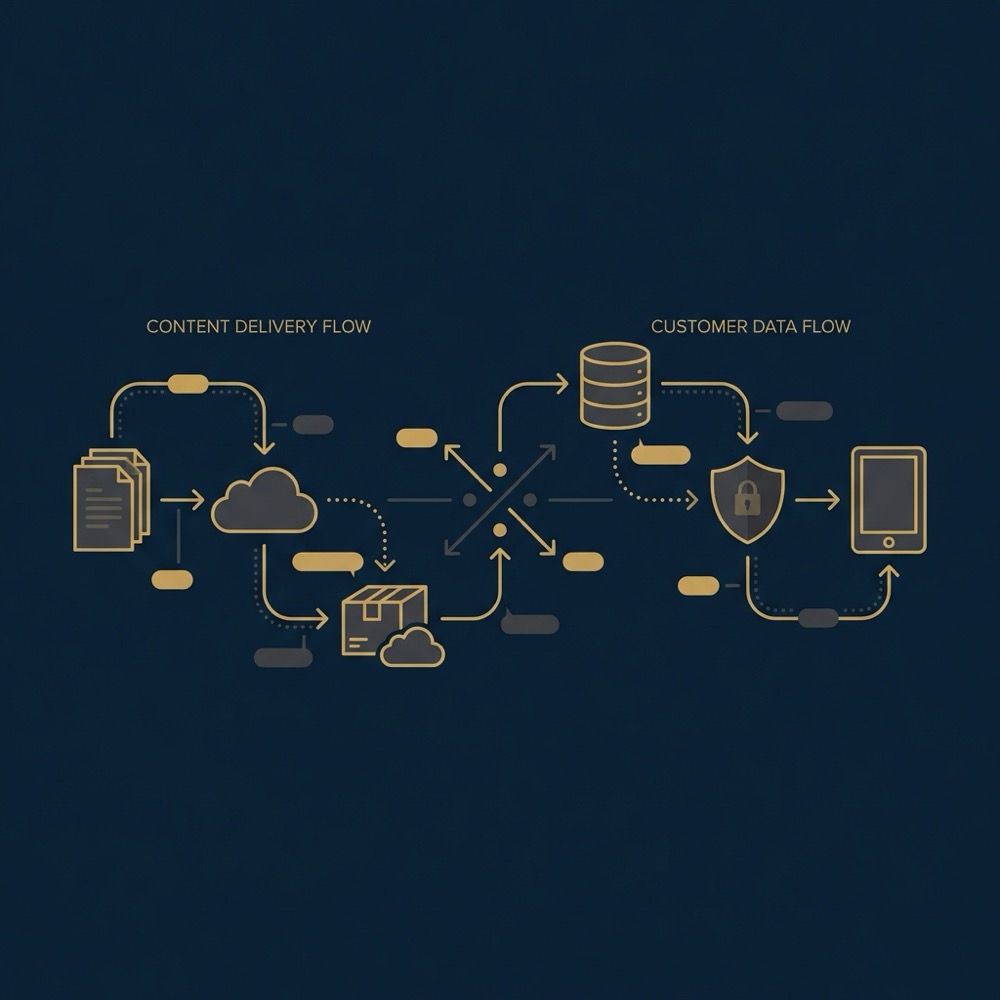
Teams commonly integrate CMS and CRM so site behaviour and content can update customer profiles, enable personalization, and improve attribution. Connecting these systems makes it possible to tie content interactions to later conversions, which supports better measurement when done carefully HubSpot article on CMS and CRM differences.
Typical integration use cases include enriching lead records with page behaviour, personalising site content based on lifecycle stage, and sending high intent signals into sales workflows so follow up is timed and relevant.
Technical patterns: APIs, webhooks and CDP style links
Common technical approaches are direct API calls from the CMS to the CRM, webhooks for event driven updates, and middleware or customer data platform connectors that normalise schema differences. Each pattern trades implementation speed against long term flexibility.
Implementations also need to plan for data model mismatch, consent and privacy rules, and the added complexity of attribution when systems are stitched together. These tradeoffs are practical constraints that affect integration benefit and ongoing maintenance W3Techs CMS usage overview.
A practical decision framework: choose CMS, CRM, or an integrated approach
Primary constraints and decision rules
Use this simple rule: prioritise a CMS when the main constraint is content production and SEO; prioritise a CRM when the main constraint is customer lifecycle and sales automation; choose integration when commerce, subscriptions or tight attribution are core needs. This rule reflects how teams commonly decide between systems HubSpot article on CMS and CRM differences.
Start by ranking your primary constraint. If content throughput, editorial coordination and search outcomes are limiting growth, invest in CMS capabilities and content architecture. If pipeline visibility, lifecycle automation and retention are limiting, invest in CRM capabilities and data quality.

Quick diagnostic checklist for teams
Run this five point diagnostic to pick a path: 1) Is content production the bottleneck? 2) Is pipeline automation missing? 3) Do you need per user personalised content? 4) Is attribution between content and revenue reliable? 5) Do you operate commerce or subscription flows? Answering these clarifies whether to prioritise CMS, CRM or integration.
Each affirmative answer points to a different focus. For example, if content is the blocker and attribution is weak, start with CMS and instrument links to the CRM incrementally. If lifecycle automation is the blocker, map CRM processes first and add CMS hooks as required.
Implementation checklist: data models, consent and measuring content to revenue
Aligning identifiers and schemas
Practical steps to align systems begin with identifiers. Make sure user IDs, email keys and session mapping are defined and shared across teams. A deliberate mapping of these keys reduces mismatch and improves the accuracy of joined reports.
When you join events from the CMS to CRM records, instrument server side or authenticated signals where possible, and document which fields in each system serve as keys. This reduces guesswork during integration and makes debugging simpler HubSpot article on CMS and CRM differences.
Consent, privacy and realistic attribution
Capture consent explicitly where you plan to move behavioural data from the site into customer records. Store consent flags with timestamps and scopes so downstream systems can respect preferences and retention rules.
Measurement of content to revenue paths should be pragmatic. Expect murky joins, and aim to build incrementally: validate signal quality, test simple attribution windows, and use controlled experiments where possible to reduce bias in your conclusions Statista CRM market size.
Common mistakes and pitfalls teams make
Assuming one system will do everything
One common mistake is assuming the CMS will solve CRM tasks or the CRM will replace content strategy. Both systems have design intent. Expecting one to do the other leads to technical debt and gaps in reporting.
Poor data alignment and measurement blind spots
Other predictable errors are inconsistent naming conventions, missing identifier alignment, and no clear test system for creative or content experiments. These lead to unreliable reports and slow iteration.
Quick internal checklist to validate identifier alignment between CMS and CRM
Run after any integration change
Mitigations are practical: small automations that copy canonical keys, shared naming conventions documented in a short guide, and a small staging integration to validate assumptions before wide release.
Example scenarios: ecommerce, subscriptions and service businesses
Ecommerce example: CMS for catalog and CRM for orders and retention
For ecommerce the CMS often manages catalog presentation, landing pages and SEO, while the CRM or order system manages transactions, cohorts and retention messaging. Integration helps tie browsing and content signals to later purchases for better attribution and personalised offers.
In practice, teams might prioritise CMS changes to improve organic traffic to product pages, then add CRM enrichment so sales and retention teams see which content attracted repeat buyers HubSpot article on CMS and CRM differences.
Service business example: lead capture in CMS feeding CRM pipelines
For a service business the CMS is frequently the inbound engine, producing content that attracts leads. The CRM then captures those leads, runs qualification and moves opportunities through a pipeline. That separation keeps content and sales workflows focused and measurable.
When subscriptions or repeat billing are core, teams should consider integrated approaches so lifecycle triggers and content personalisation support retention rather than ad hoc point solutions Statista CRM market size.
Conclusion and next steps for operators
Quick recap
The practical rule is straightforward: prioritise a CMS when content production and cms seo are the main constraints, prioritise a CRM when customer lifecycle and sales automation are dominant, and choose integration for commerce, subscriptions or tight attribution.
Suggested first actions
Three useful next steps are: run the diagnostic checklist, audit identifier alignment and consent handling, and map a minimal integration test that proves a single signal end to end. Treat this as systems design work that compounds over time rather than a one off project.
A CMS manages content creation, templates and publication for websites, while a CRM centralises customer records, interactions and sales or service workflows.
Not always. Integrate when you need personalization, tighter attribution, commerce or subscription flows, and after you have basic identifier alignment and consent in place.
Prioritise the CMS for SEO work, because content architecture and on page controls are usually implemented at the publishing layer.
Orvus Limited can act as a systems builder and strategic reference to translate diagnostic findings into a prioritized plan without promising specific outcomes.
References
- https://wordpress.org/about/
- https://w3techs.com/technologies/overview/content_management
- https://www.salesforce.com/crm/what-is-crm/
- https://www.statista.com/statistics/1208062/global-crm-market-size/
- our services
- about Orvus
- our knowledge base
- https://www.contentstack.com/blog/all-about-headless/transform-your-digital-strategy-best-practices-for-integrating-headless-cms-with-crm
Want this kind of work done for your business?
We build and run AI-powered marketing and automation. 15 minutes, honest assessment.
Book a call